Virtual private networks, and really VPN services of many types, are similar in function but different in setup. At the end of this post I also briefly explain the general functionality of a new remote access vpn technology, the AnyConnect SSL client VPN.
The Cisco AnyConnect VPN is supported on the new ASA 8.x software and later version and provides remote access to users with just a secure Web Browser (https).
The AnyConnect client software supports Windows Vista, XP, 2000, MAC OS X and Linux. The client can either be preinstalled to remote user’s PC or it can be loaded to ASA flash and uploaded to remote user’s PC when they connect to the ASA. You have also the option to uninstall the client from the remote user when he/she disconnects from the ASA.
EDIT: My new ebook, “Cisco VPN Configuration Guide – By Harris Andrea” provides a comprehensive technical tutorial about all types of VPNs that you can configure on Cisco Routers and ASA Firewalls (including of course SSL Anyconnect or IPSEC Remote Access VPNs).
In this post I will explain the technical details to configure AnyConnect SSL VPN on Cisco ASA 5500. I assume that we use the AnyConnect client version 2.0 which will be stored on ASA flash and uploaded to remote user on demand.
The same configuration applies for newer versions of AnyConnect. The remote users, after successful authentication, will receive an IP address from local ASA pool 192.168.100.1-50. The internal ASA network will use subnet range 192.168.5.0/24
Therefore, after the remote user successfully authenticates on Cisco ASA with the AnyConnect client, he will receive an IP address in the range 192.168.100.1 to 50 and he will be able to access resources in the internal LAN network 192.168.5.0/24.
Upload AnyConnect to ASA
The first step is to obtain the AnyConnect client software from the Cisco Software Download Website. You will need to download the appropriate software version according to the Operating System that your users have on their computers.
Assume the software vpn client file is “anyconnect-win-2.0.0343-k9.pkg”.
ASA(config)# copy tftp flash
Address or name of remote host ? 192.168.5.10
Source filename ? anyconnect-win-2.0.0343-k9.pkg
Destination filename [anyconnect-win-2.0.0343-k9.pkg]?
Accessing tftp://192.168.5.10/anyconnect-win-2.0.0343-k9.pkg…!!!!!!!!!!!!!
Writing file disk0:/anyconnect-win-2.0.0343-k9.pkg…
!!!!!!!!!!!!!!!!!!!!!!!!!!!!!!!!!!!!!!!!!!!!!!!!!!!!!!!!!!!!!!!!!!!!!!!!!!!!!
Configuring the Cisco ASA
! Specify the AnyConnect image to be downloaded by users
ASA(config)#webvpn
ASA(config-webvpn)#anyconnect image disk0:/anyconnect-win-2.0.0343-k9.pkg 1
! Enable AnyConnect access on the outside ASA interface
ASA(config-webvpn)#enable outside
ASA(config-webvpn)#anyconnect enable
ASA(config-webvpn)#exit
! Create a local IP address pool to assign for remote users
ASA(config)# ip local pool SSLClientPool 192.168.100.1-192.168.100.50 mask 255.255.255.0
! Configure NAT exemption for traffic between internal LAN and remote users
For ASA Version prior to 8.3
ASA(config)#access-list NONAT extended permit ip 192.168.5.0 255.255.255.0 192.168.100.0 255.255.255.0
ASA(config)# nat (inside) 0 access-list NONAT
For ASA Version 8.3 and later
object network INSIDE-HOSTS
subnet 192.168.5.0 255.255.255.0
!
object network VPN-HOSTS
subnet 192.168.100.0 255.255.255.0
!
nat (inside,outside) source static INSIDE-HOSTS INSIDE-HOSTS destination static VPN-HOSTS VPN-HOSTS
! Create usernames that will use the AnyConnect remote access only
ASA(config)#username userA password test123
ASA(config)#username userA attributes
ASA(config-username)# service-type remote-access
ASA(config)#username userB password test12345
ASA(config)#username userB attributes
ASA(config-username)# service-type remote-access
! Create a group policy with configuration parameters that should be applied to clients (there are two options available here according to the ASA version you are running)
OPTION 1
ASA(config)# group-policy SSLCLientPolicy internal
ASA(config)# group-policy SSLCLientPolicy attributes
ASA(config-group-policy)# dns-server value 192.168.5.100
ASA(config-group-policy)# vpn-tunnel-protocol svc
ASA(config-group-policy)# address-pools value SSLClientPool
OPTION 2
ASA(config)# group-policy SSLCLientPolicy internal
ASA(config)# group-policy SSLCLientPolicy attributes
ASA(config-group-policy)# dns-server value 192.168.5.100
ASA(config-group-policy)# address-pools value SSLClientPool
ASA(config-group-policy)# webvpn
ASA(config-group-webvpn))#vpn-tunnel-protocol svc
! Allow the AnyConnect traffic to bypass access lists
ASA(config)# sysopt connection permit-vpn
! Create tunnel group profile to define connection parameters
ASA(config)# tunnel-group SSLClientProfile type remote-access
ASA(config)# tunnel-group SSLClientProfile general-attributes
ASA(config-tunnel-general)# default-group-policy SSLCLientPolicy
ASA(config-tunnel-general)# tunnel-group SSLClientProfile webvpn-attributes
ASA(config-tunnel-webvpn)# group-alias SSLVPNClient enable
ASA(config-tunnel-webvpn)# webvpn
ASA(config-webvpn)#tunnel-group-list enable
How to Connect
The user just needs to open a browser and go to https://[outside ASA IP]
The login screen is displayed as below example:
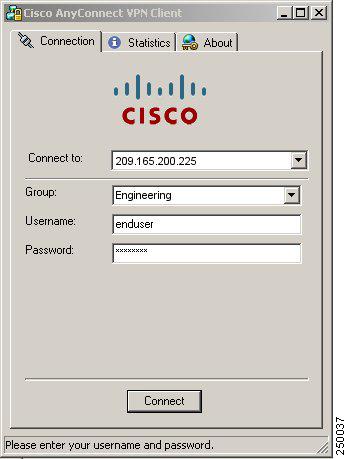
On “Group” field enter the name of the tunnel group SSLClientProfile or SSLVPNClient (group alias name).
On “Username” and “Password” field enter the user credentials (e.g UserA, test123).
Cisco AnyConnect SSL VPN Client on Cisco ASA 5500
The convenience and advantages of secure VPNs has driven the specific technology to keep evolving continuously.
Several years ago we only had the standardized IPSec VPN (which still strongly exists today). IPSec is a pure IP network VPN technology for connecting distant LAN networks over unsecured paths. Also, IPSec is used for client VPNs connecting remote teleworkers to their central site network.
The characteristic of IPSec VPNs is that it provides FULL network connectivity between the VPN peers. That is, a remote access client IPSec VPN will connect the remote user to the central network just like the user would be locally connected.
After IPsec, the Web SSL VPN made its appearance. The remote user needs just a Web Browser with HTTPs to connect to the central site network. After authentication, the user is presented with a Web portal with links to the applications he is allowed to run.
That is, the Web SSL VPN does not provide full network visibility to the remote user. The user has access only to specific applications (like internal email, internal files etc). Both IPSec VPNs and SSL VPNs are supported by Cisco ASA 5500 firewalls.
The newest generation of remote access VPNs is offered from Cisco AnyConnect SSL VPN client. This is supported by Cisco ASA 8.x.
The AnyConnect SSL VPN provides the best features from both of the other VPN technologies (IPSec and Web SSL).
With AnyConnect, the remote user has full network connectivity to the central site. Also, it offers the convenience of the Web SSL since there is no need to install an IPSec VPN client permanently to the user’s computer.
Instead, there is an SSL client stored in the ASA flash memory which is downloaded to the remote user’s computer on demand.
How AnyConnect SSL VPN Client works
For first time user connection, the remote teleworker just opens a browser pointing to https://<ASA-outside-public-IP>.
The browser connects to the ASA firewall and presents the user with a login screen. The user enters his credentials (username/password) and the ASA identifies that the user does not have the SSL client installed.
Therefore it pushes the SSL client to the user’s computer. The client installs itself to the remote PC and establishes a secure SSL VPN connection between the remote user and the ASA.
The user is also assigned an IP address from an address pool configured on the ASA and has full network access to the central site. When the SSL connection is stopped, the SSL client either uninstalls itself or remains on the user’s PC (depending on the configuration of the ASA).
In the case of a previously installed client, when the user authenticates, the security appliance examines the revision of the client, and upgrades the client as necessary.
The AnyConnect SSL client can be downloaded from the security appliance, or it can be installed manually on the remote PC by the system administrator.
DOWNLOAD THIS ARTICLE AS PDF FILE
Related Posts
- Prevent Spoofing Attacks on Cisco ASA using RPF
- Configuring Connection Limits on Cisco ASA Firewalls – Protect from DoS
- Configuring AAA Authentication-Authorization-Accounting on Cisco ASA Firewall (TACACS+, RADIUS)
- Cisco ASA Firewall Management Interface Configuration (with Example)
- How to Configure Access Control Lists on a Cisco ASA 5500/5500-X Firewall (with Examples)