Cisco ASA 5505 Basic Configuration Tutorial
The Cisco ASA 5505 Firewall is the smallest model in the new 5500 Cisco series of hardware appliances. Although this model is suitable for small businesses, branch offices or even home use, its firewall security capabilities are the same as the biggest models (5510, 5520, 5540 etc). The Adaptive Security technology of the ASA firewalls offers solid and reliable firewall protection, advanced application aware security, denial of service attack protection and much more. Moreover, the performance of the ASA 5505 appliance supports 150Mbps firewall throughput and 4000 firewall connections per second, which is more than enough for small networks.
In this article I will explain the basic configuration steps needed to setup a Cisco 5505 ASA firewall for connecting a small network to the Internet. We assume that our ISP has assigned us a static public IP address (e.g 200.200.200.1 as an example) and that our internal network range is 192.168.1.0/24. We will use Port Address Translation (PAT) to translate our internal IP addresses to the public address of the outside interface. The difference of the 5505 model from the bigger ASA models is that it has an 8-port 10/100 switch which acts as Layer 2 only. That is, you can not configure the physical ports as Layer 3 ports, rather you have to create interface Vlans and assign the Layer 2 interfaces in each VLAN. By default, interface Ethernet0/0 is assigned to VLAN 2 and its the outside interface (the one which connects to the Internet), and the other 7 interfaces (Ethernet0/1 to 0/7) are assigned by default to VLAN 1 and are used for connecting to the internal network. Let’s see the basic configuration setup of the most important steps that you need to configure. The diagram below illustrates the network topology for the configuration setup that we will describe. Notice from the diagram that port Ethernet0/0 connects to the Internet, and ports Ethernet0/1 to 7 connect to internal hosts (PC computers etc).
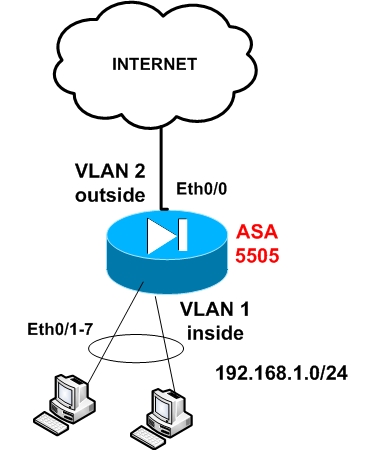
Step1: Configure the internal interface vlan
ASA5505(config)# interface Vlan 1
ASA5505(config-if)# nameif inside
ASA5505(config-if)# security-level 100
ASA5505(config-if)# ip address 192.168.1.1 255.255.255.0
ASA5505(config-if)# no shut
Step 2: Configure the external interface vlan (connected to Internet)
ASA5505(config)# interface Vlan 2
ASA5505(config-if)# nameif outside
ASA5505(config-if)# security-level 0
ASA5505(config-if)# ip address 200.200.200.1 255.255.255.0
ASA5505(config-if)# no shut
Step 3: Assign Ethernet 0/0 to Vlan 2
ASA5505(config)# interface Ethernet0/0
ASA5505(config-if)# switchport access vlan 2
ASA5505(config-if)# no shut
Step 4: Enable the rest interfaces with no shut
ASA5505(config)# interface Ethernet0/1
ASA5505(config-if)# no shut
Do the same for Ethernet0/1 to 0/7.
Step 5: Configure PAT on the outside interface
ASA5505(config)# global (outside) 1 interface
ASA5505(config)# nat (inside) 1 0.0.0.0 0.0.0.0
UPDATE for ASA Version 8.3
From March 2010, Cisco announced the new Cisco ASA software version 8.3. This version introduced several important configuration changes, especially on the NAT/PAT mechanism. The “global” command is no longer supported. NAT (static and dynamic) and PAT are configured under network objects. The PAT configuration below is for ASA 8.3 and later:
object network obj_any
subnet 0.0.0.0 0.0.0.0
nat (inside,outside) dynamic interface
Step 6: Configure default route towards the ISP (assume default gateway is 200.200.200.2)
ASA5505(config)# route outside 0.0.0.0 0.0.0.0 200.200.200.2 1
The above steps are the absolutely necessary steps you need to configure for making the appliance operational. Of course there are much more configuration details that you need to implement in order to enhance the security and functionality of your appliance, such as Access Control Lists, Static NAT, DHCP, DMZ zones, authentication etc.
Download the best configuration tutorial for any Cisco ASA 5500 Firewall model Here.
Related posts:
- Configure Cisco ASA 5505 to allow Remote Desktop access from Internet
- How to upgrade the Cisco ASA 5505 software
- Configure Static Routing on Cisco ASA Firewall
- Cisco Router with Cisco ASA for Internet Access
- Cisco ASA Firewall in Transparent Layer2 Mode
Tagged with: asa 5505 configuration • asa 5505 configuration tutorial • Cisco ASA 5505 • how to configure cisco asa 5505
Filed under: Cisco ASA Configuration
Like this post? Subscribe to my RSS feed and get loads more!

I’ve 2 routers on HSRP need to connect directly to firewall. I think I can use the SVI to avoid using an intermediate switch between rouetr and firewall. IS that right? Any cons if I do this?
Hello there,
Yes you can do that ofcourse since the ASA5505 ports work just like a switch. The ASA will “see” the HSRP virtual address and the routers will “see” the ASA Vlan1 address.
Let me know if you need more clarifications
Harris
Thanks for the quick reply, how about ASA5510
Well, ASA 5510 does not have an embedded switch like the 5505. So you will need to use an extra switch to connect your ASA and routers.
Thanks for the update
I have a vendor who setup a router to router VPN using Cisco ASA5505. At the remote site i cannot ping the server at the main office by ip or computer name. The vendor will not return calls so i am stuck. Server is MS Server 2003 std. Workstation is XP Pro. Are there any configurations necessary to get the XP workstation to talk to the server? XP firewall issue? Need to run RRAS on server? Thank you
No you don’t need to run RRAS on server. Also, its not an XP firewall issue since XP firewall allows outbound pings. It might be a Win2003 firewall issue though. Try to access the server from XP using another service (not ping). Maybe try to open remote desktop or anything else. Do other computers between remote and central site communicate between each other? Maybe your VPN tunnel is down? execute the command “show crypto isakmp sa” to verify that tunnel is up
Hi, is possible to have two offices connected by VPN with the Cisco ASA 5505, and in one of the offices have two ISPs with a Load Balance configured, and grant access to both ISPs request from that office to the VPN connection?
Kev,
I don’t fully understand your question. Will you have a load balancer in front of the ASA firewall or will the ASA have two interfaces connected to two ISPs ? The first case (load balancer) will work, but the second case will not work in my opinion ( I have not seen similar situation before).
I have a 5505 that was configured for us. It was initially set up for our police dept. to allow our mobile data terminals to connect as well as our internal lan.
We have since moved into a new building that includes our city hall. Since we are in the same building, they now want to drop down to one internet connection for both departments.
I tried to set up interface 3 for the city hall to just feed them internet and nothing else, however it’s not working. Is there a 5505 for dummies on how to do this?
Thanks
Bill
Hello Bill,
What you describe is relatively easy to achieve. Check out the following configuration which should work:
—————————————————————-
asa5505(config)#interface Ethernet0/3
asa5505(config-if)#switchport access vlan 3
asa5505(config)#interface vlan 3
asa5505(config-if)#nameif cityhall
asa5505(config-if)#security-level 50
asa5505(config-if)#ip address x.x.x.x 255.255.255.0
global(outside) 1 interface
nat(inside) 1 0 0
nat(cityhall) 1 0 0
—————————————————————————-
The above configuration will provide internet access to cityhall network which I assume that you connect to interface 3
Becareful, if you have a 5505 with base license. The base license lets you have 2 vlans and 1 restricted vlan. The restriction is that you can initiate traffic from the restricted vlan to only one other vlan. When you create a third vlan, the asa will complain that you need to restrict one of the vlans. You’ll have to turn on “no forward interface vlan ” on one of the three vlan interfaces. You’ll need to purchase a Security plus license for your ASA 5505 to unlock this license restriction.
Thanks for the comment. You are totally correct. You can configure for example on Vlan for inside, one vlan for outside and one vlan for DMZ. In this scenario, all vlans can have internet access (inside towards outside and DMZ towards outside) BUT the DMZ vlan can NOT have access to the inside vlan. The scenario that Bill above wanted to implement will work with a base license (i.e provide internet access to two vlan networks)
thanks for the replies. I am using the GUI interface to try to accomplish this as i have no experience with command prompt. Do you know where to go in the gui for this?
Thanks
we have a wireless W20 Ericsson as router which is configured with the LAN IP (Gateway) 192.168.1.1, now we got a Cisco ASA 5505, I am new with cisco, i am using GUI Interface to configure, i wanted to go with factory default for internet connection but i am not getting Internet.
I assume that you want to connect the ASA5505 behind the W20 Ericsson. That is, the outside interface of the ASA will be connected to the LAN interface of the W20. If this is the case, then the factory default configuration of your ASA will not work. The factory default settings for ASA5505 are the following:
Because the ASA outside interface will receive an IP address in the range 192.168.1.x from the W20, this IP range is the same as the inside interface of the ASA. This CAN NOT happen. You must have different IP subnets between inside and outside of the ASA. What you can do is to use ASDM and change the inside IP address range of the ASA and make it for example 192.168.2.0/24.
Thanks for the reply,
I tried to change inside IP address range, was giving error. i found easy to change W20 IP range, i made it now 192.168.0.1,
Do i need to define PAT or with factory default i should get Internet Connection? as ur information now w20 DHCP server is giving 192.168.0.101 IP to ASA, still i didn’t able to ping 192.168.0.1 (w20 gateway)
You do not need to define PAT as it should be already configured by default. Did the W20 assigned a default gateway to the ASA? Try to assign a default route on the ASA using the ASDM (the default route for the ASA must be 192.168.0.1).
Thank you for the reply,
I will try to set the default route, thank you for your Suggestion bcoz It is very helpful for me, all examples and book refers almost same kind of network, and mine i found different had lots of doubts. Thanks once again, i will come with my experience of try.
Using ASDM I found these entries (in Monitoring – Routing – Routes)
Protocol – , Type – d* DEFAULT, Destination IP – (Blank),Net mask -255.255.255.255,Gateway – , Interface – 0.0.0.0 0.0.0.0 [1/0] via 192.168.0.1, AD/ Metric -
even i run all the commands metioned in the tutorial through command interface in ASDM. i am getting outside and inside ip address and up(green). but still i am not able to ping the (w20) my defalt gateway IP – 192.168.0.1, now where i am missing don’t know. waiting for your suggestions.
Regards,
Samuel
Dear BlogAdmin,
I tried to apply NAT rule but translation is not happening, i am not able to ping w20 IP 192.168.0.1, ping is happening through ASDM but not through cmd prompt,
I wanted to know that Cisco ASA 5505 0/0 port (outside)is looking for global IP?? or i can install this ASA in local network.
waiting for ur suggestions.
Regards,
Samuel
Hi there,
Does a 5520 support secondary addresses?
Hello,
Officialy from Cisco you can not have a secondary IP address on an ASA interface. You can do something about it using the proxy ARP feature but I would not recommend it. Search on Google about Cisco ASA secondary IP and you will find some information how to use the proxy arp
I have a setup where we have a BT Boradband line connected to a BT Broadband Wifi router. This then links into our cisco ASA 5505. this then relays the Broadband signal to WIFI hotspots on certain levels. The problem I have is that the WIFI hotspots give out IP addresses and it connects to the wireless network. Unfortunatly there is no internet connection although you are connected to the wireless network. Could this be a problem with the ASA 5505 not routing the broadband signal properly to the WIFI hotspots? If so is there any commands etc.. I can use to sort this?
Thanks
Hello Scott,
You confused me a little bit here. As I understand, you have the following: {Internet-BT Broadband Line}< ------>{BT Broadband WiFi Router}< ----->{ASA5505}< ---->{WiFi Hotspots}. Is that correct? If that is the network topology, are the WiFi hotspots working as routers or as Layer2 bridges? If they work as Layer2 bridge, then the IP addresses assigned by the wifi hotspot must be in the same subnet as the inside IP address subnet of the ASA5505. If the Wifi hostspots work as routers then the IP address of the wired port of the hotspot device must be in the same subnet as the inside address of ASA.
Please clarify the network topology so that I can help you further.
Can we block Team Viewer through ASA5505,
We have a 5505 installed, as soon as we installed it we started having connectivity issues. At Least 3 times a week we will have to power cycle it before we can get online. In the past few weeks we have been monitoring it and it seems to drop the connection every time at 7:15 pm. Is there a setting that we can change to cure this issue.
Hello Eric,
It does not look like a configuration issue. To me it sounds like a hardware problem with your ASA 5505. If there was something wrong with the configuration then the ASA would not work at all. Check the power as the ASA 5505 used to have some issues with it in the past. I would ask for a replacement if I were you.
Hey, I’ve got one for you: Is there any way I can change the default configuration IP Address of 192.168.0.1? It’s clashing with another interface I have (which happens to have the same subnet), and it won’t allow me to have 2 subnets with the same IP prefix.
Thanks a million.
Zack
Sure you can change the default 192.168.0.1. Just follow the configuration on my article above. As you can see in my example configuration above, you can specify the internal IP address under “interface vlan 1″ configuration. Then put any IP address you want (my example uses 192.168.1.1).
So I am currently testing an ASA5505 box and want to use it as my DHCP server also, but apparently it says it is restricted to a pool of only 256 address.
Can this be changed?
Gabriel,
No this can not be changed. It is a matter of performance. If you have more than 254 internal hosts then you should use a bigger ASA model (5510, 5520 etc) and not a 5505.
Hi!, I purchased your books to configure the ASA5505. My actual network topology is:
ISP ROUTER IN BRIDGE MODE >—-> CISCO881-SEC-K9 WITH PPoE FOR ADSL >—-> SWITCHES >—-> IP PHONES – PC – PRINTES AND SERVERS.
I segment my network with the help of the CISCO881, with 5 VLAN’s (For VoIP, Servers, Guest, VPN Users, Etc.) All this runs perfect!.
Now, I want to connect an ASA5505 with base license at the beggining of the network, between the ISP Router and my CISCO881. Something like this: ISP ROUTER IN BRIDGE MODE >—-> ASA5505 WITH PPoE FOR ADSL >—-> CISCO881 ……THE REST OF THE NETWORK.
I have 2 Questions. With this scenario, What do you suggest? To Configure the firewall as a real ASA (With different levels of Interfaces, working in a diferent network, or to connect it in a transparent mode?
I try to connect the ASA in my network, and all the Internet traffic flows to and from the CISCO881, without problems, but my VPN Users, (That now are connected in the ASA5505), can’t go more further than the Firewall. (I don’t know how to send the vpn users to the CISCO881, to Access to the Data Servers, Printes, and IP PBX System).
Is there any form to fix this problema using default and static routes?, or I must use Dyanmic protocols like OSPF, like the diagram in the page 95, of your second book?
Thanks in advanced !
Hi Antonio,
I suggest to use the ASA in normal routed mode (not transparent). Does your Cisco 881 perform NAT on the internal traffic? If not, then the reason that your VPN users can not communicate with your internal networks is probably because you did not configure the proper access-lists for the VPN interesting traffic. If lets say you have 5 internal networks with subnets 192.168.1.0/24 up to 192.168.5.0/24 and assuming that you don’t have any NAT on the Cisco881, then you must configure the proper VPN access-lists on the ASA to allow traffic between 192.168.1.0 and 192.168.2.0 etc towards the VPN IP pool (i.e the pool of addresses that the ASA assigns IP to the vpn users). Also, you must configure static routes on the ASA pointing to the internal networks.
If cisco881 outside address is 10.1.1.1, then you must configure static routes on ASA:
route inside 192.168.1.0 255.255.255.0 10.1.1.1
route inside 192.168.2.0 255.255.255.0 10.1.1.1
route inside 192.168.3.0 255.255.255.0 10.1.1.1
etc
etc
Let me know if you need more information
Harris
Hi,
We have an ASA 5520 that i setup in transparent mode. I’m having trouble accessing the ASDM interface from the outside. I can access it on the inside network 10.x.x.x but not from the outside. I’ve changed the firewall ip to a public ip and still cannot access it from the outisde, only inside.
I’ve even allowed management from 0.0.0.0 with a 0.0.0.0 mask on both the outside and inside interfaces and still no luck, only access from the inside is working.
When i try to bring up the management port with its own public IP and plug it into the same switch as the inside interface, the whole network goes down.
I’m using version 8.2.
I even tried setting up a NAT from a public ip to the firewall’s 10.x.x.x IP but that didn’t work either. I have to physically plug in my laptop to the same switch that the inside interface is plugged into to gain access to ASDM.
Transparent Firewall Guidelines
Follow these guidelines when planning your transparent firewall network:
•For IPv4, a management IP address is required for both management traffic and for traffic to pass through the adaptive security appliance. For multiple context mode, an IP address is required for each context.
Unlike routed mode, which requires an IP address for each interface, a transparent firewall has an IP address assigned to the entire device. The adaptive security appliance uses this IP address as the source address for packets originating on the adaptive security appliance, such as system messages or AAA communications.
The management IP address must be on the same subnet as the connected network. You cannot set the subnet to a host subnet (255.255.255.255).
For IPv6, at a minimum you need to configure link-local addresses for each interface for through traffic. For full functionality, including the ability to manage the adaptive security appliance, you need to configure a global IP address for the device.
You can configure an IP address (both IPv4 and IPv6) for the Management 0/0 or Management 0/1 management-only interface. This IP address can be on a separate subnet from the main management IP address.
•The transparent adaptive security appliance uses an inside interface and an outside interface only. If your platform includes a dedicated management interface, you can also configure the management interface or subinterface for management traffic only.
In single mode, you can only use two data interfaces (and the dedicated management interface, if available) even if your security appliance includes more than two interfaces.
——————————————————————————–
Note In transparent firewall mode, the management interface updates the MAC address table in the same manner as a data interface; therefore you should not connect both a management and a data interface to the same switch unless you configure one of the switch ports as a routed port (by default Cisco Catalyst switches share a MAC address for all VLAN switch ports). Otherwise, if traffic arrives on the management interface from the physically-connected switch, then the adaptive security appliance updates the MAC address table to use the management interface to access the switch, instead of the data interface. This action causes a temporary traffic interruption; the adaptive security appliance will not re-update the MAC address table for packets from the switch to the data interface for at least 30 seconds for security reasons.
——————————————————————————–
•Each directly connected network must be on the same subnet.
•Do not specify the adaptive security appliance management IP address as the default gateway for connected devices; devices need to specify the router on the other side of the adaptive security appliance as the default gateway.
•For multiple context mode, each context must use different interfaces; you cannot share an interface across contexts.
•For multiple context mode, each context typically uses a different subnet. You can use overlapping subnets, but your network topology requires router and NAT configuration to make it possible from a routing standpoint.
thanks for the quick reply.
i followed those guidelines from the cisco docs and everything works fine internally but i can’t access the ASDM interface from the outside.
the internal network is 10.132.196.0 I have set the firewall ip to 10.132.196.15 I can access the firewall ASDM interface when i’m plugged into the switch internally via the internal IP but how do i access it from the outside?
We have a load balancer that is NATed so I setup a public ip to be NATed to the 10.132.196.15 IP but that didn’t work either.
It would be nice to be able to use the management port on the firewall with a public IP.
Probably the ASA does not allow ASDM management traffic coming from the outside interface when it works in transparent mode (I have not tried it before). What you can do though is to use the dedicated ASA management interface, connect it on a separate VLAN on your switch and give it a private IP address in a different subnet (for example 10.10.10.1). Then assign a public IP address and do a static NAT on your load balancer pointing to the internal management address. That way you can access the management with ASDM from internet.
hi there,
i cannot ping inside network others that vlan 1 from outside network which i have configured as above example, this is how the network topology
(172.17.x.x LAN)(172.17.1.1 CORE SWITCH)(ASA5520)(my laptop).
i use my laptop as it is a outside network, i configure the ASA inside and outside network as 1 subnet(inside 172.17.1.204,outside 172.17.1.205).
my laptop network configuration:
ip address 172.17.1.206
s/m 255.255.255.0
do i have to specify the gateway, and what would be the gateway?
You CAN NOT have the same subnet on both inside and outside networks. This is basic routing principle. Since your ASA is working in Routed Mode (normal default operation of ASA), you MUST have different network subnets on inside and outside networks. For example, configure 172.17.1.0/24 on outside network and 192.168.1.0/24 on inside network.
Hi, I have a question, I am newly with ASA.
Can I create redundant port with ASA 5505, and this reduntdant port will be trunked with Switch, then create redundant sub-interfaces and assign
them to Vlans ?
Thanks so much!!!
To create a trunk port on the Cisco ASA 5505 you need to have the “Security Plus” license (not the basic license). Then to create a redundant interface, do the following:
ASA(config)# interface redundant 1
ASA(config-if)# member-interface ethernet 0/2
ASA(config-if)# member-interface ethernet 0/3
From now on, all interface related commands must refer to “interface redundant 1″. However, I have never checked if you can have a trunk port configured as redundant. You can try it and let us know if this can work.
Cheers
hi there,
i would be very obliged if you could help me out on this one.I have no clue about firewalls and have been given the task of setting up a network with an Aztec internet router/modem from the isp and an asa 5505 firewall. now what the requiremnt is – before the internet was coming directly from the aztec modem, now they require it to go through the firewall and then to the switch .Could you kindly help me out on this with the config.
cheers and thnx in advance
I assume that the Aztec modem works as a router and not as a bridge modem. I also assume that the Aztec router assigns IP addresses to its LAN ports. If my assumptions are correct, then just connect the outside interface of ASA 5505 (port ethernet0) to one of the LAN ports of the Aztec router. Then, connect one of the internal ports of ASA (all ports from eth1 to eth7 are internal ports) to the switch of your internal network. By default the ASA 5505 is configured to work out of the box, so it will receive IP address from the Aztec router and also it will assign IP addresses to your Internal computers. The only problem I see here is if the internal IP addresses assigned by ASA (usually 192.168.1.0/24 network) are maybe the same network as the addresses assigned by the Aztec router. This means that the outside address of ASA will be in the same network as its inside address and this can not work.
hi admin..so far ur rite and that is exactly how it is. both the aztec and the asa are 192.168.1.0/24. Could we change the ip on either and what about dhcp? since it is enabled on both the aztec and the asa.
thnx for your reply..much appreciated
we have in our topology cisco firewall ASA 5510, for that ASA we have configured 3 interfaces (inside-DMZ-outside) with security levels (100-100-0). the inside interface connected to database servers& internal network, the DMZ interface for application servers that will be accessed by the customers from the internet & the outside interface connected to 2 DSL router modems with 2 differnet ISP.s
our question is what needed configuration on ASA in CLI (what needed NAT rules and access lists and security policies on the ASA)
Yes you can change the IP address on either the ASA or the Aztec. It might be easier to change the IP address on the Aztec router. Change the internal IP of Aztec to be in the range 192.168.2.0/24 and arrange the DHCP pool assigned by the Aztec to be in the same network.
Amaher,
What you ask me here is a complete firewall configuration which can not be answered so easily, but I will give you some general guidelines. One thing I didn’t like is using the same security level on DMZ and Inside.The best practice is to use security level 100 for inside zone and a lower security level (let’s say 50) for the DMZ. Now, regarding NAT, it is better to enable NAT control (command is “nat-control”) and configure static NAT between DMZ and Outside. Then apply the proper access-list in the inbound direction of the outside ASA interface to allow the required traffic from Internet to DMZ servers. To enable communication between DMZ and Inside, do the same thing as you did between Outside to DMZ (i.e static NAT between Inside, DMZ and proper access list on DMZ in the inbound direction).
Hope the above helps a bit.
thnx so much for your quik reply.
I don’t have experince in writing commands on ASA firewall but I could make the basic configuration on the ASA(give the intefaces names.IP.s and security levels) so could you please tell me about the commands formats on ASA 5510(Ver.8) needed for making static NAT between DMZ and both inside and outside interfaces and access list commands?? (I want to point that application servers that conneceted on the DMZ interface must be always syncronized with the data base servers that conneceted to inside interface.
also I want to inquire if default static route is needed on the ASA toward the outside interface that conneceted to ISP DSL router??
Do a search on Cisco or Google or you can purchase “Cisco ASA Firewall Fundamentals” for learning anything you need regarding the scenario you have. If you want to enhance your knowledge in networking or network security you must do a lot of research and reading. Do not expect everything ready in the plate.
hi harris,
how can i change the ip of the firewall(asa 5505) and disable the dhcp???
Emdee,
Log in to ASA 5505 with command line (use the console cable for example) and do the following:
conf t
interface vlan 1
ip address 192.168.2.1 255.255.255.0
exit
no dhcpd enable inside
harris
can i pay online and download your ebook rather than waiting for the hard copy via mail
please advise as i need to get my hands on it
thnx harris..already purchased the book…it was pdf
Hi Harris
Need help with this one
ciscoasa(config-network)#network-object host 10.0.0.1
i believe this is for defining 1 host. What if i want to define a range of hosts say from 10.0.0.100 to 10.0.0.254
Emdee,
With ASA versions prior to 8.3, you could only specify either single hosts or subnets under the network objects. You could not specify arbitrary range of IP addresses. However, from ASA version 8.3(1) and later you can now use the “object network” command to specify single hosts, subnets, AND range of IP addresses.
For example you can use”
ciscoasa(config)# object network test-object
ciscoasa(config-network-object)# range 10.0.0.100 10.0.0.254
ciscoasa(config-network-object)# exit
ciscoasa(config)# access-list inside_access_in permit tcp object test-object any eq 80
Harris
Sorry man, Dont mean to bother you, i have asa ver 7.2(3), Is there no other way to provide internet only to a particular range of ip addresses and deny the others or do i have to upgrade to asa 8.3(1)
No other way. You must use the closest subnet mask and use network objects. For example if you want to deny access to lets say 60 IP addresses, then select the closest subnet mask with 64 hosts (i.e mask should be .192).
Is the ASA 5510 firewall support load balance between 2 different ISP??
do we can load sharing between 2DSL routers connected to different 2 ISP by making route mapping on the ASA as we can do on Cisco routers in like that case????
amaher,
No, you can not do load balancing between 2 different ISPs with the Cisco ASA. You need a router in front of the ASA or maybe a load balancer device.
FOR the ASA in our topology:
the inside interface connected to database servers& internal network, the DMZ interface for application servers that will be accessed by the customers from the internet and by internal network& the outside interface connected to the DSL router modem to ISP
after reading the ASA manual I got that the basic configuartion needed for the ASA are:
1)Inside user to visit an internet web server.
No NAT rules needed
2)Outside user to visit the DMZ web server.
• An address translation rule between the outside and DMZ interfaces that translate the public IP address of the DMZ web server to its private IP address
3)Inside user visits the web server on the DMZ
• A NAT rule between the DMZ and inside interfaces that translates the real IP address of the DMZ web server to its public IP address.
• A NAT rule between the inside and DMZ interfaces that translates the real addresses of the internal client network. In this scenario, the real IP address of the internal network is “translated” to itself (I don’t know why), that is, the real IP address of the internal network is used when internal clients communicate with the DMZ web server.
4)default route on he ASA to the ISP(DSL modem)
5)access rule is needed for Web servers on DMZ & HTTP clients from both inside & outside networks can access that web server so clients on the internet are permitted to use HTTP access only to DMZ web servers & all other traffic coming from the internet will be denied
any other Configuration needed?????!!!!!
amaher,
From what you say above:
1) For Inside users to visit Internet web server: You will need a dynamic NAT rule (many-to-one NAT) (usually Port Address Translation – PAT) translating the private inside IP addresses to a public outside IP address (usually this is the outside interface IP address of the ASA firewall).
2) Outside user to visit the DMZ web server: A static NAT rule between the outside and DMZ interfaces that translate the public IP address of the DMZ web server to its private IP address.
3) Inside users to visit the web server on the DMZ: Here you ONLY need a static NAT rule between the inside and DMZ interfaces that translate the real IP address of the inside network to itself. You do this here because you have private IP addresses on both the inside and DMZ and you don’t need to translate to public addresses, so you translate the private IP inside network to itself. You will need the static NAT here in order to be able to communicate between DMZ to inside (lower security level to higher security level).
4) default route on the ASA to the ISP(DSL modem): this is needed
5) Access lists rules: You will need one access list applied inbound on the outside ASA interface to allow internet traffic towards the public IP address of the DMZ Web servers (port 80). You will also need one access list applied inbound on the DMZ interface to allow communication of the DMZ web servers towards the inside database servers.
6) if you don’t apply an access list on the inside interface then all traffic originating from inside will be permitted. If you want to apply restrictions, you must also configure an access list and apply that to the inside interface of the ASA.
Hope the above helped you
thank so much for the reply,
and what if we have 2 appliaction servers on the DMZ that needed to be accessed by the users on the internet (each server will have it’s own public IP) & what is needed to be configured for the app. servers on the DMZ to be syncronized with the database servers on the inside??
You will need to do a second static NAT between the outside and DMZ interfaces to translate the second public IP to the second DMZ server. Then add one more line in the outside access-list to allow HTTP traffic towards the second server. I don’t see any difficulty on that once you manage to set up the initial scenario as we described above.