Cisco ASA 5505 Basic Configuration Tutorial
The Cisco ASA 5505 Firewall is the smallest model in the new 5500 Cisco series of hardware appliances. Although this model is suitable for small businesses, branch offices or even home use, its firewall security capabilities are the same as the biggest models (5510, 5520, 5540 etc). The Adaptive Security technology of the ASA firewalls offers solid and reliable firewall protection, advanced application aware security, denial of service attack protection and much more. Moreover, the performance of the ASA 5505 appliance supports 150Mbps firewall throughput and 4000 firewall connections per second, which is more than enough for small networks.
In this article I will explain the basic configuration steps needed to setup a Cisco 5505 ASA firewall for connecting a small network to the Internet. We assume that our ISP has assigned us a static public IP address (e.g 200.200.200.1 as an example) and that our internal network range is 192.168.1.0/24. We will use Port Address Translation (PAT) to translate our internal IP addresses to the public address of the outside interface. The difference of the 5505 model from the bigger ASA models is that it has an 8-port 10/100 switch which acts as Layer 2 only. That is, you can not configure the physical ports as Layer 3 ports, rather you have to create interface Vlans and assign the Layer 2 interfaces in each VLAN. By default, interface Ethernet0/0 is assigned to VLAN 2 and its the outside interface (the one which connects to the Internet), and the other 7 interfaces (Ethernet0/1 to 0/7) are assigned by default to VLAN 1 and are used for connecting to the internal network. Let’s see the basic configuration setup of the most important steps that you need to configure. The diagram below illustrates the network topology for the configuration setup that we will describe. Notice from the diagram that port Ethernet0/0 connects to the Internet, and ports Ethernet0/1 to 7 connect to internal hosts (PC computers etc).
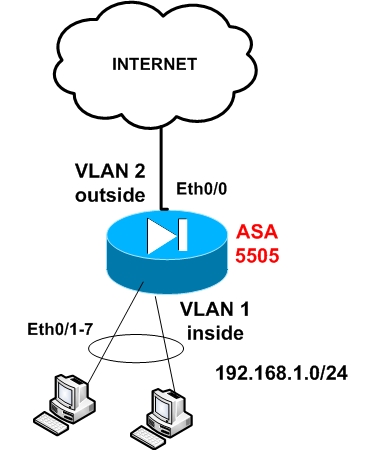
Step1: Configure the internal interface vlan
ASA5505(config)# interface Vlan 1
ASA5505(config-if)# nameif inside
ASA5505(config-if)# security-level 100
ASA5505(config-if)# ip address 192.168.1.1 255.255.255.0
ASA5505(config-if)# no shut
Step 2: Configure the external interface vlan (connected to Internet)
ASA5505(config)# interface Vlan 2
ASA5505(config-if)# nameif outside
ASA5505(config-if)# security-level 0
ASA5505(config-if)# ip address 200.200.200.1 255.255.255.0
ASA5505(config-if)# no shut
Step 3: Assign Ethernet 0/0 to Vlan 2
ASA5505(config)# interface Ethernet0/0
ASA5505(config-if)# switchport access vlan 2
ASA5505(config-if)# no shut
Step 4: Enable the rest interfaces with no shut
ASA5505(config)# interface Ethernet0/1
ASA5505(config-if)# no shut
Do the same for Ethernet0/1 to 0/7.
Step 5: Configure PAT on the outside interface
ASA5505(config)# global (outside) 1 interface
ASA5505(config)# nat (inside) 1 0.0.0.0 0.0.0.0
UPDATE for ASA Version 8.3
From March 2010, Cisco announced the new Cisco ASA software version 8.3. This version introduced several important configuration changes, especially on the NAT/PAT mechanism. The “global” command is no longer supported. NAT (static and dynamic) and PAT are configured under network objects. The PAT configuration below is for ASA 8.3 and later:
object network obj_any
subnet 0.0.0.0 0.0.0.0
nat (inside,outside) dynamic interface
Step 6: Configure default route towards the ISP (assume default gateway is 200.200.200.2)
ASA5505(config)# route outside 0.0.0.0 0.0.0.0 200.200.200.2 1
The above steps are the absolutely necessary steps you need to configure for making the appliance operational. Of course there are much more configuration details that you need to implement in order to enhance the security and functionality of your appliance, such as Access Control Lists, Static NAT, DHCP, DMZ zones, authentication etc.
Download the best configuration tutorial for any Cisco ASA 5500 Firewall model HERE.
Related posts:
- Cisco ASA Redundant Interface Configuration
- Cisco ASA 5505 Network Port Interfaces
- Cisco ASA Firewall in Transparent Layer2 Mode
Tagged with: asa 5505 configuration • asa 5505 configuration tutorial • Cisco ASA 5505 • how to configure cisco asa 5505
Filed under: Cisco ASA Configuration
Like this post? Subscribe to my RSS feed and get loads more!


I’ve 2 routers on HSRP need to connect directly to firewall. I think I can use the SVI to avoid using an intermediate switch between rouetr and firewall. IS that right? Any cons if I do this?
Hello there,
Yes you can do that ofcourse since the ASA5505 ports work just like a switch. The ASA will “see” the HSRP virtual address and the routers will “see” the ASA Vlan1 address.
Let me know if you need more clarifications
Harris
Thanks for the quick reply, how about ASA5510
Well, ASA 5510 does not have an embedded switch like the 5505. So you will need to use an extra switch to connect your ASA and routers.
Thanks for the update
I have a vendor who setup a router to router VPN using Cisco ASA5505. At the remote site i cannot ping the server at the main office by ip or computer name. The vendor will not return calls so i am stuck. Server is MS Server 2003 std. Workstation is XP Pro. Are there any configurations necessary to get the XP workstation to talk to the server? XP firewall issue? Need to run RRAS on server? Thank you
No you don’t need to run RRAS on server. Also, its not an XP firewall issue since XP firewall allows outbound pings. It might be a Win2003 firewall issue though. Try to access the server from XP using another service (not ping). Maybe try to open remote desktop or anything else. Do other computers between remote and central site communicate between each other? Maybe your VPN tunnel is down? execute the command “show crypto isakmp sa” to verify that tunnel is up
Hi, is possible to have two offices connected by VPN with the Cisco ASA 5505, and in one of the offices have two ISPs with a Load Balance configured, and grant access to both ISPs request from that office to the VPN connection?
Kev,
I don’t fully understand your question. Will you have a load balancer in front of the ASA firewall or will the ASA have two interfaces connected to two ISPs ? The first case (load balancer) will work, but the second case will not work in my opinion ( I have not seen similar situation before).
I have a 5505 that was configured for us. It was initially set up for our police dept. to allow our mobile data terminals to connect as well as our internal lan.
We have since moved into a new building that includes our city hall. Since we are in the same building, they now want to drop down to one internet connection for both departments.
I tried to set up interface 3 for the city hall to just feed them internet and nothing else, however it’s not working. Is there a 5505 for dummies on how to do this?
Thanks
Bill
Hello Bill,
What you describe is relatively easy to achieve. Check out the following configuration which should work:
—————————————————————-
asa5505(config)#interface Ethernet0/3
asa5505(config-if)#switchport access vlan 3
asa5505(config)#interface vlan 3
asa5505(config-if)#nameif cityhall
asa5505(config-if)#security-level 50
asa5505(config-if)#ip address x.x.x.x 255.255.255.0
global(outside) 1 interface
nat(inside) 1 0 0
nat(cityhall) 1 0 0
—————————————————————————-
The above configuration will provide internet access to cityhall network which I assume that you connect to interface 3
Becareful, if you have a 5505 with base license. The base license lets you have 2 vlans and 1 restricted vlan. The restriction is that you can initiate traffic from the restricted vlan to only one other vlan. When you create a third vlan, the asa will complain that you need to restrict one of the vlans. You’ll have to turn on “no forward interface vlan ” on one of the three vlan interfaces. You’ll need to purchase a Security plus license for your ASA 5505 to unlock this license restriction.
Thanks for the comment. You are totally correct. You can configure for example on Vlan for inside, one vlan for outside and one vlan for DMZ. In this scenario, all vlans can have internet access (inside towards outside and DMZ towards outside) BUT the DMZ vlan can NOT have access to the inside vlan. The scenario that Bill above wanted to implement will work with a base license (i.e provide internet access to two vlan networks)
thanks for the replies. I am using the GUI interface to try to accomplish this as i have no experience with command prompt. Do you know where to go in the gui for this?
Thanks
we have a wireless W20 Ericsson as router which is configured with the LAN IP (Gateway) 192.168.1.1, now we got a Cisco ASA 5505, I am new with cisco, i am using GUI Interface to configure, i wanted to go with factory default for internet connection but i am not getting Internet.
I assume that you want to connect the ASA5505 behind the W20 Ericsson. That is, the outside interface of the ASA will be connected to the LAN interface of the W20. If this is the case, then the factory default configuration of your ASA will not work. The factory default settings for ASA5505 are the following:
Because the ASA outside interface will receive an IP address in the range 192.168.1.x from the W20, this IP range is the same as the inside interface of the ASA. This CAN NOT happen. You must have different IP subnets between inside and outside of the ASA. What you can do is to use ASDM and change the inside IP address range of the ASA and make it for example 192.168.2.0/24.
Thanks for the reply,
I tried to change inside IP address range, was giving error. i found easy to change W20 IP range, i made it now 192.168.0.1,
Do i need to define PAT or with factory default i should get Internet Connection? as ur information now w20 DHCP server is giving 192.168.0.101 IP to ASA, still i didn’t able to ping 192.168.0.1 (w20 gateway)
You do not need to define PAT as it should be already configured by default. Did the W20 assigned a default gateway to the ASA? Try to assign a default route on the ASA using the ASDM (the default route for the ASA must be 192.168.0.1).
Thank you for the reply,
I will try to set the default route, thank you for your Suggestion bcoz It is very helpful for me, all examples and book refers almost same kind of network, and mine i found different had lots of doubts. Thanks once again, i will come with my experience of try.
Using ASDM I found these entries (in Monitoring – Routing – Routes)
Protocol – , Type – d* DEFAULT, Destination IP – (Blank),Net mask -255.255.255.255,Gateway – , Interface – 0.0.0.0 0.0.0.0 [1/0] via 192.168.0.1, AD/ Metric -
even i run all the commands metioned in the tutorial through command interface in ASDM. i am getting outside and inside ip address and up(green). but still i am not able to ping the (w20) my defalt gateway IP – 192.168.0.1, now where i am missing don’t know. waiting for your suggestions.
Regards,
Samuel
Dear BlogAdmin,
I tried to apply NAT rule but translation is not happening, i am not able to ping w20 IP 192.168.0.1, ping is happening through ASDM but not through cmd prompt,
I wanted to know that Cisco ASA 5505 0/0 port (outside)is looking for global IP?? or i can install this ASA in local network.
waiting for ur suggestions.
Regards,
Samuel
Hi there,
Does a 5520 support secondary addresses?
Hello,
Officialy from Cisco you can not have a secondary IP address on an ASA interface. You can do something about it using the proxy ARP feature but I would not recommend it. Search on Google about Cisco ASA secondary IP and you will find some information how to use the proxy arp
I have a setup where we have a BT Boradband line connected to a BT Broadband Wifi router. This then links into our cisco ASA 5505. this then relays the Broadband signal to WIFI hotspots on certain levels. The problem I have is that the WIFI hotspots give out IP addresses and it connects to the wireless network. Unfortunatly there is no internet connection although you are connected to the wireless network. Could this be a problem with the ASA 5505 not routing the broadband signal properly to the WIFI hotspots? If so is there any commands etc.. I can use to sort this?
Thanks
Hello Scott,
You confused me a little bit here. As I understand, you have the following: {Internet-BT Broadband Line}< ------>{BT Broadband WiFi Router}< ----->{ASA5505}< ---->{WiFi Hotspots}. Is that correct? If that is the network topology, are the WiFi hotspots working as routers or as Layer2 bridges? If they work as Layer2 bridge, then the IP addresses assigned by the wifi hotspot must be in the same subnet as the inside IP address subnet of the ASA5505. If the Wifi hostspots work as routers then the IP address of the wired port of the hotspot device must be in the same subnet as the inside address of ASA.
Please clarify the network topology so that I can help you further.
Can we block Team Viewer through ASA5505,
We have a 5505 installed, as soon as we installed it we started having connectivity issues. At Least 3 times a week we will have to power cycle it before we can get online. In the past few weeks we have been monitoring it and it seems to drop the connection every time at 7:15 pm. Is there a setting that we can change to cure this issue.
Hello Eric,
It does not look like a configuration issue. To me it sounds like a hardware problem with your ASA 5505. If there was something wrong with the configuration then the ASA would not work at all. Check the power as the ASA 5505 used to have some issues with it in the past. I would ask for a replacement if I were you.
Hey, I’ve got one for you: Is there any way I can change the default configuration IP Address of 192.168.0.1? It’s clashing with another interface I have (which happens to have the same subnet), and it won’t allow me to have 2 subnets with the same IP prefix.
Thanks a million.
Zack
Sure you can change the default 192.168.0.1. Just follow the configuration on my article above. As you can see in my example configuration above, you can specify the internal IP address under “interface vlan 1″ configuration. Then put any IP address you want (my example uses 192.168.1.1).
So I am currently testing an ASA5505 box and want to use it as my DHCP server also, but apparently it says it is restricted to a pool of only 256 address.
Can this be changed?
Gabriel,
No this can not be changed. It is a matter of performance. If you have more than 254 internal hosts then you should use a bigger ASA model (5510, 5520 etc) and not a 5505.
Hi!, I purchased your books to configure the ASA5505. My actual network topology is:
ISP ROUTER IN BRIDGE MODE >—-> CISCO881-SEC-K9 WITH PPoE FOR ADSL >—-> SWITCHES >—-> IP PHONES – PC – PRINTES AND SERVERS.
I segment my network with the help of the CISCO881, with 5 VLAN’s (For VoIP, Servers, Guest, VPN Users, Etc.) All this runs perfect!.
Now, I want to connect an ASA5505 with base license at the beggining of the network, between the ISP Router and my CISCO881. Something like this: ISP ROUTER IN BRIDGE MODE >—-> ASA5505 WITH PPoE FOR ADSL >—-> CISCO881 ……THE REST OF THE NETWORK.
I have 2 Questions. With this scenario, What do you suggest? To Configure the firewall as a real ASA (With different levels of Interfaces, working in a diferent network, or to connect it in a transparent mode?
I try to connect the ASA in my network, and all the Internet traffic flows to and from the CISCO881, without problems, but my VPN Users, (That now are connected in the ASA5505), can’t go more further than the Firewall. (I don’t know how to send the vpn users to the CISCO881, to Access to the Data Servers, Printes, and IP PBX System).
Is there any form to fix this problema using default and static routes?, or I must use Dyanmic protocols like OSPF, like the diagram in the page 95, of your second book?
Thanks in advanced !
Hi Antonio,
I suggest to use the ASA in normal routed mode (not transparent). Does your Cisco 881 perform NAT on the internal traffic? If not, then the reason that your VPN users can not communicate with your internal networks is probably because you did not configure the proper access-lists for the VPN interesting traffic. If lets say you have 5 internal networks with subnets 192.168.1.0/24 up to 192.168.5.0/24 and assuming that you don’t have any NAT on the Cisco881, then you must configure the proper VPN access-lists on the ASA to allow traffic between 192.168.1.0 and 192.168.2.0 etc towards the VPN IP pool (i.e the pool of addresses that the ASA assigns IP to the vpn users). Also, you must configure static routes on the ASA pointing to the internal networks.
If cisco881 outside address is 10.1.1.1, then you must configure static routes on ASA:
route inside 192.168.1.0 255.255.255.0 10.1.1.1
route inside 192.168.2.0 255.255.255.0 10.1.1.1
route inside 192.168.3.0 255.255.255.0 10.1.1.1
etc
etc
Let me know if you need more information
Harris
Hi,
We have an ASA 5520 that i setup in transparent mode. I’m having trouble accessing the ASDM interface from the outside. I can access it on the inside network 10.x.x.x but not from the outside. I’ve changed the firewall ip to a public ip and still cannot access it from the outisde, only inside.
I’ve even allowed management from 0.0.0.0 with a 0.0.0.0 mask on both the outside and inside interfaces and still no luck, only access from the inside is working.
When i try to bring up the management port with its own public IP and plug it into the same switch as the inside interface, the whole network goes down.
I’m using version 8.2.
I even tried setting up a NAT from a public ip to the firewall’s 10.x.x.x IP but that didn’t work either. I have to physically plug in my laptop to the same switch that the inside interface is plugged into to gain access to ASDM.
Transparent Firewall Guidelines
Follow these guidelines when planning your transparent firewall network:
•For IPv4, a management IP address is required for both management traffic and for traffic to pass through the adaptive security appliance. For multiple context mode, an IP address is required for each context.
Unlike routed mode, which requires an IP address for each interface, a transparent firewall has an IP address assigned to the entire device. The adaptive security appliance uses this IP address as the source address for packets originating on the adaptive security appliance, such as system messages or AAA communications.
The management IP address must be on the same subnet as the connected network. You cannot set the subnet to a host subnet (255.255.255.255).
For IPv6, at a minimum you need to configure link-local addresses for each interface for through traffic. For full functionality, including the ability to manage the adaptive security appliance, you need to configure a global IP address for the device.
You can configure an IP address (both IPv4 and IPv6) for the Management 0/0 or Management 0/1 management-only interface. This IP address can be on a separate subnet from the main management IP address.
•The transparent adaptive security appliance uses an inside interface and an outside interface only. If your platform includes a dedicated management interface, you can also configure the management interface or subinterface for management traffic only.
In single mode, you can only use two data interfaces (and the dedicated management interface, if available) even if your security appliance includes more than two interfaces.
——————————————————————————–
Note In transparent firewall mode, the management interface updates the MAC address table in the same manner as a data interface; therefore you should not connect both a management and a data interface to the same switch unless you configure one of the switch ports as a routed port (by default Cisco Catalyst switches share a MAC address for all VLAN switch ports). Otherwise, if traffic arrives on the management interface from the physically-connected switch, then the adaptive security appliance updates the MAC address table to use the management interface to access the switch, instead of the data interface. This action causes a temporary traffic interruption; the adaptive security appliance will not re-update the MAC address table for packets from the switch to the data interface for at least 30 seconds for security reasons.
——————————————————————————–
•Each directly connected network must be on the same subnet.
•Do not specify the adaptive security appliance management IP address as the default gateway for connected devices; devices need to specify the router on the other side of the adaptive security appliance as the default gateway.
•For multiple context mode, each context must use different interfaces; you cannot share an interface across contexts.
•For multiple context mode, each context typically uses a different subnet. You can use overlapping subnets, but your network topology requires router and NAT configuration to make it possible from a routing standpoint.
thanks for the quick reply.
i followed those guidelines from the cisco docs and everything works fine internally but i can’t access the ASDM interface from the outside.
the internal network is 10.132.196.0 I have set the firewall ip to 10.132.196.15 I can access the firewall ASDM interface when i’m plugged into the switch internally via the internal IP but how do i access it from the outside?
We have a load balancer that is NATed so I setup a public ip to be NATed to the 10.132.196.15 IP but that didn’t work either.
It would be nice to be able to use the management port on the firewall with a public IP.
Probably the ASA does not allow ASDM management traffic coming from the outside interface when it works in transparent mode (I have not tried it before). What you can do though is to use the dedicated ASA management interface, connect it on a separate VLAN on your switch and give it a private IP address in a different subnet (for example 10.10.10.1). Then assign a public IP address and do a static NAT on your load balancer pointing to the internal management address. That way you can access the management with ASDM from internet.
hi there,
i cannot ping inside network others that vlan 1 from outside network which i have configured as above example, this is how the network topology
(172.17.x.x LAN)(172.17.1.1 CORE SWITCH)(ASA5520)(my laptop).
i use my laptop as it is a outside network, i configure the ASA inside and outside network as 1 subnet(inside 172.17.1.204,outside 172.17.1.205).
my laptop network configuration:
ip address 172.17.1.206
s/m 255.255.255.0
do i have to specify the gateway, and what would be the gateway?
You CAN NOT have the same subnet on both inside and outside networks. This is basic routing principle. Since your ASA is working in Routed Mode (normal default operation of ASA), you MUST have different network subnets on inside and outside networks. For example, configure 172.17.1.0/24 on outside network and 192.168.1.0/24 on inside network.
Hi, I have a question, I am newly with ASA.
Can I create redundant port with ASA 5505, and this reduntdant port will be trunked with Switch, then create redundant sub-interfaces and assign
them to Vlans ?
Thanks so much!!!
To create a trunk port on the Cisco ASA 5505 you need to have the “Security Plus” license (not the basic license). Then to create a redundant interface, do the following:
ASA(config)# interface redundant 1
ASA(config-if)# member-interface ethernet 0/2
ASA(config-if)# member-interface ethernet 0/3
From now on, all interface related commands must refer to “interface redundant 1″. However, I have never checked if you can have a trunk port configured as redundant. You can try it and let us know if this can work.
Cheers
hi there,
i would be very obliged if you could help me out on this one.I have no clue about firewalls and have been given the task of setting up a network with an Aztec internet router/modem from the isp and an asa 5505 firewall. now what the requiremnt is – before the internet was coming directly from the aztec modem, now they require it to go through the firewall and then to the switch .Could you kindly help me out on this with the config.
cheers and thnx in advance
I assume that the Aztec modem works as a router and not as a bridge modem. I also assume that the Aztec router assigns IP addresses to its LAN ports. If my assumptions are correct, then just connect the outside interface of ASA 5505 (port ethernet0) to one of the LAN ports of the Aztec router. Then, connect one of the internal ports of ASA (all ports from eth1 to eth7 are internal ports) to the switch of your internal network. By default the ASA 5505 is configured to work out of the box, so it will receive IP address from the Aztec router and also it will assign IP addresses to your Internal computers. The only problem I see here is if the internal IP addresses assigned by ASA (usually 192.168.1.0/24 network) are maybe the same network as the addresses assigned by the Aztec router. This means that the outside address of ASA will be in the same network as its inside address and this can not work.
hi admin..so far ur rite and that is exactly how it is. both the aztec and the asa are 192.168.1.0/24. Could we change the ip on either and what about dhcp? since it is enabled on both the aztec and the asa.
thnx for your reply..much appreciated
we have in our topology cisco firewall ASA 5510, for that ASA we have configured 3 interfaces (inside-DMZ-outside) with security levels (100-100-0). the inside interface connected to database servers& internal network, the DMZ interface for application servers that will be accessed by the customers from the internet & the outside interface connected to 2 DSL router modems with 2 differnet ISP.s
our question is what needed configuration on ASA in CLI (what needed NAT rules and access lists and security policies on the ASA)
Yes you can change the IP address on either the ASA or the Aztec. It might be easier to change the IP address on the Aztec router. Change the internal IP of Aztec to be in the range 192.168.2.0/24 and arrange the DHCP pool assigned by the Aztec to be in the same network.
Amaher,
What you ask me here is a complete firewall configuration which can not be answered so easily, but I will give you some general guidelines. One thing I didn’t like is using the same security level on DMZ and Inside.The best practice is to use security level 100 for inside zone and a lower security level (let’s say 50) for the DMZ. Now, regarding NAT, it is better to enable NAT control (command is “nat-control”) and configure static NAT between DMZ and Outside. Then apply the proper access-list in the inbound direction of the outside ASA interface to allow the required traffic from Internet to DMZ servers. To enable communication between DMZ and Inside, do the same thing as you did between Outside to DMZ (i.e static NAT between Inside, DMZ and proper access list on DMZ in the inbound direction).
Hope the above helps a bit.
thnx so much for your quik reply.
I don’t have experince in writing commands on ASA firewall but I could make the basic configuration on the ASA(give the intefaces names.IP.s and security levels) so could you please tell me about the commands formats on ASA 5510(Ver.8) needed for making static NAT between DMZ and both inside and outside interfaces and access list commands?? (I want to point that application servers that conneceted on the DMZ interface must be always syncronized with the data base servers that conneceted to inside interface.
also I want to inquire if default static route is needed on the ASA toward the outside interface that conneceted to ISP DSL router??
Do a search on Cisco or Google or you can purchase “Cisco ASA Firewall Fundamentals” for learning anything you need regarding the scenario you have. If you want to enhance your knowledge in networking or network security you must do a lot of research and reading. Do not expect everything ready in the plate.
hi harris,
how can i change the ip of the firewall(asa 5505) and disable the dhcp???
Emdee,
Log in to ASA 5505 with command line (use the console cable for example) and do the following:
conf t
interface vlan 1
ip address 192.168.2.1 255.255.255.0
exit
no dhcpd enable inside
harris
can i pay online and download your ebook rather than waiting for the hard copy via mail
please advise as i need to get my hands on it
thnx harris..already purchased the book…it was pdf
Hi Harris
Need help with this one
ciscoasa(config-network)#network-object host 10.0.0.1
i believe this is for defining 1 host. What if i want to define a range of hosts say from 10.0.0.100 to 10.0.0.254
Emdee,
With ASA versions prior to 8.3, you could only specify either single hosts or subnets under the network objects. You could not specify arbitrary range of IP addresses. However, from ASA version 8.3(1) and later you can now use the “object network” command to specify single hosts, subnets, AND range of IP addresses.
For example you can use”
ciscoasa(config)# object network test-object
ciscoasa(config-network-object)# range 10.0.0.100 10.0.0.254
ciscoasa(config-network-object)# exit
ciscoasa(config)# access-list inside_access_in permit tcp object test-object any eq 80
Harris
Sorry man, Dont mean to bother you, i have asa ver 7.2(3), Is there no other way to provide internet only to a particular range of ip addresses and deny the others or do i have to upgrade to asa 8.3(1)
No other way. You must use the closest subnet mask and use network objects. For example if you want to deny access to lets say 60 IP addresses, then select the closest subnet mask with 64 hosts (i.e mask should be .192).
Is the ASA 5510 firewall support load balance between 2 different ISP??
do we can load sharing between 2DSL routers connected to different 2 ISP by making route mapping on the ASA as we can do on Cisco routers in like that case????
amaher,
No, you can not do load balancing between 2 different ISPs with the Cisco ASA. You need a router in front of the ASA or maybe a load balancer device.
FOR the ASA in our topology:
the inside interface connected to database servers& internal network, the DMZ interface for application servers that will be accessed by the customers from the internet and by internal network& the outside interface connected to the DSL router modem to ISP
after reading the ASA manual I got that the basic configuartion needed for the ASA are:
1)Inside user to visit an internet web server.
No NAT rules needed
2)Outside user to visit the DMZ web server.
• An address translation rule between the outside and DMZ interfaces that translate the public IP address of the DMZ web server to its private IP address
3)Inside user visits the web server on the DMZ
• A NAT rule between the DMZ and inside interfaces that translates the real IP address of the DMZ web server to its public IP address.
• A NAT rule between the inside and DMZ interfaces that translates the real addresses of the internal client network. In this scenario, the real IP address of the internal network is “translated” to itself (I don’t know why), that is, the real IP address of the internal network is used when internal clients communicate with the DMZ web server.
4)default route on he ASA to the ISP(DSL modem)
5)access rule is needed for Web servers on DMZ & HTTP clients from both inside & outside networks can access that web server so clients on the internet are permitted to use HTTP access only to DMZ web servers & all other traffic coming from the internet will be denied
any other Configuration needed?????!!!!!
amaher,
From what you say above:
1) For Inside users to visit Internet web server: You will need a dynamic NAT rule (many-to-one NAT) (usually Port Address Translation – PAT) translating the private inside IP addresses to a public outside IP address (usually this is the outside interface IP address of the ASA firewall).
2) Outside user to visit the DMZ web server: A static NAT rule between the outside and DMZ interfaces that translate the public IP address of the DMZ web server to its private IP address.
3) Inside users to visit the web server on the DMZ: Here you ONLY need a static NAT rule between the inside and DMZ interfaces that translate the real IP address of the inside network to itself. You do this here because you have private IP addresses on both the inside and DMZ and you don’t need to translate to public addresses, so you translate the private IP inside network to itself. You will need the static NAT here in order to be able to communicate between DMZ to inside (lower security level to higher security level).
4) default route on the ASA to the ISP(DSL modem): this is needed
5) Access lists rules: You will need one access list applied inbound on the outside ASA interface to allow internet traffic towards the public IP address of the DMZ Web servers (port 80). You will also need one access list applied inbound on the DMZ interface to allow communication of the DMZ web servers towards the inside database servers.
6) if you don’t apply an access list on the inside interface then all traffic originating from inside will be permitted. If you want to apply restrictions, you must also configure an access list and apply that to the inside interface of the ASA.
Hope the above helped you
thank so much for the reply,
and what if we have 2 appliaction servers on the DMZ that needed to be accessed by the users on the internet (each server will have it’s own public IP) & what is needed to be configured for the app. servers on the DMZ to be syncronized with the database servers on the inside??
You will need to do a second static NAT between the outside and DMZ interfaces to translate the second public IP to the second DMZ server. Then add one more line in the outside access-list to allow HTTP traffic towards the second server. I don’t see any difficulty on that once you manage to set up the initial scenario as we described above.
When configuring the ASA access rules to allow connection to a pair of HSRP routers should you configure all of the actual router ip addresses or just the VIP address?
Mike,
Just the VIP address will be fine. However if you need to telnet to the HSRP routers for management purposes, then you need to allow also the physical IP address of each router as well.
I was asked before about the basic configration for the ASA-5510 in our topology (FOR the ASA in our topology:
the inside interface connected to database servers& internal network, the DMZ interface for application servers that will be accessed by the customers from the internet and by internal network& the outside interface connected to the DSL router modem to ISP)
and I did the configuration as following:
ASA Version 8.0(4)
!
hostname ciscoasa
enable password 8Ry2YjIyt7RRXU24 encrypted
passwd 2KFQnbNIdI.2KYOU encrypted
names
!
interface Ethernet0/0
nameif outside
security-level 0
ip address x.x.x.x 255.255.255.248
!
interface Ethernet0/1
nameif inside
security-level 100
ip address 192.168.2.1 255.255.255.0
!
interface Ethernet0/2
nameif DMZ
security-level 50
ip address 10.30.30.1 255.255.255.0
!
interface Ethernet0/3
shutdown
no nameif
no security-level
no ip address
!
interface Management0/0
nameif management
security-level 100
ip address 192.168.1.1 255.255.255.0
management-only
!
ftp mode passive
same-security-traffic permit inter-interface
same-security-traffic permit intra-interface
access-list outside_access_in extended permit tcp any eq www host x.x.x.x
access-list inside_access_in extended permit ip any any
pager lines 24
logging asdm informational
mtu outside 1500
mtu inside 1500
mtu DMZ 1500
mtu management 1500
icmp unreachable rate-limit 1 burst-size 1
icmp permit any outside
icmp permit any inside
icmp permit any DMZ
asdm image disk0:/asdm-613.bin
no asdm history enable
arp timeout 14400
global (outside) 101 interface
nat (inside) 101 192.168.2.0 255.255.255.0
static (DMZ,outside) tcp interface www 10.30.30.30 www netmask 255.255.255.255
static (DMZ,inside) 10.30.30.30 x.x.x.x netmask 255.255.255.255
static (outside,DMZ) 10.30.30.30 x.x.x.x netmask 255.255.255.255
static (inside,DMZ) 192.168.2.0 192.168.2.0 netmask 255.255.255.255
access-group outside_access_in in interface outside
access-group inside_access_in in interface inside
route inside 0.0.0.0 0.0.0.0 x.x.x.x 1
timeout xlate 3:00:00
timeout conn 1:00:00 half-closed 0:10:00 udp 0:02:00 icmp 0:00:02
timeout sunrpc 0:10:00 h323 0:05:00 h225 1:00:00 mgcp 0:05:00 mgcp-pat 0:05:00
timeout sip 0:30:00 sip_media 0:02:00 sip-invite 0:03:00 sip-disconnect 0:02:00
timeout sip-provisional-media 0:02:00 uauth 0:05:00 absolute
dynamic-access-policy-record DfltAccessPolicy
http server enable
http 192.168.1.0 255.255.255.0 management
no snmp-server location
no snmp-server contact
snmp-server enable traps snmp authentication linkup linkdown coldstart
crypto ipsec security-association lifetime seconds 28800
crypto ipsec security-association lifetime kilobytes 4608000
telnet timeout 5
ssh timeout 5
console timeout 0
dhcpd address 192.168.1.2-192.168.1.254 management
dhcpd enable management
!
but the PING doesn’t response between the ASA interfaces although I allowed ICMP traffic on all interfaces so what’s prevent ping between the ASA intercaes????????
Amaher,
I found the following problems with your configuration:
1) access-list outside_access_in extended permit tcp any eq www host x.x.x.x
Change the above to the following:
access-list outside_access_in extended permit tcp any host x.x.x.x eq www
2) You should remove the following NAT rules:
static (DMZ,inside) 10.30.30.30 x.x.x.x netmask 255.255.255.255
static (outside,DMZ) 10.30.30.30 x.x.x.x netmask 255.255.255.255
3) static (inside,DMZ) 192.168.2.0 192.168.2.0 netmask 255.255.255.255
The above should be changed as following:
static (inside,DMZ) 192.168.2.0 192.168.2.0 netmask 255.255.255.0
4) route inside 0.0.0.0 0.0.0.0 x.x.x.x 1
remove the above and change it as following:
route outside 0.0.0.0 0.0.0.0 x.x.x.x 1
(x.x.x.x should be the default gateway given by the ISP)
5) configure also a DMZ access list to allow access from 10.30.30.x network towards the inside network as needed.
thank you for your reply
I did the modification you told about and the commands became as following
: Saved
:
ASA Version 8.0(4)
!
hostname ciscoasa
enable password 8Ry2YjIyt7RRXU24 encrypted
passwd 2KFQnbNIdI.2KYOU encrypted
names
!
interface Ethernet0/0
nameif outside
security-level 0
ip address x.x.x.x 255.255.255.248
!
interface Ethernet0/1
nameif inside
security-level 100
ip address 192.168.2.1 255.255.255.0
!
interface Ethernet0/2
nameif DMZ
security-level 50
ip address 10.30.30.1 255.255.255.0
!
interface Ethernet0/3
shutdown
no nameif
no security-level
no ip address
!
interface Management0/0
nameif management
security-level 100
ip address 192.168.1.1 255.255.255.0
management-only
!
ftp mode passive
same-security-traffic permit inter-interface
same-security-traffic permit intra-interface
access-list outside_access_in extended permit tcp any host 196.202.119.195 eq www
pager lines 24
logging asdm informational
mtu management 1500
mtu inside 1500
mtu DMZ 1500
mtu outside 1500
icmp unreachable rate-limit 1 burst-size 1
icmp permit any inside
icmp permit any DMZ
icmp permit any outside
asdm image disk0:/asdm-613.bin
no asdm history enable
arp timeout 14400
global (outside) 101 interface
nat (inside) 101 0.0.0.0 0.0.0.0
static (DMZ,inside) 10.30.30.30 x.x.x.x netmask 255.255.255.255
static (inside,DMZ) 192.168.2.0 192.168.2.0 netmask 255.255.255.0
route outside 0.0.0.0 0.0.0.0 196.202.119.194 1
timeout xlate 3:00:00
timeout conn 1:00:00 half-closed 0:10:00 udp 0:02:00 icmp 0:00:02
timeout sunrpc 0:10:00 h323 0:05:00 h225 1:00:00 mgcp 0:05:00 mgcp-pat 0:05:00
timeout sip 0:30:00 sip_media 0:02:00 sip-invite 0:03:00 sip-disconnect 0:02:00
timeout sip-provisional-media 0:02:00 uauth 0:05:00 absolute
dynamic-access-policy-record DfltAccessPolicy
http server enable
http 192.168.1.0 255.255.255.0 management
no snmp-server location
no snmp-server contact
snmp-server enable traps snmp authentication linkup linkdown coldstart
crypto ipsec security-association lifetime seconds 28800
crypto ipsec security-association lifetime kilobytes 4608000
telnet timeout 5
ssh timeout 5
console timeout 0
dhcpd address 192.168.1.2-192.168.1.254 management
dhcpd enable management
!
threat-detection basic-threat
threat-detection statistics access-list
no threat-detection statistics tcp-intercept
!
class-map inspection_default
match default-inspection-traffic
!
!
policy-map type inspect dns preset_dns_map
parameters
message-length maximum 512
policy-map global_policy
class inspection_default
inspect dns preset_dns_map
inspect ftp
inspect h323 h225
inspect h323 ras
inspect rsh
inspect rtsp
inspect esmtp
inspect sqlnet
inspect skinny
inspect sunrpc
inspect xdmcp
inspect sip
inspect netbios
inspect tftp
!
service-policy global_policy global
prompt hostname context
Cryptochecksum:c01d8c343389a000130a848dabcd9eed
: end
asdm image disk0:/asdm-613.bin
no asdm history enable
now the internal user can access the internet via the ASA but the DMZ still can’t
so what is the error???
You did not follow exactly the modifications that I told you. See number 2 of my suggestions:
2) You should remove the following NAT rules:
static (DMZ,inside) 10.30.30.30 x.x.x.x netmask 255.255.255.255
static (outside,DMZ) 10.30.30.30 x.x.x.x netmask 255.255.255.255
So, you must remove the following nat rule:
static (DMZ,inside) 10.30.30.30 x.x.x.x netmask 255.255.255.255
and also configure again the following:
static (DMZ,outside) tcp interface www 10.30.30.30 www netmask 255.255.255.255
I just wanna to ask how can I prevent the denial of service attack on the ASA 5510 firewall and how can I configure the ASA to take certain action in case of repeated trial attack from certain IP for example to block it and but the IP in black list.
In order to block a certain IP and put it in black list you need an IDS/IPS (Intrusion Prevention) system. The ASA can not do that.
Hi there
Some great responses to these questions, I was wondering if you could help me out too. I have a few simple questions
Must I specify a public address on the eth0/0 int connected to my ISP router? I only have 1 static address, so specified an address in the private address range to this interface, hoping the router would handle the NAT?
My setup is LAN (10.x.x.x) eth0/1 ASA eth0/0 192.168.x.x ISP router
Make sense?
Vermeer,
It all depends how the ISP router is configured. Usually, the static public IP address is configured on the outside interface of the ISP router which handles the NAT. So in such a case you need to configure a private IP between ASA outside (eth0/0) and router inside (just like you mention above). You must make sure that the ISP router’s inside address is in the same subnet as the ASA outside address.
hi i have a asa5505 firewall and 192.168.1.253 vlan 2 is configured in e0/1 and wan in e0/0. but whatever i have configured is getting erased when restart the device and internet seems to be not working or only in some systems when i use 1.253 as gateway. any solution?
bebo,
Do you save the configuration before restarting the device? You must save the running configuration to flash memory by using the command “wr“.
ok.. i did so and it got saved also. when i try pinging sites from the firewall its not pinging and i try to ping public ip its pinging from the other interface where i have configured lan(e0/1). now when i try to access internet some sites(google,msn) works and other sites not. its happening only in some computers also. i have connected e0/1 to a switch and around 15 computers from that.
my configuration is like this plz help me
U
dns-guard
!
interface Vlan1
nameif inside
security-level 100
ip address 192.168.1.253 255.255.255.0
!
interface Vlan2
nameif outside
security-level 0
ip address 115.119.6.34 255.255.255.0
!
interface Ethernet0/0
switchport access vlan 2
!
interface Ethernet0/1
!
interface Ethernet0/2
!
interface Ethernet0/3
!
interface Ethernet0/4
!
interface Ethernet0/5
!
interface Ethernet0/6
!
interface Ethernet0/7
!
ftp mode passive
dns domain-lookup inside
dns server-group Internal
name-server 208.67.222.222
name-server 192.168.1.224
name-server 208.67.220.220
name-server 202.54.12.164
name-server 202.54.29.5
domain-name lloy
dns-group Internal
same-security-traffic permit inter-interface
same-security-traffic permit intra-interface
access-list outside_1_cryptomap extended permit ip 192.168.1.0 255.255.255.0 192
.168.19.0 255.255.255.0
access-list inside_nat0_outbound extended permit ip 192.168.1.0 255.255.255.0 19
2.168.19.0 255.255.255.0
access-list outside_access_in extended permit tcp any interface outside eq 3389
access-list outside_access_in extended permit tcp any interface outside eq 82
access-list outside_access_in extended permit tcp any interface outside eq www
access-list outside_access_in extended permit tcp any interface outside eq 81
access-list outside_access_in extended permit tcp any interface outside eq ftp
access-list outside_access_in extended permit tcp any interface outside eq ssh
access-list outside_access_in extended permit tcp any host 115.108.3.34 eq www
access-list outin extended permit tcp any host 171.45.225.222
access-list outin extended permit tcp host 171.68.225.213 any
access-list inside_access_out extended permit tcp any interface inside eq 81
access-list standard standard permit 192.168.1.0 255.255.255.0
access-list inbound extended permit icmp any any
access-list inbound extended permit tcp any any
access-list inbound extended permit udp any any
access-list inbound extended permit tcp any host 115.119.6.34 eq www
access-list inbound extended permit tcp any host 115.119.6.34 eq domain
access-list inbound extended permit udp any host 115.119.6.34 eq domain
pager lines 24
logging enable
logging monitor debugging
bebo,
I don’t see your NAT statements in your configuration, so I have no idea if they are correct or not. Also regarding the issue that some computers are not working, maybe you have the ASA5505 with 10 users license. This means that only 10 internal hosts can access the Internet. Run a “show version” command to see what kind of license you have.
Hi dear!!
I have problem about NAT policies in my cisco ASA 5505, I have configured the firewall with an inside 10.16.1.0 and dhcp server, and an outside interface 192.168.1.0 which is connect with a router (192.168.1.1) which is provided by my ISP. The problem is that although i can ping from my computer with ip 10.16.1.50 to 10.16.1.254(interface inside) and can ping from a computer which ip 192.168.1.100 to firewall interface outside 192.168.1.2, but i think the problem is in NAT policies because i can not connect to internet throught the firewall and after throught the router
This is my configuration, can you help me with NAT
Thanks in advance
sh run
: Saved
:
ASA Version 7.2(4)
!
hostname CISCO5505
enable password 8Ry2YjIyt7RRXU24 encrypted
passwd 2KFQnbNIdI.2KYOU encrypted
names
!
interface Vlan1
nameif inside
security-level 100
ip address 10.16.1.254 255.255.255.0
!
interface Vlan2
nameif outside
security-level 0
ip address 192.168.1.2 255.255.255.0
!
interface Ethernet0/0
switchport access vlan 2
!
interface Ethernet0/1
!
interface Ethernet0/2
!
interface Ethernet0/3
!
interface Ethernet0/4
!
interface Ethernet0/5
!
interface Ethernet0/6
!
interface Ethernet0/7
!
ftp mode passive
access-list TUN-IPSEC extended permit ip 192.168.20.0 255.255.255.0 192.168.10.0 255.255.255.0
access-list 101 extended permit icmp any any
access-list NONAT extended permit ip 10.16.1.0 255.255.255.0 192.168.1.0 255.255.255.0
pager lines 24
logging asdm informational
mtu inside 1500
mtu outside 1500
icmp unreachable rate-limit 1 burst-size 1
asdm image disk0:/asdm-524.bin
no asdm history enable
arp timeout 14400
global (outside) 1 interface
nat (inside) 1 10.16.1.0 255.255.255.0
access-group NONAT in interface inside
access-group 101 in interface outside
route outside 0.0.0.0 0.0.0.0 200.100.100.10 1
timeout xlate 3:00:00
timeout conn 1:00:00 half-closed 0:10:00 udp 0:02:00 icmp 0:00:02
timeout sunrpc 0:10:00 h323 0:05:00 h225 1:00:00 mgcp 0:05:00 mgcp-pat 0:05:00
timeout sip 0:30:00 sip_media 0:02:00 sip-invite 0:03:00 sip-disconnect 0:02:00
timeout sip-provisional-media 0:02:00 uauth 0:05:00 absolute
http server enable
http 192.168.1.0 255.255.255.0 inside
no snmp-server location
no snmp-server contact
snmp-server enable traps snmp authentication linkup linkdown coldstart
crypto ipsec transform-set myset esp-aes-256 esp-sha-hmac
crypto map VPN 10 match address TUN-IPSEC
crypto map VPN 10 set peer 200.100.100.10
crypto map VPN 10 set transform-set myset
crypto map VPN interface outside
crypto isakmp enable outside
crypto isakmp policy 10
authentication pre-share
encryption aes-256
hash sha
group 5
lifetime 86400
telnet 192.168.10.1 255.255.255.255 outside
telnet timeout 5
ssh timeout 5
console timeout 0
dhcpd dns 8.8.8.8
dhcpd domain cnl-consulting.com
dhcpd auto_config outside
!
dhcpd address 10.16.1.50-10.16.1.100 inside
dhcpd enable inside
!
tunnel-group 200.100.100.20 type ipsec-l2l
tunnel-group 200.100.100.10 type ipsec-l2l
tunnel-group 200.100.100.10 ipsec-attributes
pre-shared-key *
!
!
prompt hostname context
Cryptochecksum:40efaa8309c3a038db6497fa1ca52070
: end
The problem is the access list (named NONAT) which you apply it on the inside interface. This access list allows traffic ONLY to network 192.168.1.0 and nowhere else. You should remove the access list from the inside interface:
“no access-group NONAT in interface inside“
Ok, so I don´t have to use access list?? or just that i have to remove the acces group, because if I put this just remove the access group.
Show nat
sh nat
NAT policies on Interface inside:
match ip inside 10.16.1.0 255.255.255.0 inside any
dynamic translation to pool 1 (No matching global)
translate_hits = 0, untranslate_hits = 0
match ip inside 10.16.1.0 255.255.255.0 outside any
dynamic translation to pool 1 (192.168.1.2 [Interface PAT])
translate_hits = 76, untranslate_hits = 0
match ip inside 10.16.1.0 255.255.255.0 _internal_loopback any
dynamic translation to pool 1 (No matching global)
translate_hits = 0, untranslate_hits = 0
Thanks a lot
Any access list has an implicit “deny all” at the end of the access list, so the way you configured your access list it will allow traffic only to 192.168.1.x network and deny everything else. So if you want to allow all traffic from inside to internet then you just do not use any access list on the inside interface.
Thank you,
access-list NONAT extended permit ip 10.16.1.0 255.255.255.0 any
this should work?? I have already remove this access-list,
now I can pinging to my host 10.16.1.51 to a storage ip 192.168.1.100 but no to the router ISP which ip is 192.168.1.254, and of course I have no internet access due to i can not pinging to router ISP.
now I have this configuration
for interfaces:
hostname CISCO5505
enable password 8Ry2YjIyt7RRXU24 encrypted
passwd 2KFQnbNIdI.2KYOU encrypted
names
!
interface Vlan1
nameif inside
security-level 100
ip address 10.16.1.254 255.255.255.0
!
interface Vlan2
nameif outside
security-level 0
ip address 192.168.1.2 255.255.255.0
!
interface Ethernet0/0
switchport access vlan 2
“for access-list:”
access-list 101 extended permit icmp any any
“and for nat”
global (outside) 1 interface
nat (inside) 1 10.16.1.0 255.255.255.0
access-group 101 in interface outside
“and also have:”
http server enable
http 192.168.1.0 255.255.255.0 inside
“and finally dchp server in my LAN inside”
dhcpd dns 8.8.8.8
dhcpd domain cnl-consulting.com
dhcpd auto_config outside
!
dhcpd address 10.16.1.50-10.16.1.100 inside
dhcpd enable inside
Can you help me to the configure to connect with the router 192.168.1.254 and after this should go to internet
I don´t know if the problem is in access-list or in NAT rules.
Thank you very much
Sorry, but about the last post,
i can ping to my router ISP, which is in 192.168.1.x like my eht0/0 interface vlan2
but the problem is i can not ping to http://www.google.es
thanks and sorry for the mistake in the last post, even and i have the same configuration that last post
thanks in advance
Ok, so i delete this access-list
i can ping to my internal 10.16.1.51 interface to a Lan outside, even the router ISP inside interface 192.168.1.1 that is in the same LAN that cisco asa outside 192.168.1.2 interface but the problem is that i can go oustide to internet.
this is my configuration, i have no idea about the problem is in NAT rules or access-list
Thanks a lot
sh run
: Saved
:
ASA Version 7.2(4)
!
hostname CISCO5505
enable password 8Ry2YjIyt7RRXU24 encrypted
passwd 2KFQnbNIdI.2KYOU encrypted
names
!
interface Vlan1
nameif inside
security-level 100
ip address 10.16.1.254 255.255.255.0
!
interface Vlan2
nameif outside
security-level 0
ip address 192.168.1.2 255.255.255.0
!
interface Ethernet0/0
switchport access vlan 2
!
interface Ethernet0/1
!
interface Ethernet0/2
!
interface Ethernet0/3
!
interface Ethernet0/4
!
interface Ethernet0/5
!
interface Ethernet0/6
!
interface Ethernet0/7
!
ftp mode passive
access-list 101 extended permit icmp any any
pager lines 24
logging asdm informational
mtu inside 1500
mtu outside 1500
icmp unreachable rate-limit 1 burst-size 1
asdm image disk0:/asdm-524.bin
no asdm history enable
arp timeout 14400
global (outside) 1 interface
nat (inside) 1 10.16.1.0 255.255.255.0
access-group 101 in interface outside
route outside 0.0.0.0 0.0.0.0 200.100.100.10 1
timeout xlate 3:00:00
timeout conn 1:00:00 half-closed 0:10:00 udp 0:02:00 icmp 0:00:02
timeout sunrpc 0:10:00 h323 0:05:00 h225 1:00:00 mgcp 0:05:00 mgcp-pat 0:05:00
timeout sip 0:30:00 sip_media 0:02:00 sip-invite 0:03:00 sip-disconnect 0:02:00
timeout sip-provisional-media 0:02:00 uauth 0:05:00 absolute
http server enable
http 192.168.1.0 255.255.255.0 inside
no snmp-server location
no snmp-server contact
snmp-server enable traps snmp authentication linkup linkdown coldstart
crypto ipsec transform-set myset esp-aes-256 esp-sha-hmac
crypto map VPN 10 set peer 200.100.100.10
crypto map VPN 10 set transform-set myset
crypto map VPN interface outside
crypto isakmp enable outside
crypto isakmp policy 10
authentication pre-share
encryption aes-256
hash sha
group 5
lifetime 86400
telnet 192.168.10.1 255.255.255.255 outside
telnet timeout 5
ssh timeout 5
console timeout 0
dhcpd dns 8.8.8.8
dhcpd domain cnl-consulting.com
dhcpd auto_config outside
!
dhcpd address 10.16.1.50-10.16.1.100 inside
dhcpd enable inside
!
tunnel-group 200.100.100.20 type ipsec-l2l
tunnel-group 200.100.100.10 type ipsec-l2l
tunnel-group 200.100.100.10 ipsec-attributes
pre-shared-key *
!
!
prompt hostname context
Cryptochecksum:52a8cb4a352a35b946a69822535985ca
: end
The default route you have is not correct. If the router’s ISP has internal IP 192.168.1.1 then your default route on ASA should be:
route outside 0.0.0.0 0.0.0.0 192.168.1.1
other than that, everything else is correct.
Hi,
I don’t know if you’re still checking the comments here or not, but if so, I hopefully have a simple question. I’m a new Cisco user, but I’m rather experienced with networking. I have an asa-5505 device and have it reset to factory defaults as the console port works. I checked the configuration and it looks to be correct and corresponds to what you have above. So, I assume that when I plug a computer into any port 1-7, it should get an IP address in the 192.168.1.0 subnet through DHCP, assuming the cable and computer are working properly, correct? It never works. I’ve even tried setting the IP manually to 192.168.1.50 /24 with gateway as 192.168.1.1. If the PC can’t communicate at all with the asa-5505, does that mean that the device I was sold is defective? Am I missing a setting? Do you know of something else I can try? I’ve already tried resetting it to factory defaults a few times and setting it up manually myself using your settings above. Thanks.
Hi Pete,
If you have reset the configuration to factory default, then when you plug-in a computer to any port 1 to 7 it should automatically receive an IP address from the ASA (via DHCP).
What you can do, go ahead and log in to the device with the console port and then go to each interface ethernet0/1 up to ethernet0/7 and execute the “no shut” command. Do the same also for “interface vlan 1″ and “interface vlan 2″. Maybe the physical interfaces are shut down for some reason.
Regards
Harris
Hi Harris
Thank you for the quick response. I tried what you suggested and can confirm with “show configuration” that they are all activated as it lists “shutdown” when they are set to shut down. It’s just so frustrating since i expected problems, but not problems as basic as just getting into the device. It turns on just fine and the link lights turn on ok, but nothing blinks for the external led. So, I guess if there’s nothing else I am missing, I will have to assume that this device is defective. Thank you for your assistance, unless you can think of anything else I may have missed!
Pete,
Yeap, all factors indicate that you may have a defective device. This happens sometimes….
Hello Harris,
going through all these comments points to the fact you know loads about the ASA firewall and networking in general. I am hoping you can help me as well.
My setup is BT Business Hub —-ASA5505—internal network. I have a Citrix server that I want available from the internet. I also need remote VPN access using the anyconnect client. I have 5 public addresses and have configured the ASA’s outside interface with one and the Citrix server with the another. VPN works and I can reach the citrix server from the outside interface.
My question is if I use the BT router in bridge mode (so it forwards all traffic to the ASA)and configure the outside interface of the ASA to use PPPoE, will I still be able to terminate the VPN on that interface (I am guessing the IP address of the interface will change to that assigned by the ISP)
Thanks
Tunde
Omowumi,
Using PPPoE on the Cisco ASA you can terminate VPN without problems. Also, you can ask your ISP to assign you static IP address so that you can keep your old public addresses (depending on the ISP ofcourse). Read the following post I have written in the past about PPPoE configuration on Cisco ASA 5505:
http://www.networkstraining.com/cisco-asa-firewall-with-pppoe/
Hi,
I have been using PIX firewalls for quite a few years and the time has come to start migrating a lot of them to ASA’s. It seems that even the latest version (8.4(1)) is not too dissimilar to the old Pix 501 PixOS 6.3(4) so getting a test unit up and running with basic PAT was a breeze however there is not much documentation about relating to inbound NAT rules.
A typical setup for me is to have a DSL line with a number is static IP’s, one assigned to the DSL router (NAT disabled), one assigned to the PIX outside interface and one would be for an Exchange server for example which would have a 1:1 NAT on the Pix with it’s private LAN IP.
The firewall would also be running PAT for outbound traffic
On a Pix 501 I would do the following:
ip address outside 200.200.200.2 255.255.255.0
ip address inside 192.168.1.1 255.255.255.0
route outside 0.0.0.0 0.0.0.0 200.200.200.1 1
access-group outside_in in interface outside
global (outside) 1 interface
nat (inside) 1 192.168.1.0 255.255.255.0 0 0
static (inside,outside) 200.200.200.3 192.168.1.3 netmask 255.255.255.255 0 0
object-group network trusted-hosts
network-object host 201.201.201.1
network-object host 202.202.202.2
access-list outside_in permit tcp object-group trusted-hosts host 200.200.200.3 eq 3389
access-list outside_in permit tcp any host 200.200.200.3 eq 25
On an ASA 5505 running 8.4, do you create ACLs like on a router and apply them to the outside (VLAN2) interface?
Does the ASA still do the equivalent of the Pix ‘fixup’ and if so, can it be disabled at all on a per service/port basis?
For the PAT on the ASA, I have:
object network obj_any
subnet 0.0.0.0 0.0.0.0
and also
object network obj_any
nat (inside,outside) dynamic interface
These two confuse me slightly as you would expect both the subnet (which I assume is the source range allowed to be translated) and the nat rule to be in the same ‘object network obj_any’ container so its looks wrong… I assume it isnt?
There is no ‘static’ command so how do you create 1:1 NAT translations?
Lastly, there seem to be a lot of people here who are using a standard DSL router already running NAT and then having the outside interface of the ASA obtain a private IP from the DSL routers internal DHCP range. I assume this would work for PAT and in effect it you are NATing a NAT’d network (or NATing a PAT’d connection to be precise) – but I assume there would be no way to do what I need to do above with this setup? i.e. gain RDP access to a server behind the ASA?
Thanks in advance for any help you are able to provide, apologies for the essay
Hi Dan,
I don’t know from where to start
“On an ASA 5505 running 8.4, do you create ACLs like on a router and apply them to the outside (VLAN2) interface?”
You create ACLs like the PIX and apply them using an access-group command (like the PIX again).
e.g
ciscoasa(config)# access-list OUT_IN extended permit tcp host 200.200.200.3 eq 25
ciscoasa(config)# access-group OUT_IN in interface outside
For the PAT configuration, the way you have it in your comment is correct. Regarding NAT and static NAT etc, I suggest you to visit the following Cisco forums post for more information:
https://supportforums.cisco.com/docs/DOC-9129/version/3
On the link above you will find also info about static 1 to 1 NAT translation in order to allow access from outside to inside.
“Lastly, there seem to be a lot of people here who are using a standard DSL router already running NAT and then having the outside interface of the ASA obtain a private IP from the DSL routers internal DHCP range. I assume this would work for PAT and in effect it you are NATing a NAT’d network (or NATing a PAT’d connection to be precise) – but I assume there would be no way to do what I need to do above with this setup? i.e. gain RDP access to a server behind the ASA?”
The above scenario is mostly for outbound traffic only (i.e if there is no access originated from internet needed). If you need to access an internal RDP server, then the outside DSL router must be doing some sort of port redirection from its outside interface towards the outside interface of ASA, and then another static NAT on the ASA.
Many thanks for the reply, very much appreciated.
The pre and post 8.3 NAT config info on that page is just what I need, I think I have it all sorted now.
I don’t suppose your books comes in physical form do they? Would be a good book to keep on my desk.
Hi Dan,
Unfortunately the books are available only in electronic format. You can print them out however and make them a hard cover copy
Hi,
I have an issue with 5505 wherein 2 zone (inside and dmz) is set to security level 0. Both are on different subnet, now my problem is that the management don’t want to use NAT, below is my concern
1.how can I make the inside and dmz will communicate each other without NAT? I already applied/permit ACL even a any any, but still cannot.
2. how can I set that the devices on DMZ can ping the gateway from inside and vice versa?
I really hope admin can help me on this, and also is the book cover such complecated ASA configuration? I want to purchase your book but need an assurance since I already been purchasing and all doesn’t provide such answer.
Ken,
Do you mean that both security zones are security level 0?
Regarding nat, you can disable it using “no nat-control”. Then just use access-lists to control traffic between security zones.
For ASA5505, if you have a basic license, the DMZ zone will not be able to communicate with the inside zone.
Explain also number 2 more. Which gateway do you want to ping? The inside IP address of ASA? Why is this so important?
Hi Admin,
Yes, both zone are security level 0. And there’s no outside zone, only inside and DMZ.
For number 2, let say on DMZ port I assigned 192.168.0.1 which will be the gateway for the DMZ devices (e.g. Server), and I assigned 10.10.0.1 on Inside Port which will be the gateway on Inside devices (e.g. Server. Now my question is how can I let the server’s on DMZ tp ping the inside gateway (10.10.0.1)? I already set the proper ACL but got no lucky, I’m getting hard time since this project quite conflicated request since they don’t want to have a NAT applied.
Anyway I’ll try your suggestion the “No nat-control”, and maybe it will resolve the issue.
BTW, you still didn’t answer my inquiry regarding the book.