Cisco Router with Cisco ASA for Internet Access
A classic network scenario for many enterprises is to have a Cisco border router for internet access and a Cisco ASA firewall behind this router for protection of the internal LAN or for building a DMZ network. This scenario is shown in the figure below:
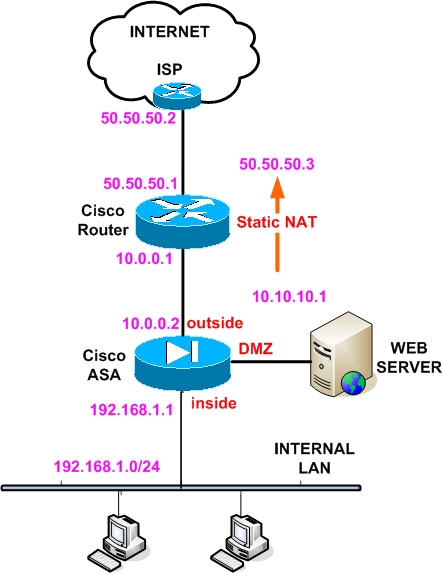
Assume that our enterprise is assigned a public IP address range of 50.50.50.0/27 (that is a 32 address subnet). The usable addresses in this subnet range between 50.50.50.1 and 50.50.50.30. In our example we assign 50.50.50.1 to the outside interface of the Cisco router and 50.50.50.2 is the ISP gateway router. Also, we need to use address 50.50.50.3 for accessing a DMZ web server which has a real private address of 10.10.10.1.
Between the Cisco Router and the outside interface of the Cisco ASA we have a private subnet 10.0.0.0/24. Also, the inside internal LAN subnet is 192.168.1.0/24. The inside IP address of the ASA is 192.168.1.1.
Traffic Flow:
We need to achieve the following traffic flow:
1) All Internal LAN hosts (192.168.1.0) should be able to access the Internet (outbound communication). No access initiated from the Internet should be allowed towards the Internal LAN network.
2) Also, we need to allow access from the Internet towards our DMZ Web Server (inbound communication).
Implementation:
There are a few ways you can follow to achieve the functionality above. For sure we need to perform NAT on the border Cisco Router to translate our internal private addresses to public addresses assigned by our ISP. We have the option also to perform additional NAT on the ASA firewall, which however I wouldn’t recommend.
The way I would configure such a scenario is the following:
- 1) For outbound communication (Internal LAN towards the Internet), do not translate the network 192.168.1.0/24 on the Cisco ASA. Rather create a static mapping of 192.168.1.0 to itself (will see this below) and configure NAT overload on the Cisco Router for the network 192.168.1.0/24.
- 2) For inbound communication (Internet towards Web Server), create again a static mapping on the ASA for address 10.10.10.1 to itself, and perform static NAT on the Cisco Router to map 10.10.10.1 to 50.50.50.3
Configuration:
Below I will show you snapshots of the configuration for both the Cisco Router and the Cisco ASA that will achieve the functionality above.
Cisco ASA:
ciscoasa(config)# interface GigabitEthernet0/0
ciscoasa(config-if)# nameif outside
ciscoasa(config-if)# ip address 10.0.0.2 255.255.255.0
ciscoasa(config-if)# security-level 0
ciscoasa(config-if)# no shutdown
ciscoasa(config)# interface GigabitEthernet0/1
ciscoasa(config-if)# nameif inside
ciscoasa(config-if)# ip address 192.168.1.1 255.255.255.0
ciscoasa(config-if)# security-level 100
ciscoasa(config-if)# no shutdown
ciscoasa(config)# interface GigabitEthernet0/3
ciscoasa(config-if)# nameif DMZ
ciscoasa(config-if)# ip address 10.10.10.2 255.255.255.0
ciscoasa(config-if)# security-level 50
ciscoasa(config-if)# no shutdown
! Now create a static NAT mapping of 192.168.1.0 to itself
ciscoasa(config)# static (inside , outside) 192.168.1.0 192.168.1.0 netmask 255.255.255.0
! Create also a static NAT mapping of 10.10.10.1 Web Server to itself
ciscoasa(config)# static (DMZ , outside) 10.10.10.1 10.10.10.1 netmask 255.255.255.255
EDIT: NAT Commands For Cisco ASA version 8.3 and later:
object network web_server_static
host 10.10.10.1
nat (DMZ,outside) static 10.10.10.1
object network inside_mapped
subnet 192.168.1.0 255.255.255.0
object network internal-lan
subnet 192.168.1.0 255.255.255.0
nat (inside,outside) static inside_mapped
! Create an access-list to allow Inbound traffic to Web server only
ciscoasa(config)# access-list OUTSIDE-IN extended permit tcp any host 10.10.10.1 eq 80
ciscoasa(config)# access-group OUTSIDE-IN in interface outside
ciscoasa(config)# route outside 0.0.0.0 0.0.0.0 10.0.0.1
Cisco Router:
interface ethernet 0
ip address 50.50.50.1 255.255.255.224
ip nat outside
!
interface ethernet 1
ip address 10.0.0.1 255.255.255.0
ip nat inside
!Assume the router uses address 50.50.50.4 for all outbound communication
ip nat pool IP-POOL 50.50.50.4 50.50.50.4 netmask 255.255.255.255
ip nat inside source list 1 pool IP-POOL overload
access-list 1 permit 192.168.1.0 0.0.0.255
!Configure Static NAT to map 10.10.10.1 to 50.50.50.3
ip nat inside source static 10.10.10.1 50.50.50.3
ip route 0.0.0.0 0.0.0.0 50.50.50.2
ip route 192.168.1.0 255.255.255.0 10.0.0.2
ip route 10.10.10.0 255.255.255.0 10.0.0.2
Tagged with: asa dmz web server • cisco asa internet access • cisco router with asa
Filed under: Cisco ASA Configuration
Like this post? Subscribe to my RSS feed and get loads more!


This is an awesome post. I am still trying to absorb what I have to change. I have a 2651 with adsl wic and /29 (all PPPOE authentication is being done on the 2651) currently feeding a 4006 with supervisor 4. I recently acquired a 5510 that I want to place between the 2651 and the 4006. I have made a couple attempts but have not yet been successful, not sure where the problem is
So here is my router config
=~=~=~=~=~=~=~=~=~=~=~= PuTTY log 2011.07.24 15:41:50 =~=~=~=~=~=~=~=~=~=~=~=
C2651#sh run
Building configuration…
Current configuration : 2737 bytes
!
version 12.4
service timestamps debug datetime msec
service timestamps log datetime msec
no service password-encryption
!
hostname C2651
!
boot-start-marker
boot-end-marker
!
no logging console
enable secret 5 $1$frux$hI7F0TDJLVfgdNBlFqexk1
enable password xxxxxxxxxxx
!
no aaa new-model
clock timezone mst -5
no network-clock-participate slot 1
no network-clock-participate wic 0
ip cef
!
!
ip domain name xxxxxxxxxxx
ip name-server 205.171.3.65
ip name-server 205.171.2.65
vpdn enable
!
!
interface ATM0/0
no ip address
no ip mroute-cache
atm restart timer 300
no atm ilmi-keepalive
dsl operating-mode auto
pvc 0/32
encapsulation aal5mux ppp dialer
dialer pool-member 1
!
!
interface FastEthernet0/0
ip address 172.16.1.1 255.255.255.0
ip nat inside
ip tcp adjust-mss 1452
duplex auto
speed 100
!
interface FastEthernet0/1
shutdown
speed 100
full-duplex
!
interface Dialer1
mtu 1492
ip address 6x.xxx.xxx.118 255.255.255.248
no ip redirects
no ip proxy-arp
ip nat outside
encapsulation ppp
dialer pool 1
dialer-group 1
no cdp enable
ppp authentication chap callin
ppp chap hostname xxxxxxxxxxxxxx
ppp chap password 0 xxxxxxxxx
ppp pap sent-username xxxxxxxxx password 0 xxxxxxxxx
!
ip forward-protocol nd
ip route 0.0.0.0 0.0.0.0 Dialer1 permanent
ip route 172.16.0.0 255.255.224.0 172.16.1.2
!
ip http server
no ip http secure-server
ip nat pool mpool 6x.xxx.xxx.113 6x.xxx.xxx.118 netmask 255.255.255.248
ip nat source static tcp 172.16.26.11 21 6x.xxx.xxx.113 21 extendable
ip nat inside source list 1 pool mpool overload
ip nat inside source static tcp 172.16.26.11 21 6x.xxx.xxx.113 21 extendable
ip nat inside source static tcp 172.16.26.23 25 6x.xxx.xxx.113 25 extendable
ip nat inside source static tcp 172.16.26.23 443 6x.xxx.xxx.113 443 extendable
ip nat inside source static tcp 172.16.26.11 3389 6x.xxx.xxx.113 3389 extendable
ip nat inside source static tcp 172.16.26.42 443 6x.xxx.xxx.115 443 extendable
ip nat inside source static tcp 172.16.26.17 5090 6x.xxx.xxx.115 5090 extendable
ip nat inside source static tcp 172.16.26.42 8742 6x.xxx.xxx.115 8742 extendable
ip nat inside source static tcp 172.16.26.6 443 6x.xxx.xxx.116 443 extendable
ip nat inside source static tcp 172.16.26.7 25 6x.xxx.xxx.117 25 extendable
ip nat inside source static tcp 172.16.26.8 80 6x.xxx.xxx.117 80 extendable
ip nat inside source static tcp 172.16.26.7 443 6x.xxx.xxx.117 443 extendable
!
access-list 1 permit 172.16.0.0 0.224.255.255
snmp-server community public RO
snmp-server community xxxx RW
!
!
!
!
line con 0
line aux 0
line vty 0 4
password xxxxxxxxxx
login
!
!
end
C2651#
So If I follow the above example and change the IP of fa0/0 to 10.0.0.1 and change the route statement to ip route 172.16.0.0 255.255.224.0 10.0.0.2, what else would I need to change. The ASA has been configured per the example with ip changes where applicable
Thanks
@BlogAdmin,
Awesome document. I have a simialr scenario. I’ll be upgrading my company from one Linksys dual WAN router (2 DSL connections) to a Cisco 891 and a ASA 5505 behind it.
One question, we won’t have a DMZ, just a LAN with a few servers in it, some incoming connections from the internet will need to be forwarded to these internal servers (smtp, rdp, …). I would like to manage all of this port translations on the ASA- how would I need to configure NAT on the edge router? Say my internal server is 192.168.1.100. Would i need to do do a static NAT statement on the router and then be more granular with an access list on the ASA?
I do not have a pool of WAN ip addresses, i have static IPs from my ISP.
If you could provide sample statements to accomplish this scenario would be much appreciated. Thanks very much in advance and again, awesome job with this tute. Regards
Jack,
I think it would be easier for your scenario if you disable NAT completely on ASA (using “no nat-control”) and you have the ASA working as a router. Ofcouerse it will continue inspecting traffic and doing its firewall job, but it will not do any NAT. Since all the nat is done on your border router, you don’t need another NAT device. You will have to control traffic on the ASA just by using Access Lists.
Fernando,
I suggest to disable NAT on the ASA (“no nat-control”) and do all the NAT on the router. This will be the simplest scenario. You can have a static NAT on the router mapping one static public IP to the internal server 192.168.1.100. Then have the ASA control the traffic to the internal server with access list applied on its outside interface. You must put the proper static route also on the router for the internal servers which are behind the ASA.
Crash5050,
Didn’t understand exactly what you want to achieve. Be more specific please
So I guess one of the places I am confused is with the static nat to itself. The inside interface of the ASA is pointing to the native vlan 1 of a 4006 with sup 4. There are several vlans on the 4006 all in the range of 172.16.0.x to 172.16.31.x so wouldn’t I change this static nat to 172.16.0.0 172.16.0.0 netmask 255.255.224.0 or do I need to create a static nat for each of the class C vlans?
Jack,
You will disable NAT completely on the ASA (so there will not be any static NAT to itself like my example above). Think about it as if you are placing a normal router in front of the switch.
I purchased the book and it is very informative. My understanding of the ASA is better but I still have a question for the particular setup I want to do. I have a 2651XM with ADSL wic and a /29 from my ISP. The router is configured for nat and the dialer is is configured for the public pool. The router inside interface is connected to a Catalyst 4006 with a supervisor 4 WS-X4515. I have numerous vlans configured on the 4006 in the range of 172.16.0.x – 172.16.31.x. The loaded the latest 8.4 software on the ASA. The router inside interface is 172.16.1.1 /24 and I have the following routes ip route 0.0.0.0 0.0.0.0 Dialer1 permanent and ip route 172.16.0.0 255.255.224.0 172.16.1.2 The 4006 vlan1 ip is 172.16.1.2 /24 and I have the following routes ip default-gateway 172.15.1.1 ip route 0.0.0.0 0.0.0.0 172.16.1.1. What would be the best way to insert the ASA between the router and the layer 3 switch?
Jack,
As I have already said on my previous comment, it would be better and easier to disable NAT on the ASA. This will make the ASA work like a router but still inspecting traffic and applying firewall rules to traffic. Connect the outside interface of ASA to the inside of router, and the inside interface of ASA to vlan1 of the 4006 switch. You will need to introduce a new layer3 subnet to accommodate let say the subnet between outside ASA and inside of router. The inside of ASA and vlan1 can stay as 172.16.1.0/24. On the ASA, router and 4006 you will need to add the required static and default routes.
@BlogAdmin,
Hi, i used this article as a guide and got my network up and running properly. I have now discoverd a problem with FTP. I have an FTP server in my inside network in passive mode. On the ASA i have static NAT translations- port 21 and 20 to my internal server- also have port 20 and 21 open on the outside interface. Problem is when I connect from a FTP client from outside I can connect to the server just fine- I get asked for authentication but then the connection breaks. For what I;ve been reading it’s because the server in passive mode uses random ports to transmit the data, and those ports are obviously not allowed on my ASA. The asa should be able to inspect the data and let it through.. any ideas of how to do this? I’ve been looking everywhere and can’t get it tow work. A bit of help would be greatly appreciated.
Kind regards
Fernando
Hi Fernando,
Have you enabled FTP inspection on the ASA.
Do the following:
ASA(config)#policy-map global_policy
ASA(config-pmap)#class inspection_default
ASA(config-pmap-c)#inspect FTP
If the above does not work, then try the following command:
ASA(config)#ftp mode passive
@BlogAdmin,
thanks. I did try that but still no luck. Any more ideas? I can authenticate from FTP client but I do not get the list of folders…
Hi All
Just wondering whether some one could shed light on this.
I am currently doing a network upgrade where ASA being installed. Everything is ok apart from proxy configuration.
WHAT I WOULD LIKE TO DO IS TO HAVE A INTERNAL PROXY SERVER SO THAT ALL CLIENTS GO THROUGH IT. BUT I DONT KNOW WHAT CONFIG NEED TO BE DONE IN ASA>
secondly for another project I WANT TO USE EXTERNAL PROXY, STILL STUCK WITH CONFIGURATION.
Appreciate if some one could help me.
SF,
What you want to achieve can be done easily with access control lists (ACL). Basically you will need to apply an ACL (inbound direction) on the inside interface of ASA which will allow access to only the IP address of proxy and then deny everything else.
Thanks for the prompmt reply
But still trying to get my head around how to setup the firewall when an internal proxy is being used.
.The proxy server resides in inside network.
.All the clients go through it, when accessing web.
If I only allowed web traffic source from proxy server, would it be the correct way of setting up?
SF,
My last comment was about allowing the internal proxy. Basically on the ACL you permit only source IP of proxy to any destination and then deny everything else.
Excellent !!
Thanks for clarifying that.
Why are you creating a static NAT mapping of 192.168.1.0 to itself
Max,
The stating NAT mapping of 192.168.1.0 to itself is basically used to avoid doing dynamic NAT on the ASA, since the dynamic NAT (for outbound communication) is done on the border router. Basically the internal LAN network passes untranslated from the inside of the ASA to its outside and then the border router does NAT to translate this private network into a public IP in order to get routed on the Internet.
Hi – i came across your post and found it very relevant to what i am doing. Except i am no expert here.
I am not sure if you are still doing this – i do not mind paying for your service to modify my existing Site-To-Site VPN.
If you are keen we can explore working on it remotely.
Here are my settings
NOW -
ISP Cisco811 (VPN peer running no problem)
New
ISP Cisco811CiscoASA5100 (To use VPN Here )
VPN Peer to move to CiscoASA
Please let me know if you are keen.
Thanks
Francis
Hi,
Do you have a static public IP on the outside interface of cisco811? Do you have more public IP addresses to assign to the ASA outside interface?
Also, what other kind of access do you have? i.e internet users from inside browsing the internet and also what kind of VPN is this?
Let me know the above and I will tell you how to proceed. I offer a paid service if you want me to connect remotely and fix it for you.
Harris