Configure Static Routing on Cisco ASA Firewall
Although the Cisco ASA appliance does not act as a router in the network, it still has a routing table and it is essential to configure static or dynamic routing in order for the appliance to know where to send packets. When a packet arrives to a network interface on the ASA firewall, the packet undergoes several security controls, such as ACL filtering, NAT, deep-packet inspection etc. After the packet passes all firewall controls, the security appliance needs to send the packet to its destination address. It therefore checks its routing table to determine the outgoing interface where the packet will be sent.
Cisco ASA firewalls support both static and dynamic routing. For dynamic routing, the ASA supports RIPv2 and OSPF. I recommend not to use dynamic routing though and stick with just static routes. The reason is that one of the purposes of a firewall is to hide your internal trusted network addressing and topology. By configuring dynamic routing support, you might be advertising routes to untrusted networks thus exposing your network to threats.

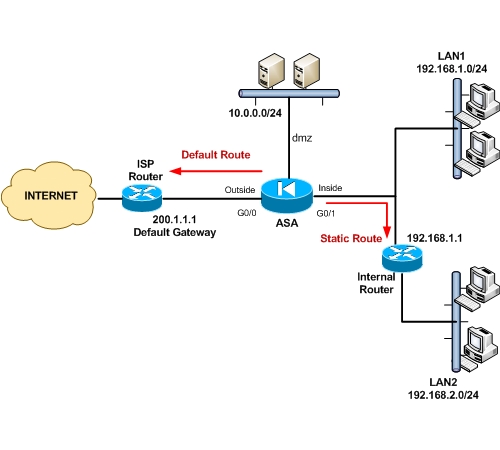
The scenario in the diagram above will help us understand how to configure static routing. The ASA connects to the internet on the outside and also has a DMZ and Internal zones. The default gateway towards the ISP is 200.1.1.1. The DMZ network is 10.0.0.0/24 and the internal LAN1 network is 192.168.1.0/24. LAN1 is directly connected to the Inside interface of the firewall. Additionally, there is another internal network, namely LAN2, with network 192.168.2.0/24. LAN2 is not directly connected to the firewall. Rather, there is an internal router with address 192.168.1.1 through which we can reach LAN2. Therefore, in order for the ASA to reach network LAN2, we need to configure a static route to tell the firewall that network 192.168.2.0/24 can be reached via 192.168.1.1.
So we need to configure two static routes. One Default Static route for Internet access, and one internal static route to reach network LAN2. For directly connected networks (DMZ and LAN1) we don’t need to configure a static route since the firewall already knows about these networks as they are directly connected to its interfaces.
Configuration:
The format of the static route command is:
ASA(config)# route [interface name] [destination address] [netmask] [gateway]
! First configure a default static route towards the default gateway
ASA(config)# route outside 0.0.0.0 0.0.0.0 200.1.1.1
! Then configure an internal static route to reach network LAN2
ASA(config)# route inside 192.168.2.0 255.255.255.0 192.168.1.1
Related posts:
- Permitting traffic to enter and exit the same interface
- Cisco ASA 5505 Basic Configuration Tutorial
- Cisco Router with Cisco ASA for Internet Access
- Policy NAT on Cisco ASA Firewall
- How to Configure SNMP on Cisco ASA 5500 Firewall
Tagged with: asa static route • static route
Filed under: Cisco ASA Configuration
Like this post? Subscribe to my RSS feed and get loads more!

Hello,
I came across this article because I am having an issue doing what you have defined in your diagram.
I have a layer 3 switch that has two VLANS on it. I need to be able to configure a static route on the asa so that when workstations or other network devices can access the VLAN.
I am able to enter the route as you have shown and can ping from within the ASA to the vlan. But when a device on the network tries to access it, its still a no go.
It seems that it is no passing packets back out the interface when they come in.
Hello James, thanks for visiting.
From what I understand, the inside interface of your ASA belongs to one VLAN, and then there is another VLAN on the switch, is that correct? If this is the case, you should create two Layer 3 Interfaces (SVI) on the switch using “Interface Vlan X” command and assign an IP address on the Vlan interfaces. This will configure your Layer 3 switch to work as a router separating the two internal networks. The gateways of the hosts should be the IP addresses of the Layer 3 interface Vlan on the switch. Please let me know if this clarifies your question.
You would also need to setup subinterfaces for each VL
AN in order to route traffic from the ASA to the switch interfaces.
Hello Derek,
The scenario I’m describing here assumes only one firewall internal zone, which is the “inside” interface. For this particular scenario you don’t need subinterfaces. What you mention would be true if we wanted two or more internal security zones, and thus we would have to configure subinterfaces on the ASA.
Thanks for your comment.
Dear Friends,
My Network Diagram being like this I have one Adsl router it has been directly connected to ASA firewall e0 i assigned my public ip in e0 then i assigned local ip address in e1.e1 ip address is 192.168.2.1 subnet mask is 255.255.255.0 this line goes to connect to my server.my server ip address is 192.168.2.5 snm 255.255.255.0.
what is my question is?
if we want to communicate with outside networks we should add the static route in ASA firewall,which ip i want to configure my adsl gateway is 192.168.1.254 or my isp router gateway? i hope i want to add the default route in my ASA firewall about my isp router gateway.If it’s wrong kindly send me the details.
Thanks and Regards
N.Mohamed Ushama
It depends if your ADSL router works in routed mode or bridge mode. If your ADSL router is not in bridged mode, then you need to configure a default route on the ASA which will be the internal IP address of your ADSL router. If your ADSL box is configured in bridged mode, then the default gateway on the ASA should be the ISP router gateway address.
Hi everone, I have the same config as the diagram. I can ping from ASA to computer on LAN2, but when I try to connect from DMZ(192.168.14.0) to LAN2(172.22.41.0)I get the next message:
“No translation group found for tcp src DMZ:192.168.14.2/59716 dst inside:172.22.41.5/3389″ EXPLANATION(a packet does not meet any of the outbound nat command rules)
Thanks to all,
Ivan
You will need to configure a static nat between inside to DMZ in order for DMZ to be able to access the host on LAN2. The following shows you how to configure static identity NAT:
static (inside,dmz) 172.22.41.5 172.22.41.5 netmask 255.255.255.255
access-list DMZ-IN extended permit tcp 192.168.14.0 255.255.255.0 host 172.22.41.5 eq 3389
access-group DMZ-IN in interface dmz
Thanks a lot BlogAdmin, using your example I did the next modifications and it worked fine.
static (inside,dmz) 172.22.41.0 172.22.41.0 netmask 255.255.255.0
didn’t put an access list because the default one on DMZ interface was enough. With this I let all comunication from DMZ to LAN2 opened.
New Problem:
I can’t get it to work from inside(172.18.0.0/16) to LAN2. I think it’s because when the packet returns from LAN2, as the internal router has an interface on inside the packet reaches the computer who started comunication directy and not through the ASA. In other words the return path is not the same as the starting path.
What dou you think?
Best regards,
Ivan Mckenzie
Ivan,
Be careful with your DMZ. You said that you let all communication from DMZ to LAN2 open. This is not a good idea. If a host in your DMZ gets compromised from the Internet, then you also expose your internal LAN2 to danger. The attacker from DMZ can easily propagate into your LAN2 network. I suggest you to modify your DMZ access list and allow ONLY the required IP and protocols needed.
Regarding your new problem, this happens because your inside zone hosts (172.18.0.0) have as default gateway the ASA inside IP. By default, the ASA does not allow traffic redirection in order for the initial packet from 172.18.0.0 to reach LAN2. If the ASA was a normal router, then the traffic would go to the ASA and then get redirected to your internal LAN2 router. This does not happen with the ASA by default. You can change this behavior though.
You can try the following on ASA:
ciscoasa(config)# same-security-traffic permit intra-interface
The above will allow redirections to work.
Hi All
I have diiferent internal VLAN (port)configure on the same switch (one for the pc-lan, one for Server, …one for DMZ) some with the same security level but different network.
I have open all the traffic between the same security sub-interface on the firewall, but it didn’t work
can You help me?
Thanks
By default the ASA does not allow traffic to flow between interfaces with same security level. You need to enable this using the following:
ASA(config)# same-security-traffic permit inter-interface
Thanks
I have did it, but I’m not sure of:
1-The switch port must be in trunk mode?
2-For multiple LAN2/24 (11), like Your diagram, there’s a unique route or different to set?
3- i’m tryng to configure Active/Standby statefull failover with 2 ASA, on two different place in my network, I would use sub-interface on two different switch, doYou think it’s possible?
4-I’m not able to find a rich detailed manual, could You help me?
Regard
Rocco
Hi Guys,
I too have pretty much a same scenario, it is like this,
I’ve two vlans(100,101)connected to an cisco 2950 switch and the switch connects to the inside interface(ethernet 0/2) of the asa.
I want to enable inter-vlan routing and want to access internet. I assume that I’ve to configure a trunk between the asa and 2950 switch(inside).
My problem is when I try to configure sub-interfaces on the asa interface(ethernet 0/2) it wont allow me to do so. Further it wont allow me to configure (nameif,security-level and ip address)on the physical interface. Every time I’ve to configure interface vlans and has to map them to the physical interface.
Can anyone assist me with this request.
Regards,
Suren
Hello Suren,
From your description I have understood that you have a Cisco ASA 5505 model, is that correct? If that is the case, then you CAN NOT create subinterfaces on the physical interface if you have the base license on the ASA. For Cisco ASA 5505, all physical interfaces are Layer2 ports, and you must create a Layer 3 interface Vlan which is mapped to a specific Layer2 Vlan configured on the physical interface.
With the 5505 base license you can create up to 3 Vlans, but two of them can not communicate between each other. If you create for example two inside vlans (inside1, inside2) and one outside vlan, then inside1 and inside2 can only communicate with the outside, but not between each other.
I have the same configuration : several internal VLANs with a layer 3 internal switch and ASA for outgoing connexions.
The ASA has only one internal IP in VLAN1 (and is connected to a VLAN1 port on the Layer 3 switch).
The internal switch is the default gateway for machines in other VLANs.
I couldn’t get the ASA to route connexions from VLAN1 to the others, I assume this is because it doesn’t see the return packets (packets form other VLANs to VLAN1 are routed directly through the internal switch).
Anyway, to fix this :
I attributed to the internal switch an IP for each VLAN. And a default route to go to the ASA.
Then I set all my machines to use the internal switch as their default gateway, even for machines in VLAN1.
That way traffic between internal VLANs doesn’t go through the ASA anymore.
Hello daff42, thank you for your comment. Yes you are right. The way you have configured the switch, all the Intervlan routing goes through the switch and never reaches the ASA. Ofcourse, internet traffic will have to go through the ASA via the default route that you have on the switch.
Regarding security, all traffic between your internal VLANs has no restrictions. If you want to implement traffic control between your internal Vlans, then you can use access-lists on the Layer3 switch for some basic protection (maybe you want to block some internal users for reaching sensitive servers in your internal network)