When it comes to authentication services in networking and IT systems in general, the best practice is to have a centralized authentication system which contains the user account credentials in a secure way and controls all authentication and authorization.
This is why Active Directory in Microsoft environments is such a useful and powerful authentication scheme. In the world of networking, we have AAA servers which centrally control and manage all authentication requests from users that need to access the peripheral network devices.
What is AAA
AAA stands for Authentication, Authorization, and Accounting. AAA is a mechanism that is used to tell the firewall appliance (or any networking appliance) who the user is (Authentication), what actions the user is authorized to perform on the network (Authorization), and what the user did on the network after connecting (Accounting).
In this post we will see examples how to configure all AAA elements on ASA (that is Authentication, Authorization and Accounting) using TACACS+ and also explain how to configure authentication using the RADIUS protocol.
Types of Authentication supported on ASA appliances
Three types of Authentication are available for Cisco ASA firewalls:
1. User Authentication for accessing the security appliance itself.
2. User Authentication for accessing services through the security appliance. This is also called “cut-through proxy” and is used to authenticate users for accessing Telnet, FTP, HTTP, and HTTPs services located in the network through the firewall.
3. User Authentication for VPN tunnel access (IPsec or SSL VPN).
We will see a configuration example for the first type (authentication for accessing the security appliance for management using Serial Console, SSH, and Telnet access).
Authentication configuration example using TACACS+
In this example we assume that we have already installed and configured a AAA server (e.g Cisco ACS or ISE) running the TACACS+ authentication protocol.
NOTE: Cisco ACS has reached end-of-life as a product. The replacement option is Cisco ISE (Identity Services Engine) but the concepts of authenticating via TACACS+ are the same.
On the AAA server, we have configured a username/password account that the firewall administrators will use to authenticate. Assume also that the AAA server is located on our internal LAN network with address 10.1.1.1
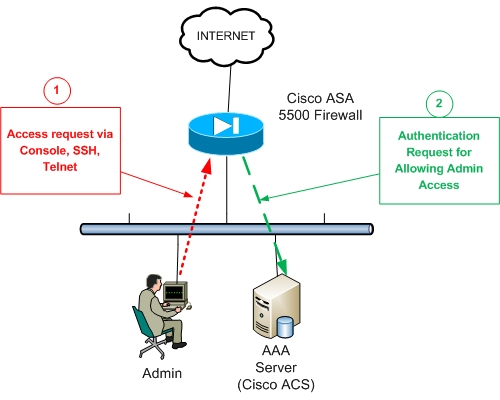
Referring to the figure above, the firewall administrator (Admin) requests firewall access (serial console, SSH, or Telnet) (Arrow 1) for managing the appliance.
The ASA firewall (Arrow 2) will request Authentication permission from the AAA server in order to prompt the admin user for Username/Password credentials.
After the Admin successfully enters his/her credentials, the AAA server will give the permission to the Firewall to allow the user in.
Here is the configuration below:
! Specify a AAA server name (NY_AAA) and which protocol to use (Radius or TACACS+)
ASA(config)# aaa-server NY_AAA protocol tacacs+
! Designate the Authentication server IP address and the authentication secret key
ASA(config)# aaa-server NY_AAA (inside) host 10.1.1.1
ASA(config-aaa-server-host)# key secretauthkey
ASA(config-aaa-server-host)# exit
! Enable Authentication for management access
ASA(config)# aaa authentication serial console NY_AAA LOCAL
ASA(config)# aaa authentication telnet console NY_AAA LOCAL
ASA(config)# aaa authentication ssh console NY_AAA LOCAL
The “LOCAL” keyword at the end designates the use of the local firewall username database for authentication in case the AAA server authentication is not available (e.g AAA server is down).
Of course, to complete the scenario above, you need to properly configure the AAA Server with the internal IP address of the ASA firewall and the same authentication key (e.g secretauthkey) as the one you configured on the ASA above.
Accounting configuration example using TACACS+
Following our previous example above about AAA Authentication for management access to a Cisco ASA Firewall, in this section we will describe how we can keep track of the authentication requests of admin users to the firewall.
This can be helpful to keep a record of the time and date that an administrator user connected to the firewall. This functionality can be achieved by configuring “Accounting” on the ASA Firewall.
This will enable the appliance to generate an accounting record that marks the establishment and termination of management access via Telnet, Serial Console, and SSH.
Assume that we have already installed a AAA server and configured the details on the firewall (see previous section). The name of the AAA server that we have given is NY_AAA.
AAA Accounting Configuration:
ASA(config)# aaa accounting serial console NY_AAA
ASA(config)# aaa accounting telnet console NY_AAA
ASA(config)# aaa accounting ssh console NY_AAA
The configuration above will keep a record in the AAA server database for the start-time and end-time of administrator access to the firewall.
Now, if we also need to keep track of all the commands entered by the administrator when he/she was connected to the firewall, we can use the “accounting command” as shown below:
ASA(config)# aaa accounting command NY_AAA
The above works only with TACACS+ protocols.
Authorization configuration example using TACACS+
With Authorization, we can specify what commands are allowed to run for each specific user. For example, we might have low-privilege operator users that are allowed only to execute monitoring commands (e.g only “show” commands) and not anything else.
This can be achieved with Authorization as shown below:
ASA(config)# aaa authorization exec authentication-server auto-enable
ASA(config)# aaa authorization command NY_AAA LOCAL
AAA Configuration Example with RADIUS
A RADIUS server can be used as an external AAA server to provide Authentication, Authorization and Accounting services for ASA like the TACACS+ protocol. Let’s see a configuration example below:
! Specify a AAA server name (Radius_SRV) and which protocol to use (Radius in our case)
ASA(config)# aaa-server Radius_SRV protocol radius
ASA(config-aaa-server-group)# exit
! Designate the Authentication server IP address and the authentication secret key
ASA(config)# aaa-server Radius_SRV (inside) host 10.1.1.1
ASA(config-aaa-server-host)# key RadiusAuthKey
ASA(config-aaa-server-host)# exit
! Enable Authentication for management access
ASA(config)# aaa authentication serial console Radius_SRV
ASA(config)# aaa authentication telnet console Radius_SRV
ASA(config)# aaa authentication ssh console Radius_SRV
AAA External Servers Supported by ASA
Here are the AAA servers and protocols supported by Cisco ASA as external authentication servers:
- TACACS+ (such as Cisco ISE)
- RADIUS (such as Cisco ISE)
- LDAP (such as Microsoft Active Directory)
- Kerberos
- RSA SecurID
Related Posts
- Prevent Spoofing Attacks on Cisco ASA using RPF
- Configuring Connection Limits on Cisco ASA Firewalls – Protect from DoS
- Cisco ASA Firewall Management Interface Configuration (with Example)
- How to Configure Access Control Lists on a Cisco ASA 5500/5500-X Firewall (with Examples)
- Cisco ASA Firewall Packet Tracer for Network Troubleshooting