In order to be able to monitor and troubleshoot your Cisco ASA firewall, you need to understand the difference between connections and translations.
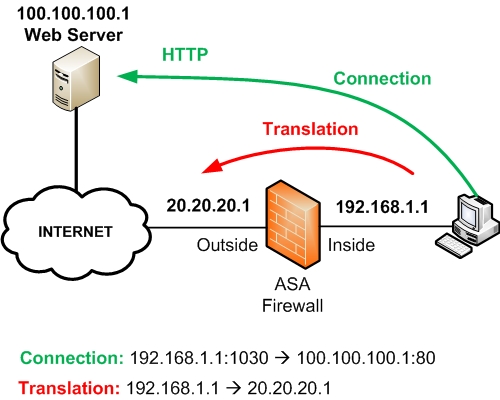
Refer to the diagram above for an explanation about Connections and Translations.
A Connection works at the Transport Layer and includes the Source IP/Source Port and the Destination IP/Destination Port.
Connections are subsets of Translations. You can have many connections open that are all using the same Translation. For example, a connection shown above is originated from Internal source host 192.168.1.1 with source port 1030 towards a Destination host (public Web Server) 100.100.100.1 on Destination Port 80.
A Translation works at the IP Layer and includes the Real IP Address and the Mapped (Translated) IP Address.
Using NAT or PAT, a Real IP address is translated to a Mapped IP address and vice-versa. From the diagram above, the Real IP address 192.168.1.1 is translated to a Mapped IP address 20.20.20.1.
Connection Related Commands
ASA# show conn
ASA# show conn details
ASA# show local-host
The above commands will display the current active connections and information details about each connection. An example output is the following:
TCP outside:100.100.100.1/80 inside:192.168.1.1/1030 idle 0:00:05 bytes 1965 flags UIO
Translation Related Commands
ASA# show xlate
ASA# show xlate detail
ASA# clear xlate
The commands above enable you to display or clear the contents of the translation table. An example output is the following:
NAT from inside:192.168.1.1 to outside:20.20.20.1 flags i
Related Posts
- What is Cisco ASA Firewall – All you need to Know
- Traffic Rate and Bandwidth Limiting on Cisco ASA Firewall
- Cisco ASA Firewall (5500 and 5500-X) Security Levels Explained
- Cisco ASA 5505-5510-5520-5540-5550-5580 Performance Throughput and Specs
- Password Recovery for the Cisco ASA 5500 Firewall (5505,5510,5520 etc)