With the older Cisco PIX firewall appliances, there was no way for traffic to enter a specific interface and then exit back from the same interface again. With the new Cisco ASA models, this is also not supported by default, but you can enable this functionality with the same-security-traffic permit intra-interface command.
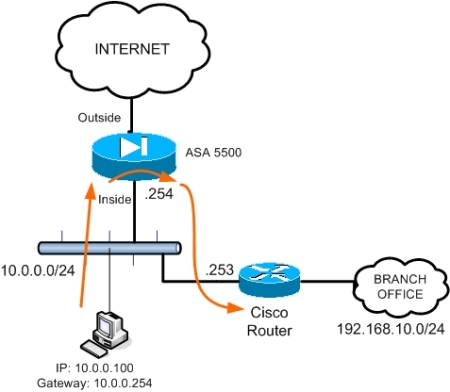
The schematic above shows a possible scenario where this functionality can be used. All internal hosts in network 10.0.0.0/24 have the ASA as default gateway (10.0.0.254) in order to access the Internet.
However, there is another internal network range (Branch Office: 192.168.10.0/24) which is accessible via a cisco router at 10.0.0.253. In order for the internal hosts to access this subnet, a static route must be configured on the ASA together with the “permit intra-interface” command, as shown below:
ciscoasa(config)# route inside 192.168.10.0 255.255.255.0 10.0.0.253 1
ciscoasa(config)# same-security-traffic permit intra-interface
All traffic from internal hosts destined to subnet 192.168.10.0 will be redirected by the ASA firewall through the Cisco router. The feature above is supported in versions 7.2(1) and later.
It is also called “hairpinning” as you can find it on some VPN configurations where you terminate remote users on the ASA outside interface and then they are allowed to get out from the same interface (outside) towards the Internet.
same-security-traffic permit intra-interface VS inter-interface
A similar command is the same-security-traffic permit inter-interface. This command allows traffic to enter an interface of certain security level and then exit from another interface of the SAME security level.
For example assume you have two internal security zones (inside1 and inside2) having the same security level of 90. By default, the ASA does not allow traffic to enter and exit interfaces of the same security level. With the command above you can allow this communication between same security level interfaces.
Related Posts
- Prevent Spoofing Attacks on Cisco ASA using RPF
- Configuring Connection Limits on Cisco ASA Firewalls – Protect from DoS
- Configuring AAA Authentication-Authorization-Accounting on Cisco ASA Firewall (TACACS+, RADIUS)
- Cisco ASA Firewall Management Interface Configuration (with Example)
- How to Configure Access Control Lists on a Cisco ASA 5500/5500-X Firewall (with Examples)