In this post we will configure Site-to-Site IPSEC VPN between a Cisco IOS Router and ASA Firewall. ASA configuration is not much different from Cisco IOS with regards to IPSEC VPN since the fundamental concepts are the same. Let’s start our LAB example and we’ll see how it’s done.
Consider the following diagram. The first site (Remote1) is equipped with a Cisco ASA firewall (any model) and the second site (Remote2) is equipped with a Cisco Router. Remember that a Cisco ASA firewall is by default capable to support IPSEC VPN but a Cisco Router must have the proper IOS software type in order to support encrypted VPN tunnels.
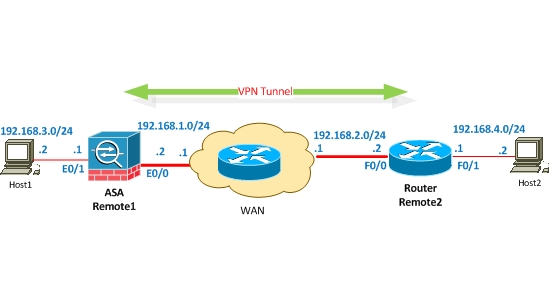
Equipment Used in this LAB:
- ASA 5510 – Cisco Adaptive Security Appliance Software Version 8.0(3)
- Cisco Router 2801 – C2801-ADVIPSERVICESK9-M Version 12.4(9)T4
Scenario:
LAN of Remote1 must be connected to LAN of Remote2 via VPN Tunnel. The most usual scenario is that the WAN cloud is the Internet, so secure connectivity shall be provided between the two LAN networks over the Internet.
First of all we shall make sure that the outside interfaces of ASA and router must be reachable over the WAN. Now let’s start IPSEC VPN configuration.
Cisco ASA Configuration
First I started ASA configuration.
I’ve created an Access list, which will match the interesting traffic which is the traffic to be encrypted. If source is 192.168.3.0/24 and destination is 192.168.4.0/24, then traffic will be matched by the access list as “interesting traffic” and will be encrypted and pass through the tunnel.
ASA(config)# access-list vpn extended permit ip 192.168.3.0 255.255.255.0 192.168.4.0 255.255.255.0
!IKE PHASE #1
! I’ve created a phase1 policy. This policy provides secured process of exchanging Keys.
ASA(config)# crypto isakmp policy 1
! For authentication I used Pre-shared. This method is most frequently used today.
ASA(config)# authentication pre-share
!For encryption I used 3des.
ASA(config)# encryption 3des
! Hashing md5.
ASA(config)# hash md5
! I used second group of diffie-hellman. Group1 is used by default. The most secured is Group5.
ASA(config)# group 2
! configure crypto key. The keys must match to each other between peers. Otherwise Phase1 will not be completed.
ASA(config)# crypto isakmp secretsharedkey address 192.168.2.2
NOTE: Crypto key is hidden in ASA configuration. If we look at configuration, it will be shown in following way.
tunnel-group 192.168.2.2 ipsec-attributes
pre-shared-key *
! Activate policy on Outside interface.
ASA(config)# crypto isakmp enable outside
! IKE PHASE #2- VPN Tunnel is established during this phase and the traffic between VPN Peers is encrypted according to the security parameters of this phase.
! I created Transform-set, by which the traffic will be encrypted and hashed between VPN peers.
ASA(config)# crypto ipsec transform-set ts esp-3des esp-md5-hmac
! Apply the access list created earlier for matching the interesting traffic.
ASA(config)# crypto map vpn 10 match address vpn
! I indicated address of Remote2 peer public outside interface.
ASA(config)# crypto map vpn 10 set peer 192.168.2.2
! Apply also the transform-set.
ASA(config)# crypto map vpn 10 set transform-set ts
! Attach the already created Crypto-map and VPN to outside interface.
ASA(config)# crypto map vpn interface outside
ASA configuration is completed here (regarding the VPN config of course). Now let’s start Router Configuration below.
Cisco Router Configuration
ISAKMP Phase 1
! Enter crypto-isakmp policy configuration mode for configuring crypto isakmp policy.
Router(config)# crypto isakmp policy 10
! Turn on 3des as an encryption type.
Router(config)# encr 3des
! I indicated MD5 as a hashing type.
Router(config)# hash md5
! I indicated pre-share authentication.
Router(config)# authentication pre-share
! I used second group of diffie-hellman. group1 is used by default.
Router(config)# group 2
! I defined peer key same as ASA site.
Router(config)# crypto isakmp secretsharedkey address 192.168.1.2
It’s not necessary to match policy numbers. The most important is to match corresponding parameters of policy. Otherwise negotiation of Phase1 will not be successful.
! Access list for matching interesting traffic.
Router(config)# ip access-list extended vpn
Router(config)# permit ip 192.168.4.0 0.0.0.255 192.168.3.0 0.0.0.255
ISAKMP PHASE 2
!
! Create IPSEC transform-set, by which the mechanism of hashing and encryption is determined, by which the traffic will be hashed/encrypted in VPN tunnel later.
Router(config)# crypto ipsec transform-set ts esp-3des esp-md5-hmac
! Enter into crypto-map configuration mode.
Router(config)# crypto map vpn 10 ipsec-isakmp
! Indicate IP address of peer.
Router(config)# set peer 192.168.1.2
! Indicate IPsec transform-set created above.
Router(config)# set transform-set ts
! Apply access list created above.
Router(config)# match address vpn
! Apply crypto-map to interface.
Router(config)# interface FastEthernet0/0
Router(config)# crypto map vpn
With this, VPN configuration is completed so let’s start verification.
! In the output below it is shown that ISAKMP PHASE1 is active, which means that negotiation of PHASE1 is completed successfully.
ASA# show crypto isakmp sa
Active SA: 1
Rekey SA: 0 (A tunnel will report 1 Active and 1 Rekey SA during rekey)
Total IKE SA: 1
1 IKE Peer: 192.168.2.2
Type : L2L Role : initiator
Rekey : no State : MM_ACTIVE
Router# show crypto isakmp sa
dst src state conn-id slot
192.168.1.2 192.168.2.2 MM_ACTIVE 1 0
! Checking ISAKMP PHASE2. Here we see that IPSec is working and the interesting traffic flows in VPN Tunnel.
ASA# show crypto ipsec sa
interface: outside
Crypto map tag: vpn, seq num: 10, local addr: 192.168.1.2
access-list vpn permit ip 192.168.3.0 255.255.255.0 192.168.4.0 255.255.255.0
local ident (addr/mask/prot/port): (192.168.3.0/255.255.255.0/0/0)
remote ident (addr/mask/prot/port): (192.168.4.0/255.255.255.0/0/0)
current_peer: 192.168.2.2
#pkts encaps: 344, #pkts encrypt: 344, #pkts digest: 344
#pkts decaps: 344, #pkts decrypt: 344, #pkts verify: 344
#pkts compressed: 0, #pkts decompressed: 0
#pkts not compressed: 344, #pkts comp failed: 0, #pkts decomp failed: 0
#pre-frag successes: 0, #pre-frag failures: 0, #framents created: 0
#PMTUs sent: 0, #PMTUs rcvd: 0, #decapsulated frgs needing reassembly: 0
#send errors: 0, #recv errors: 0
Router# show crypto ipsec sa
interface: FastEthernet0/0
Crypto map tag: vpn, local addr 192.168.2.2
protected vrf: (none)
local ident (addr/mask/prot/port): (192.168.4.0/255.255.255.0/0/0)
remote ident (addr/mask/prot/port): (192.168.3.0/255.255.255.0/0/0)
current_peer 192.168.1.2 port 500
PERMIT, flags={origin_is_acl,}
#pkts encaps: 344, #pkts encrypt: 344, #pkts digest: 344
#pkts decaps: 344, #pkts decrypt: 344, #pkts verify: 344
#pkts compressed: 0, #pkts decompressed: 0
#pkts not compressed: 0, #pkts compr. failed: 0
#pkts not decompressed: 0, #pkts decompress failed: 0
#send errors 0, #recv errors 0
VPN Tunnel is established and works.
Related Posts
- Prevent Spoofing Attacks on Cisco ASA using RPF
- Configuring Connection Limits on Cisco ASA Firewalls – Protect from DoS
- Configuring AAA Authentication-Authorization-Accounting on Cisco ASA Firewall (TACACS+, RADIUS)
- Cisco ASA Firewall Management Interface Configuration (with Example)
- How to Configure Access Control Lists on a Cisco ASA 5500/5500-X Firewall (with Examples)