Most of us are used to the standard keyboards that are attached to our computers without looking for other types of computer keyboards. Without questioning what functionalities we require from our keyboards, we type away oblivious to the fact that there could be a better one out there for us.
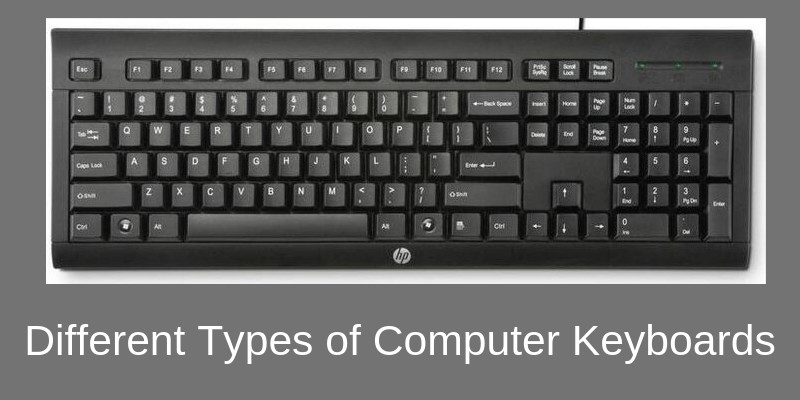
From flexible keyboards, easily rolled away in our backpacks to elaborately detailed gaming keyboards, there is a multitude of options available out there; all we have to do is look.
Whether you are an avid gamer or a professional designer, there is a keyboard out there for you. Have a look at this list of different keyboards to see what works best for you:
1. Flexible Keyboard
These keyboards work just the same as standard keyboards but are meant for people on the move. They are typically made of silicon, which is water and dust-resistant and don’t require constant cleaning.
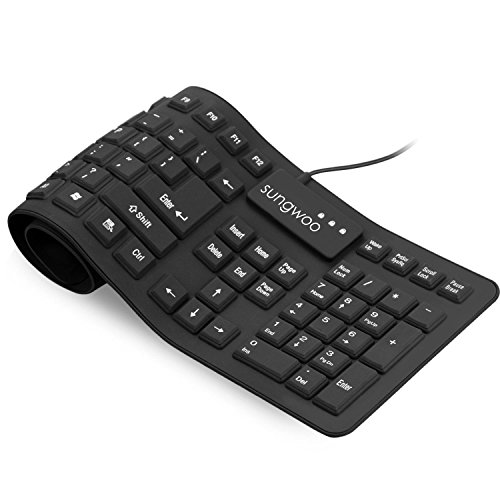
- Multiple function: Flexible, Soft, Foldable, Roll-up, Silent, Waterproof, Dustproof, Lightweight, Portable and easy to store. Multiple function make it an extraordinary computer keyboard!
- Soft silicone material: Made of high intensity and high elasticity silicone gel, non-toxic and odorless. Flexible material allow you to roll up freely for storage, very handy and convenient to take along with your notebook, laptop and mac.
- Waterproof and dustproof: No additional keyboard cover skin required, food crumbs or dust can be easily cleaned thoroughly. Clean the silicone keyboard with water, alcohol, or alcohol based disinfectant.
Last update on 2026-06-11 at 18:04 / Affiliate links / Images from Amazon Product Advertising API
These keyboards are ideal for those who spend a lot of time travelling and outdoors; it can be rolled up and stuffed into a bag, and it is resilient in outdoorsy situations.
2. Ergonomic Keyboard
The ergonomic keyboard is designed to reduce the strain of constant typing on the wrist and other problems that stem from that.
These keyboards prevent musculoskeletal problems such as Repetitive Strain Syndrome (RSI), something that can be caused by long hours of using keyboards.
Ergonomic keyboards are designed to angle the hands the way they would naturally fall and typically feature padding for the wrists to rest on.

- Split-Key Ergonomic Design: One-piece split layout separates keys into left and right zones to reduce wrist bending and support a natural hand position, helping minimize strain during long hours of typing.
- Long Key Travel & Tactile Feedback: Extended key travel delivers responsive, tactile feedback with audible confirmation, similar to brown mechanical switches. Built for durability with up to 20 million keystrokes.
- Old-School Curved Row Design: Stepped, curved key rows promote a natural typing posture and reduce fatigue during long sessions. Made from high-quality ABS with membrane switches and 4.2 mm key travel.
Last update on 2026-06-11 at 18:04 / Affiliate links / Images from Amazon Product Advertising API
There are a few different ergonomic designs to accommodate the needs of different typists. From split keyboards, to contoured to hand-held keyboards; there is an ergonomic design for everyone.
3. Gaming Keyboard
Gaming keyboards are created for use for long periods of time, often adopting ergonomic designs for comfort and also lighted keys for playing in the night.
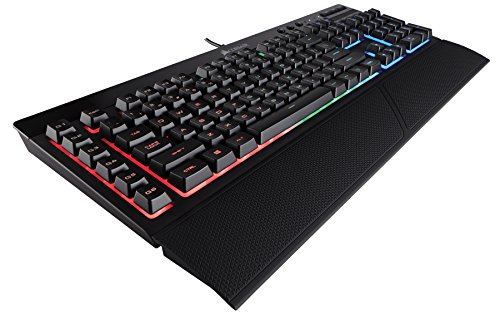
- Quiet and responsive keys give a satisfying feel
- Dedicated volume and multimedia controls for direct audio control without interrupting your game
- Multi-Key anti-ghosting ensures the most accurate simultaneous key presses
Last update on 2026-06-11 at 18:04 / Affiliate links / Images from Amazon Product Advertising API
These keyboards are also built with programmable keys that can be adapted to the kind of gamer you are. They have an extra thick coat of paint on the keys, more often used for gaming, such a W, A, S, D and the space bar.
4. Wireless Keyboard
The wireless keyboard is exactly what it’s called; a keyboard without a wire. It is connected to your computer with infrared, 2.4 GHz WiFi or more often through Bluetooth.

- Easy Setup: Simply insert the nano USB receiver into your computer and use the keyboard instantly.
- Ergonomic design: Stainless steel material gives heavy duty feeling, low-profile keys offer quiet and comfortable typing.
- 6-Month Battery Life: Rechargeable lithium battery with an industry-high capacity lasts for 6 months with single charge (based on 2 hours non-stop use per day).
Last update on 2026-06-11 at 18:04 / Affiliate links / Images from Amazon Product Advertising API
These keyboards can be used if you connect your computer to either a screen or television so you can control it from the comfort of your bed or sofa. They are relatively inexpensive and very easily available.
5. Multimedia/Internet Keyboard
Both multimedia and internet keyboards are just regular keyboards with a few extra options. For multimedia designers, the keyboards feature volume control and media application launch buttons.
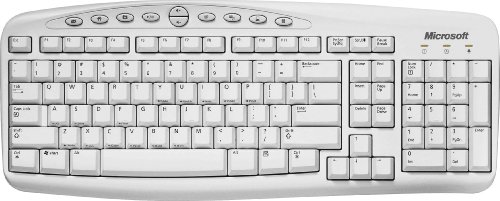
- Microsoft C19-00330 xINTERNET KEYBOARD WIN9x
Last update on 2026-06-11 at 18:04 / Affiliate links / Images from Amazon Product Advertising API
As for zealous internet users, they have the multimedia keys, as well as e-mail and browser launch keys to make launching apps easier and quicker.
6. Membrane Keyboard
Unlike the majority of keyboards, membrane keyboards don’t have space between the individual keys. These keys are pressure sensitive and are divided by an outline for each symbol, letter or number. The keys lay flat on a flexible surface.
7. Mechanical Keyboard

- 🔥𝗧𝗿𝘂𝗲 𝗠𝗲𝗰𝗵𝗮𝗻𝗶𝗰𝗮𝗹 𝗙𝗲𝗲𝗹 𝘄𝗶𝘁𝗵 𝗟𝗶𝗻𝗲𝗮𝗿 𝗥𝗲𝗱 𝗦𝘄𝗶𝘁𝗰𝗵𝗲𝘀 - Experience smooth, consistent keystrokes with linear red mechanical switches designed for rapid actuation and quiet operation. Perfect for both gaming marathons and extended typing sessions without the tactile bump of blue or brown switches.
- 🔥𝗩𝗶𝗯𝗿𝗮𝗻𝘁 𝗥𝗮𝗶𝗻𝗯𝗼𝘄 𝗟𝗘𝗗 𝗕𝗮𝗰𝗸𝗹𝗶𝗴𝗵𝘁𝗶𝗻𝗴 𝘄𝗶𝘁𝗵 𝟲 𝗗𝘆𝗻𝗮𝗺𝗶𝗰 𝗠𝗼𝗱𝗲𝘀 - Enjoy eye-catching rainbow backlighting with 6 preset lighting modes, including breathing, wave, ripple, and reactive effects. Note: This Rainbow LED version features fixed color patterns and does not support software customization. Brightness is adjustable via keyboard shortcuts for optimal visibility in any lighting.
- 🔥𝗦𝗼𝗳𝘁𝘄𝗮𝗿𝗲 𝗗𝗿𝗶𝘃𝗲𝗿 𝗦𝘂𝗽𝗽𝗼𝗿𝘁 𝗳𝗼𝗿 𝗙𝘂𝗹𝗹 𝗖𝘂𝘀𝘁𝗼𝗺𝗶𝘇𝗮𝘁𝗶𝗼𝗻 𝗖𝗼𝗻𝘁𝗿𝗼𝗹 - Take control of your K552-KR with dedicated software drivers, remap each key, assign complex macro commands, and tailor it perfectly to your personal workflow or gaming style.
Last update on 2026-06-11 at 18:04 / Affiliate links / Images from Amazon Product Advertising API
These robust keyboards are relatively cheap, long-lasting and are seen as somewhat primitive in the keyboard space. This old school keyboard gives you that feel of real typing because the keys lay on physical mechanical buttons. These keyboards are also a lot louder than the alternatives.
However, mechanical keyboards have fanatical supporters especially among the gaming community. Because the keys are mechanical, they provide precise control, are more durable and also are more responsive when playing games.
8. Virtual Keyboard
A virtual keyboard is essentially just software that allows you to type without the need for actual physical keys. The way you to use this keyboard is with the use of a touch screen featured in newer laptop releases and tablet computers.
9. Laptop Keyboard
Laptop keyboards have what we call “chiclet style” keys, which are sleeker than traditional keys to fit in thinner design laptops.
No products found.
These modern-looking keyboards also often feature a lot more than a regular keyboard from volume control, and on and off switches as well as brightness control right there on the keyboard. There is sometimes also a tiny tracker featured among the keys that can be used for the cursor.
10. Projection Keyboard
Probably the coolest keyboard of the lot is the projection keyboard. This is a device that can be connected through Bluetooth to your mini PC, tablet computer or even smartphone.
It shows the laser projection of a keyboard on any plain surface that you choose. You type on the holograph of the keys and the device records your key strokes and responds accordingly. Welcome to the future!
11. Portable Mini Keyboard
For people on the go, a portable mini keyboard will be an ideal companion.
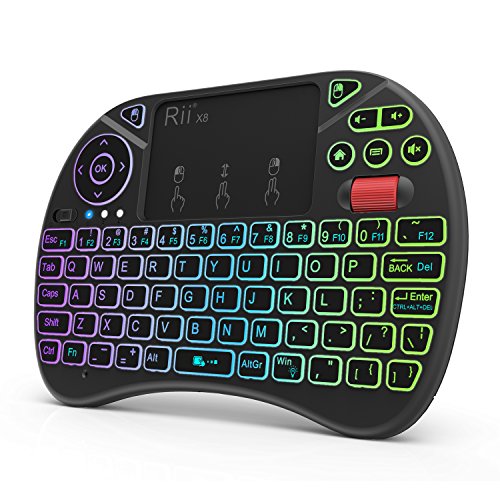
- Rii 2.4GHz Mini Wireless QWERTY keyboard connected by the included usb dongle, plug and play. Small and handheld design, innovative shape,perfect for Raspberry Pi series, Android TV Box , HTPC and PC.
- Mini Wireless Keyboard with Touchpad supporting multi-touch function, mouse left and right buttons,easy to type and copy/paste,making it faster and more convenient for you to move to choose what you want.
- 8-Color RGB Backlit,Multi-media buttons,Direction keys ,Power switch,Left and Right Buttons,Scroll wheel.Wireless mini keyboard with built in rechargeable lithium-ion battery.
Last update on 2026-06-11 at 18:04 / Affiliate links / Images from Amazon Product Advertising API
These keyboards usually have a wireless connection interface (bluetooth or WiFi) but can also be connected with a USB cable.
They have full QWERTY keys and can be used with computers, Android boxes, streaming TV sticks, tablets, Raspberry devices and other computing or electronic devices.
Another advantage of this type of keyboard is that it includes also a mouse pad embedded on the keyboard itself.
12. Backlit Keyboard
In this type of keyboard there is a background light which illuminates every key thus helping the user to type even in the dark.

- 🎮𝐀𝐥𝐥-𝐢𝐧-𝐎𝐧𝐞 𝐆𝐚𝐦𝐢𝐧𝐠 & 𝐎𝐟𝐟𝐢𝐜𝐞 𝐂𝐨𝐦𝐛𝐨 - 𝐔𝐧𝐛𝐞𝐚𝐭𝐚𝐛𝐥𝐞 𝐕𝐚𝐥𝐮𝐞: Experience premium features without the premium price. This complete wired set includes a full-size RGB backlit keyboard AND a high-precision gaming mouse, offering everything you need for gaming, work, or study. Perfect for first-time gamers, students, and budget-conscious users seeking a durable and responsive upgrade from basic peripherals.
- ✨𝐅𝐮𝐥𝐥𝐲 𝐂𝐮𝐬𝐭𝐨𝐦𝐢𝐳𝐚𝐛𝐥𝐞 𝐑𝐆𝐁 & 𝐌𝐚𝐜𝐫𝐨𝐬 - 𝐘𝐨𝐮𝐫 𝐂𝐨𝐧𝐭𝐫𝐨𝐥, 𝐘𝐨𝐮𝐫 𝐒𝐭𝐲𝐥𝐞: Dive into your gameplay with dynamic lighting. The keyboard features 6 vibrant backlight modes, and the mouse boasts 10 lighting effects. Easily customize colors, brightness, and patterns using the intuitive software (downloadable at redragon.com). Record complex command sequences with the 5 dedicated macro keys for a competitive edge in any game.
- 🔇𝐐𝐮𝐢𝐞𝐭, 𝐂𝐨𝐦𝐟𝐨𝐫𝐭𝐚𝐛𝐥𝐞 & 𝐑𝐞𝐬𝐩𝐨𝐧𝐬𝐢𝐯𝐞 𝐓𝐲𝐩𝐢𝐧𝐠 𝐄𝐱𝐩𝐞𝐫𝐢𝐞𝐧𝐜𝐞: Designed for marathon sessions. The soft-touch membrane keys provide satisfying feedback while remaining remarkably quiet—ideal for shared spaces, late-night gaming, or office use. The included ergonomic wrist rest reduces fatigue, and the anti-ghosting keyboard ensures every key press is registered instantly, even during intense action.
Last update on 2026-06-11 at 18:04 / Affiliate links / Images from Amazon Product Advertising API
They are an excellent choice for gamers who like to play their action or adventure games in the dark.
These types of devices make use of LED (Light Emitting Diode) for illuminating the keys and are much easier to use than normal keyboards.
Each individual key may not need a backlight on its own so small LED lights may be placed in the background of the device to provide lighting for the whole keyboard layout.
How Do I Choose a Computer Keyboard?
With so many options available in the market, it can be hard to find the perfect keyboard for your computer and for your specific needs. Here are some factors you can consider while buying a keyboard.
Connection Type (USB, Wireless etc)
First, you must see what kind of port your computer has. Older computers used to have a PS2 port which were specialized round ports for connecting mouse and keyboards.
New computers (desktops and laptops) have several USB ports which are the main type of connecting a wired keyboard.
Alternatively, you can choose a wireless computer keyboard if your computer can support Bluetooth features or if you have WiFi in the house (most houses do).
To set up a wireless Bluetooth keyboard, you have to go to your Control Panel and choose “Bluetooth Devices.” After that, select the icon for your wireless keyboard and add it by choosing the “Add” button.
With that said, nowadays, the USB-port wired keyboard is far more common and widely available compared to other types of keyboards.
Use Case
Select your keyboard according to the use case you will need to cover. Do you want just a normal keyboard, ergonomic, gaming etc.
Standard Keyboards
After finalizing on the keyboard connection type, determine why you need the keyboard. A standard keyboard is known as the “QWERTY” keyboard.
These keyboards consist of a range of functions at the top of the keyboard; as well as numbers 1 to 0; a separate numeric keypad to the right; punctuation symbols, and letters A-Z that start from the “QWERTY” sequence. These keyboards are perfect for any standard use such as normal typing, day-to-day browsing, etc.
Ergonomic Keyboards
Specialized keyboard such as ergonomic computer keyboard is designed to minimize muscle strain.
Manufacturers position the keyboard’s keys to follow the natural form of hands and include a large pad to support the user’s wrist and palms.
If you’re someone who needs to use keyboards for long hours, this type of keyboard is the best.
Gaming Keyboards
Gaming keyboards are enhanced versions of standard keyboards and have many additional features and functions. Usually, these keyboards have illuminated keys to help gamers play at night.
At the same time, these keyboards also consist of multimedia keys that enable users to adjust the volume; various shortcuts for multiple tasks such as check mails while playing, and palm rests to reduce the strain on the user’s hands while playing games.
How Do I Know If I Need a New Keyboard?
The average life expectancy of most keyboards is between 5 to 50 million key presses with mechanical keyboards being more durable compared to their silent counterparts.
However, some keyboards can develop issues earlier due to rough usage. Here are three major signs that tell that your keyboard needs to be replaced:
- Physical Issues; broken keys
- Excessive Dust and Other Debris inside the keyboard
- Unresponsiveness of some keys
How to Clean Your Keyboard?
Cleaning a keyboard is pretty straightforward. You just need to wipe the keyboard using a clean, lint-free microfiber cloth, but it has to be dampened lightly to remove any dust stuck on your keyboard.
Although water does the job, it’s better to dab the cloth with isopropyl alcohol. Lastly, you must make sure that no moisture gets directly into the openings. Never spray water directly on the keyboard.
Also, before start cleaning the keyboard as described above, it’s a good idea to turn it upside-down and hit it lightly at the back so that any debris and dust from inside will fall out. You will be surprised what will come out from the keyboard !!
Can I Use an External Keyboard for My Laptop?
Yes. You can plug use an external keyboard by plugging it in the USB port of your laptop. Likewise, a wireless keyboard will also work in this manner. After adding the external keyboard to your laptop, you can use both keyboards at the same time.
Final Words
So, whether you’re typing behind a desk all day, or choosing to work remotely from a peaceful campsite, just remember there is a keyboard out there designed just for your needs!

Woooow this is great, thanks a billion
i like to computer study
I wish to use you as my mentor. That is great of you.
That great i wish you can teach me more
It helped
THANKS