In this article I will try my best to offer you a comprehensive Review of “Advanced System Optimizer” including product features, advantages and disadvantages, actual user testimonials gathered from all over the Internet and much more. Read through the end to find out if this tool will satisfy your computer needs.
What is Advanced System Optimizer
Advanced System Optimizer is a bundle of several Windows optimization, cleaning and security features designed to have your PC running like new.
The software has won several 5-star awards and comes with a money-back guarantee. It works on Windows 10, 8, 7, Vista and XP (both 32 and 64bit versions are supported).
System cleaner, disk optimizer, system security protector, game optimizer, driver optimizer etc are just a handful of the many utilities included in Advanced System Optimizer.
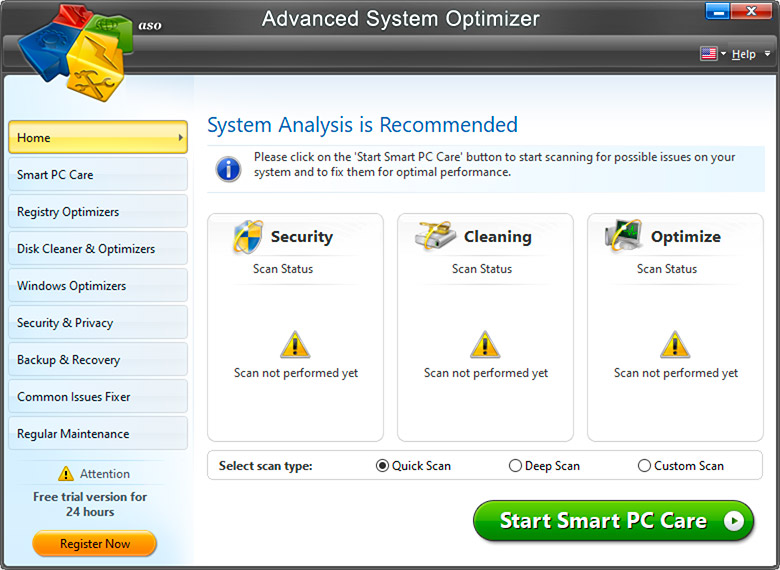
A total of 16+ Windows optimization and fixing tools are included in the bundle.
These are the 4 categories of tool/features that you will get if you download the product:
Disk Related Tools
- System Cleaner
- Disk Optimizer
- Disk Tools
- Disk Explorer
Security Related Tools
- System Protector
- Privacy Protector
- Secure Delete
- Secure Encryptor
Windows Optimization
- Game Optimizer
- Improved Game Performance
- Driver Updater
- RAM Optimization
Backup and Recovery Tools
- Undelete Files
- Backup Manager
- System Files Backup & Restore
- Effortless Backup & Restore
Now, consider this: If you were to purchase separately all of the above tools, you would need several hundred dollars. ASO, will certainly cost you much lower than that.
Features – Utilities Included in the package
As we’ve said, there are 16+ utility tools included in the ASO bundle product. Let’s describe briefly some of them below:
Driver Updater finds the old drivers on your computer, downloads new drivers automatically and creates a backup of existing drivers, in case you should need to go back to the old version. Driver Updater’s automatic update feature saves you the time of having to check each driver for the newest version and going to the site to download each one. Updated PC drivers means a more stable and error-free system.
Game Optimizer makes all of the system resources available for your game for optimum speed. It also creates a private virtual desktop for game playing, free from distractions such as instant messages, pop-ups and e-mail alerts. Your game won’t be interrupted and you’ll be able to concentrate and avoid making mistakes.
PC Fixer scans your PC and then provides you with a list of problems that can hamper system performance, and sorts them by categories. It then repairs the problems to increase your PC’s performance and remove errors.
System Protector is designed to intercept or remove spyware. It automatically scans your computer and identifies and cleans spyware quickly. Processes on your PC are continually monitored by System Protector to detect any spyware threats before damage is done. Moreover, it can also identify malware, trojan programs that can take over your PC etc.
File Recovery (Undelete) If you have accidentally deleted files (like photos, documents etc) or you have lost files because of disk corruption etc, this utility can help you restore them back. Even external drives are supported.
Backup related utilities There are a few data backup utilities in the product such as backup manager, system files backup to save the whole system on external drive, easy restore tool etc. Now when ransomware attacks are so prevalent, you must have a solid backup system in place.
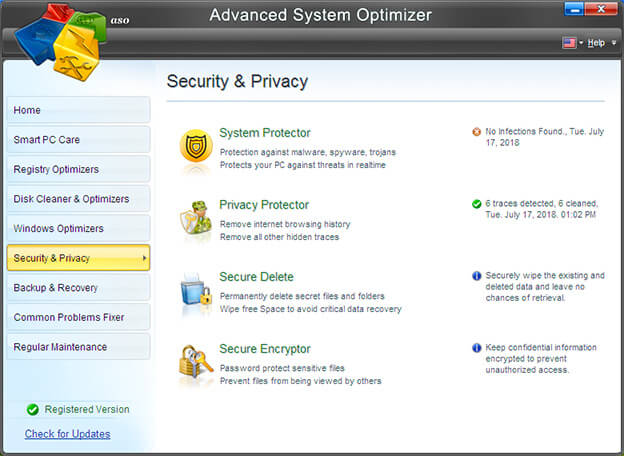
Secure Delete is a feature designed to securely and permanently delete files and folders. It actually uses a method that was designed by the U.S. Department of Defense. Secure Delete permanently removes any private or sensitive information and no tool can restore any files or folders that have been deleted with Secure Delete. With Secure Delete, you can be confident that sensitive company or personal information cannot be recovered and stolen by anyone. Secure Delete also helps protect you from becoming a victim of identity theft.
Browsers also leave a lot of cache and logs on the system when visiting the Internet and these trails can be used against your privacy, so secure delete helps with that as well. Keep in mind that this feature is helpful for deleting local logs and data. For avoiding external logging from ISPs and governments, a trusted Virtual Private Network is a better option.
Smart PC Care is a well round utility with the primary aim to enhance and optimize the whole performance of your system by defragmenting drives, clean junk data from hard disk, remove spyware, perform other optimization and cleaning tasks etc.
Company Behind Advanced System Optimizer
Advanced System Optimizer is developed by Systweak, Inc., an IT Solutions and Services company that was established in 1999.
Their mission is “to make your life simpler and easier by providing the best cost-effective software solutions with high quality standards.”
The company’s user-friendly, high-quality software, combined with a dedicated customer support staff, has earned them an excellent reputation and a worldwide customer base.
Testimonials
Overall, users are extremely pleased with Advanced System Optimizer, as indicated by the numerous testimonials that are shared all over the Internet. I have collected a few testimonials from CNET and other websites below:
“Does what it says it does!”
“Pros: This program takes the guess work out of computer maintenance. User friendly, and effective at fine tuning various aspects not considered.
Cons: Being picky… the user interface could be more attractive. I would like to see a bar indicating progress of updates etc.
Summary: I loved the fact that this system caught viruses (trojans) that other well known programs missed!!! Saves time so I don’t have to remember what needs to be done. Saves time and energy trying to identify problems but more importantly prevents serious problems. Increased awareness of what needs to be done to run an efficient system.
A.S.O. explains why it is important to make the changes and covers a wide range of issues and management areas.
This is a fabulous product and I recommend it to anyone. From novice to veteran.” – Isaron www.cnet.com
“Pros: It has many useful and powerful utilities for PC optimization. Most of the optimizers are just a fake, they really do nothing, just emulate performance. But not this one!.
Cons: Nothing bad to say, really.” – ofpopt www.cnet.com
“Feature-pack, stable,
Pros: Performance: Removed more than 4GB of junk from my PC. Programs working better; system boots up faster; found spyware (a password stealer among 4 others) Kaspersky missed (Amazing)
Freebie: Systweak PhotoStudio
Cons: It advised me to switch to Vista! I’m using a genuine XP Home SP3 OS. H—s NO! I love my XP. Haha. And it told me it would be better not to use a wallie. I get why it did but I love my Amelie. Otherwise everything’s peachy =)
Summary: EXCELLENT, ESPECIALLY FOR THE PRICE.” – mythosfelis www.cnet.com
“Has many uses – great program
it has Lots of good utilities.
I like its, Registry Cleaner & Registry Optimizer programs very much.
such a best program for my PC. i need it always.
Thanks” – John www.howtomakecomputerfaster.net
Pros and Cons
Advantages
• One of the cheapest all-in-one PC repair and optimization products.
• Feature Rich with 16+ utility tools to improve, fix, optimize and protect your computer system.
• Easy to use.
• Microsoft Gold Certified Partner (this means company is Trusted).
• You get Systweak PhotoStudio for FREE when you purchase.
• 30-Day Money Back Guarantee.
Disadvantages
• No Phone support (includes however web-based and email support)
EDIT: Actually you can contact their support in several ways like email, web contact form, telephone etc
Our Recommendation
Advanced System Optimizer is an all-in-one solution for all those annoying PC problems, from sluggishness to spyware.
This program works on just about every area of your PC, returning it to its optimal performance.
Advanced System Optimizer 3 is currently on limited time offer which includes Systweak PhotoStudio, an advanced photo editor program, for free!
For such an affordable price, along with a money-back guarantee, there’s no reason not to try Advanced System Optimizer 3.
If you were to purchase all individual tools separately, you would have to pay hundreds of dollars. So, Advanced System Optimizer is an excellent value for money.
Some FAQs
Is Advanced System Optimizer free?
The tool is not free but it offers a free-trial for 30-days to test-drive its abilities. If you are satisfied, its price is one of the best in the market since with the tool you get also a free lifetime license of Systweak PhotoStudio v2.1 if you use the link below.
If you had to buy separately each one of the tools included in the package of ASO, you would have to pay much more money overall.
Is Advanced System Optimizer good and safe ?
This specific system utility software has been in the market for decades and has proven its reliability and safety over the years.
It is absolutely safe to use since it creates first a restore point of your computer before performing any optimization or cleaning of junk data. This means that in the unlikely event of something that might go wrong, you can always restore your system to the point it was before running any optimization tasks.
Moreover the tool is really good at what it does as it contains a ton of useful features that when used in any system they will surely improve the speed and performance considerably.
Advanced System Optimizer 3 is well known for its comprehensive and deep scanning functionality for finding and fixing a lot of computer issues.

I am using Windows XP and free PC optimization program but I must admit that there are a lot of times when I experienced some problems like crashes and just sudden non-responsiveness of my browser.
I am now thinking of investing in this complete bundle to protect and optimize my PC. The price is affordable and hopefully the benefits would be enormous. I am now reviewing this package of software.
As one of the many satisfied users of Advanced System Optimizer 3, all I can say is that this is the best bundle to enhance and guard anyone’s personal computer. This is actually a real steal because it is 22-in-1. Really worth the money!
Encouraged by this very comprehensive review on Advanced System Optimizer 3, I just bought it yesterday.And true enough, it is very much useful. I cleared around 6GB of redundant files and was able to locate at least 6 adwares and trojans.
I am now a very satisfied customer! This is a very wise investment.
Hey Tom,
Thanks for stopping by and leaving your comment. I know that free computer tools are cool but they sometimes cause more problems. Investing in a good solid optimization software is a wise move and you will not be disappointed.
cheers
Hi Alliah,
Thanks for your feedback. Along the same lines was my own experience too. Its great to get a software bundle which has so many software tools included. If you were going to buy each individual software separately you would have to spend 100’s of dollars.
This is a very interesting package. I am looking for a pro-active protection software for my PC.
By the way, can I use the program with more than one computer? Please reply…
In my online business — downloading affiliate system — I am always exposed to various harmful viruses, adwares, trojans, etc. so I know the importance of protecting my PC. All the information and documents I am using with my business are all contained in my PC hence protection is vital.
Before buying this bundle, I would like to know if these software are regularly updated for free…?
Just bought this yesterday…and immediately I got the Optimizer working for my computer. The Registry Cleaner I think is the best part here because it fixed a lot of problems I never know of. As what I understand, registry problems are major contributor to computer slowdown.
Thanks to Optimizer 3. Great products!
I am part of the home-based revolution. I am now working home-based and online. For sure, I know how critical it is to protect my lifeblood which is my PC. At the same time, I always look around to get discount for anything I want to buy online. You seems to be providing it all here.
Hi Lee,
The software is for 1 computer but you can purchase also a 5 computer license for something like $69 dollars. However, keep in mind that with the single license option you get also for free the Systweak Photostudio tool.
Ryan,
If you are looking just for virus protection then you should buy a dedicated antivirus and antispyware software instead of advanced system optimizer. However, the ASO is even effective for antivirus protection as well. Yes it gets updated regularly
Two thumbs up! Excellent computer tools but at very affordable tag. That’s all I could say.
I am tired of hearing so many hypes and lies from reviewers who are biased and just looking for affiliate commission.
And admittedly, I expect to read more of that here on your site. Surprisingly, you seems to be honest and is really offering something of real value. A whole package of 22 important tools prices so reasonably is something we should be after at.
Congratulations to your admirable review.
Irresistible package! and very good price as well! thanks for offering this advanced system optimizer review, really an eye opener.
Regards from land down under,
kate
Unbelievable price for 22 programs. Just what I need. Thanks for coming up with this great bundle.
Usually, I am not inclined to make a comment especially on things I bought online. This is one of those exemptions. I am so happy and grateful for my decision to open up my wallet for this bundle. Rating: 9.5/10. Excellence. Great price.
I see that you are already offering these great tools at very rock bottom price. Anyway, I am already thinking of it now. Is there a support provided for this product? Just want to be sure.
One thing we should be concerned these days is identity theft. If your computer is unprotected, you will never know what could happen as hackers could strike anytime. It is true that in terms of protection, we have to look for real software providing what we really need.
Kudos!
First of all, the bundle is very attractive and the price is just great. I have been using some free programs even up to now but one thing I hate is intrusive program popping up anytime for no reason at all and always reminding to do and to do that.
Are these programs just silently running on their own?
OneWorld,
Yes sure you can find support on their dedicated page here http://www.systweak.com/Support/
Honestly, I was very skeptical at first in buying this bundle. Fortunately, my doubt was proven wrong. As it turned out, this is one of the best decisions I’ve made for my PC. Thanks for coming up with ASO3.
Konichiwa! When my laptop become sluggish, I search in google to find the solution. I learned that it could be due to registry errors and it can be corrected using registry fixer. Your review of these tools here opened my eyes to possibly acquiring them soon.
Arigato gozaimasu!
Traxis and anne,
One of the threats of using free software is that they usually carry spyware, adware, viruses etc. I would stay on the safe side and use a trusted commercial tool instead of free and shady software tools for my computer system.
From Moscow Russia here. I am a teacher here on computer programming. In my school, I already recommended this bundle of protection and optimization tools. Expect more sales soon.
Just bought the pack. To tell the truth, all I see with these 22 software is user’s big advantages. Looking at the price, it just cost less than $2 per software. Quality wise, this is what I am looking for.
At the affordable price of $39.95, this is already a very good package of tools. Just would like to know, how does the 30 day money-back guarantee works?
If someone will ask me what PC optimizer program to consider, i will readily endorse this package. Vis-a-vis with other programs anybody can buy online, this is the winner. Truly worth the money!
These 22 tools available at my fingertips are really good in making my computer functioning on its peak. And you can buy it here at discounted price. I have a friend who is a satisfied user and she is the one who recommend this to me…
I am an IT specialist and am acquanited how an optimizer could play a big role in enhancing the PC’s performance. If there is one thing I really it is a computer already dragged down by so many unfavorable elements within the system. It is time to get a very good optimizer like this product!
I am right now using free software but already thinking of finally investing a little money for optimization and protection. As a non-techie lady, I would like to know if there are things I have to learn first before I could use these programs.
Nothing is more annoying of having a PC slowed down due to registry and virus problems. In my 10 years of doing business online, I can attest to the need of having a reliable and strong protection and optimizing programs. This is the answer to our problems.
Last month, my PC was bugged down due to trojans and some viruses which I am finding hard to understand and get rid of. Last week, my friend Alliah recommended this product to me. I made a very good decision because everything is working now fast and smoothly. This is a great all-in-one protection product.
Excellent line of much-needed software! Because we all need protection, this is what I am now recommending to all of my friends online.
Thanks a lot for coming up with this package.
A very good and balanced review of advance system Optimizer. It is amazing to see a full range of sofware programs packaged together to offer comprehensive PC optimization.
if there is a better program for optimization, it must be this software…i am now using it…as well as my girlfriend and we are all fully satisfied…
I am writing this to tell you that this software is definitely a champion! My new business with at least 10 PCs is now using it live. Right now, I am experiencing no system or bug related problems. All is just working as it should be smoothly. Furthermore, everything I need is covered by this fabulous bundle of programs.
Just keep up the admirable work guys!
@Darling
For the money-back guarantee you can just contact their support (either via web or telephone) and tell them about your request.
Usually, some system problems will cause your computer running slowly, like registry errors, besides, a lot of unneeded files can also effect the speed of computer.
I am using the advanced system optimizer to optimize my computer via fix all kinds of registry errors, improving the performance of computer, etc.
Sometimes I contemplate if folks truly take time to write something original, or are they only just dishing out words to fill a site. This surely doesn’t fit that mold. Thank you for taking the time to write with awareness. Now And Then I look at a page and question whether they even proofread it.Fantastic work with this article.
Bought this product yesterday and still haven’t received the activation key code. I got the run around from their bot for email support.
So I Uninstalled the program and emailed support @systweak.com to give me the code or a full refund. No reply since. Looks like a scam considering that said it would only be 15 minutes for the link for code. Oh, and the trial version is only for 24 hours!