With over 4.6-billion mobile phones in use worldwide, communications technology is one of the world’s largest industries. The introduction of 5G networks and cheaper handsets from tech companies in China mean that more users come online every day.
When you lose your mobile phone, it’s like losing a limb. All of a sudden we become aware of how dependent we are on our devices.
We use our phone for everything. Communications, personal and professional organization, banking, timekeeping, task reminding etc, the list goes on. So, what do you do when your phone goes missing?
Fortunately, there are ways to track your Android or iOS device. Here are 5-easy ways to locate your smartphone.
1) Third Party Tracking Apps
If your phone goes missing, log on to your laptop, tablet, or PC and use a tracking app like GPS-Handy Orten to locate your phone in seconds.
This tech works through a GPS (Global Positioning System,) to triangulate the signal of your phone. For the app to work, you need to download it to your mobile device and a secondary device, like your laptop.
For the app to work, your phone needs to be switched on in its unknown location. If the device has no power, the GPS satellites won’t be able to source its current whereabouts.
In such a case, the app will only be able to track your phone to its last known location. The app works by bouncing a signal off of mobile network towers and satellite transmitters to triangulate your phone’s position with astounding accuracy.
Tracking apps allow users to track other people’s devices as well. If you’re concerned about the movements of your children, you can install the app on their phone and monitor their actions, as well as their text messages, and call history.
Some apps offer hidden functionality, allowing you to install them on other people’s devices without their knowledge.
If you suspect your spouse is cheating on you, or your kids are up to no good, this app can tell you exactly where they are and their movements, as well as their communications – all without them being any the wiser to your spying.
2) Tracking Your Phone Using Your Phone Number
Various online tools allow you to track your phone’s location using your phone number. Most of the software tools are free to users.
Type your phone number into the software interface and hit “find location.” These online tolls don’t offer the same instant access and functionality as a third party app. However, for a simple find-my-phone software, they work quite well.
For the software to work, your phone needs to be online, with the SIM card active. Therefore, if a thief disconnects your battery and pulls out the SIM, this method won’t be able to help you.
However, if you’ve misplaced your phone somewhere, it will give you the location and perhaps jog your memory as to where you last used the device.
3) Track Your Phone with Google
You’ve probably used Google Maps already. This user-friendly app guides us to venues and locations with incredible accuracy. You can use this free service to find your phone as well. For the service to work, your device must be switched on, with the GPS or location function active.
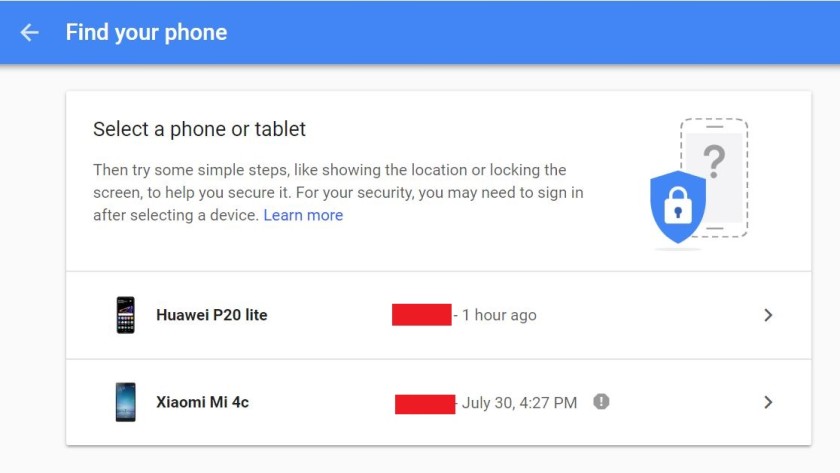
Log into any internet device and open your Google account at https://myaccount.google.com/find-your-phone . Enter your Google user details and password, then click on the phone you want to locate as shown above.
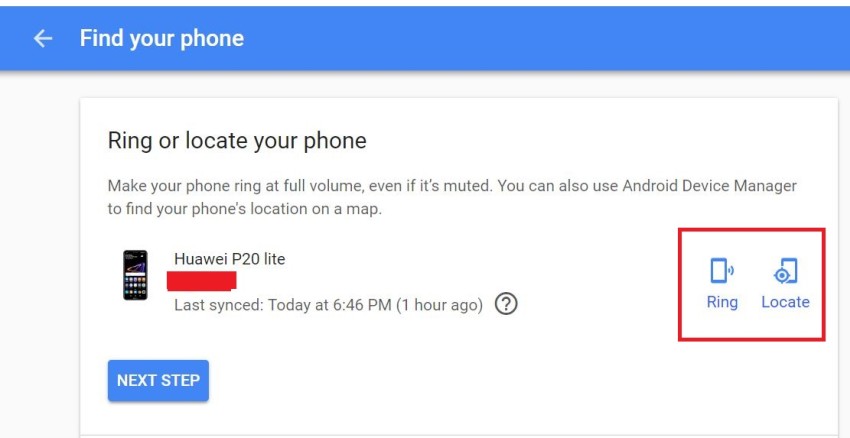
After that, click on locate phone as shown above.
4) Track Your iOS Device
Tracking your iPhone is easy. Visit the iCloud site and enter your user information and password. Your account will pull up all of your registered devices. Click on the radar icon and select the device that you want to track. iOS pulls up Apple maps and locates your device to within a few meters of its location.
5) Track Your Android Device
Android has over 80-percent of the mobile phone market. They offer a system similar to iOS for tracking Android devices.
Download the “Find my Device” app from the Play Store and install it on your device. Log into any internet connection on any device, open your Google account and type “find my phone,” into the address bar. Google will pull its location up on Google Maps for you. The app also allows you to lock the phone and display a return message remotely.

Leave a Reply