Your Mac computer is similar to your living space – both can become cluttered and unpleasant to deal with if they’re not cleaned regularly! In this article I have prepared a review of CleanMyMac-X which is a Mac optimization tool to help you out with making your system fast again.
One of the most common search queries that crops up on the internet is “How do I clear my browser cache? Another popular one is “App cache cleaner”.
This is because Macs get cluttered up with temporary app caches and files, and this causes you to run out of drive space and slows down your Mac.
MacPaw CleanMyMacX is a brilliant solution to this problem, helping to keep your Mac free of junk and performing at its best:
Grab Their Limited-Time Discount Here
- The app finds and removes large, hidden files.
- Automatically updates, uninstalls, and resets your apps.
- Quits apps that are heavy on the CPU, as well as any hung apps.
- Finds and removes any malware.
- Uses new tools to boost the speed of your Mac.
- Gives you personalized cleanup tips from the Assistant.
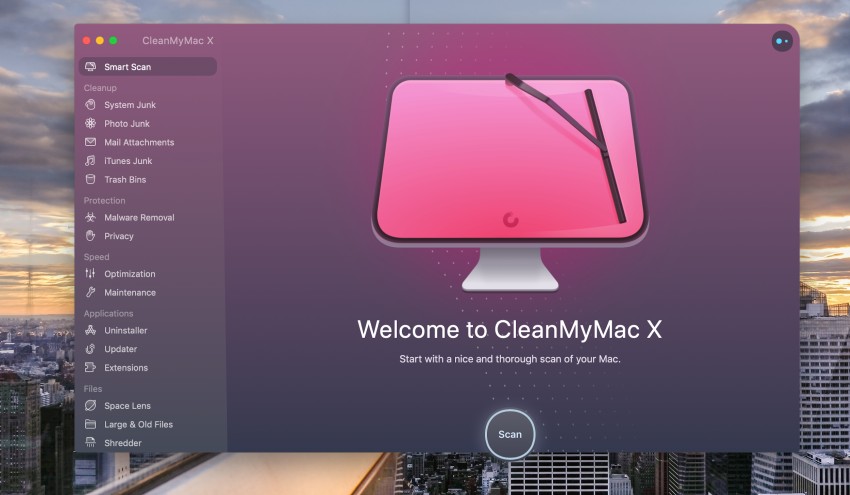
We’re going to look at some of the features that make CleanMyMacX so efficient at keeping your Mac running smoothly, and what makes it such a popular app and file cache cleaner.
Freeing up Storage Space
Your Mac collects a number of unnecessary working files that build up over time when you use media files, documents, system files, and applications.
CleanMyMacX will do a Mac system clean up by finding and deleting junk files. This frees up storage space and helps your Mac to run faster.
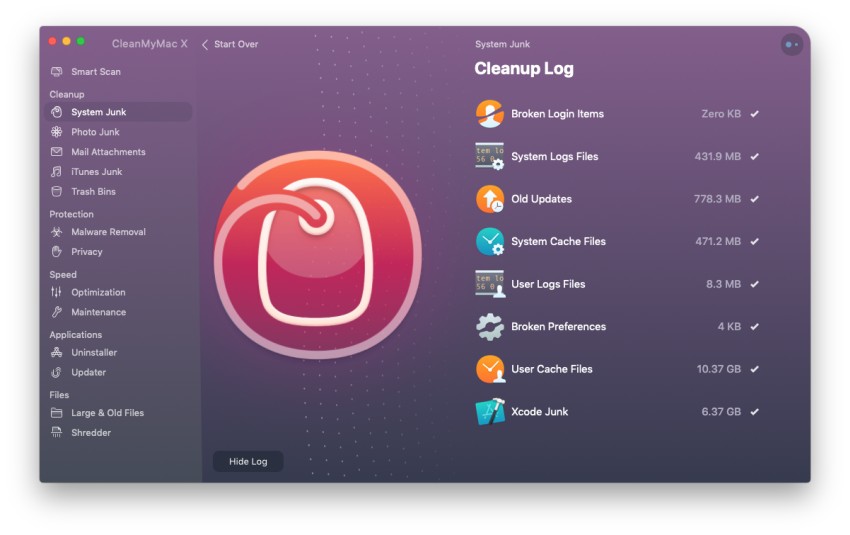
CleanMyMacX doesn’t just remove system junk files. It also finds junk photos that you have the option to remove, mail attachments, iTunes junk files, and lets you know how much space the files in the trash bins are taking up.
Scanning your hard drive only takes a few minutes, and you can free up a serious amount of space.
Protect Your Mac From Malware
Although statistically you are less likely to find your Mac a target for malware than a PC, there’s never any harm in having an extra level of protection from digital thieves, hackers, and malicious vandals.
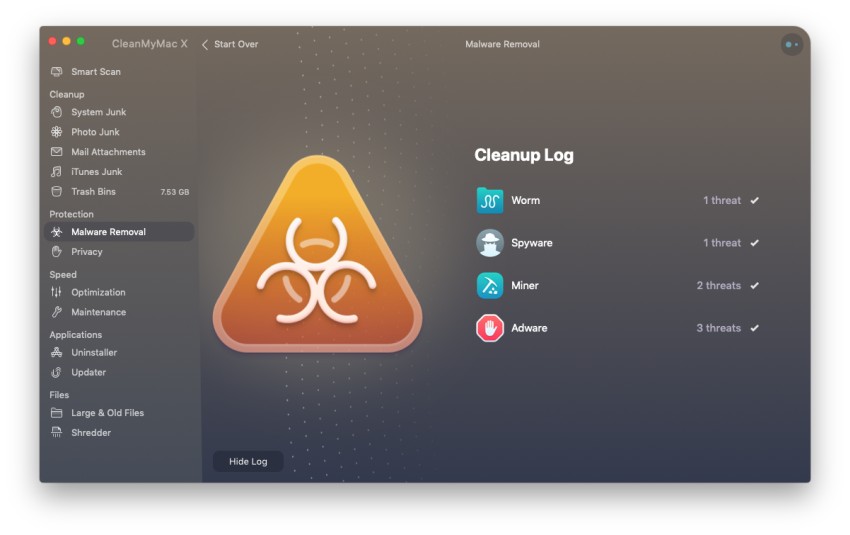
CleanMyMac has a scan option to detect and remove any malware that may have crept in on an email attachment, or from any other source.
Grab Their Limited-Time Discount Here
Privacy Scan
While the privacy scan doesn’t actually make your Mac more secure, it does delete sensitive personal information gathered from your browsing history, chat logs, and form-filling. This makes it harder for hackers to get your information and use it to steal your identity.
Improve Speed and Responsiveness
Remember how fast your Mac was when it was brand new? Chances are, if your Mac is running slowly, then its configuration has become sub-optimal over time. You probably aren’t even aware of the processes happening in the background that contribute to this gradual slowing down.
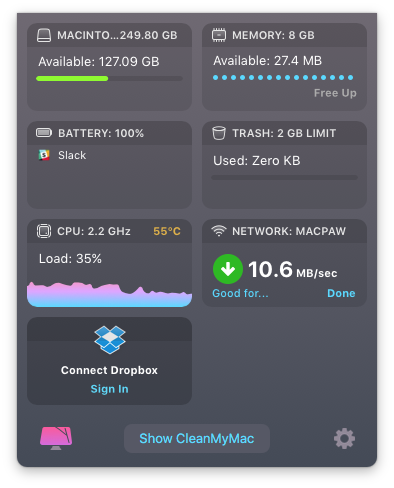
The tool can help you get better speed, more responsive apps, and a quicker boot time by identifying drains on your CPU, or hung applications, and giving you the choice to stop them.
Keeping Things Running Smoothly
Another feature of the software is that it can perform full system maintenance and optimization. This involves ensuring the hard disk is kept working at its best, and that apps are running well.
Application Clean Up
The problem with apps is that they can leave your system in a bit of a mess, particularly after an uninstall.
CleanMyMacX has its own uninstaller, which allows for complete removal of applications, with no stray files left behind to clutter up your hard drive.
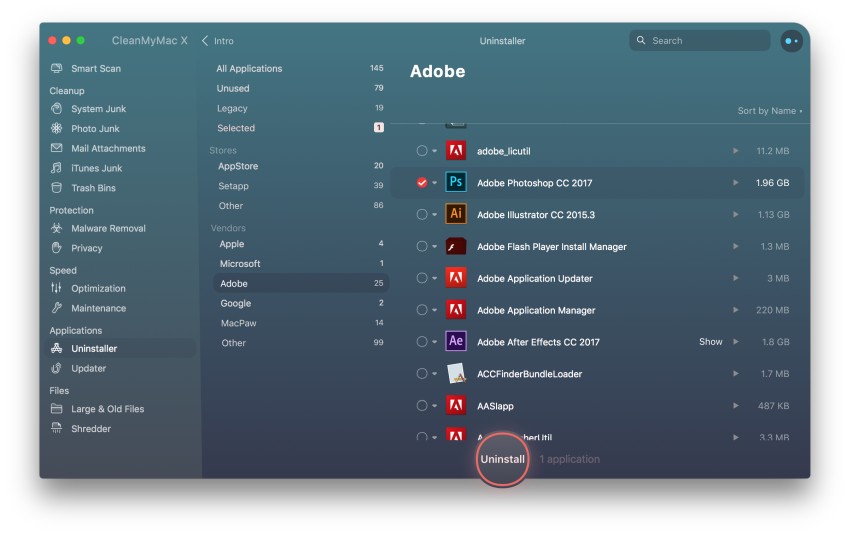
Another handy feature is the ability to manage system extensions and widgets – all from one central location.
File Management
The product gives you two ways to manage your files. It will identify any large and/or old files on your system which may be hogging valuable space. Run the scan, and you’ll find out how much room you could get back by deleting these files.
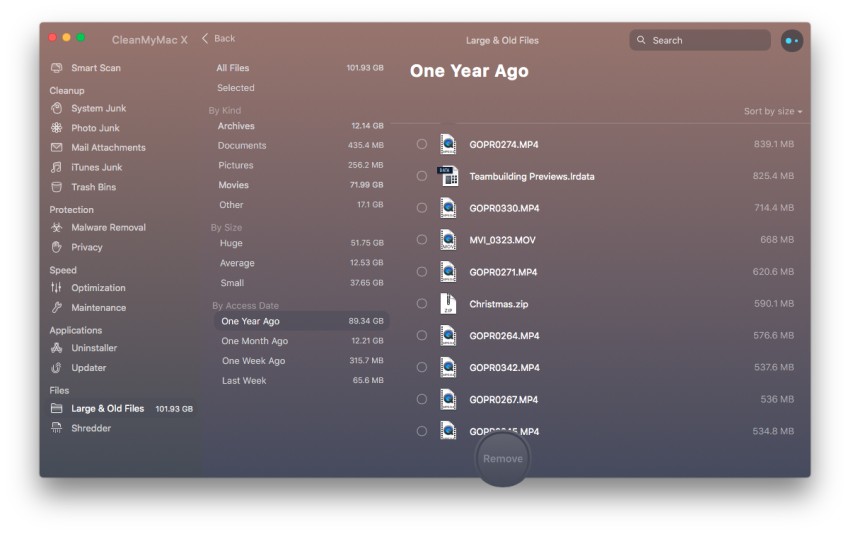
The other nifty way of managing your files is the document shredder feature. This is a great security measure, and means that when you delete a file, all traces of it are removed so they can’t be recovered.
Smart Safety
CleanMyMacX has a built-in Safety Database that can identify the system files that are important from junk files. You can be sure that the app will never delete anything without asking you first, and the Smart Assistant will guide you through cleanups.
More Features
Click below to read more details about this impressive software optimization tool.
See All Features of CleanMyMac-X Here
Conclusion
CleanMyMacX isn’t free – but with all these features you wouldn’t expect it to be! There are several pricing tiers depending on how many Macs you want a license for, and you can buy it with a one-off payment, or yearly subscription.
Grab This Limited-Time Discount Here
In testing on a MacBook Pro with 512GB storage, running CleanMyMac resulted in:
- 4X faster boot time
- 5X more responsive apps
- 5X gigabytes of free space
That’s impressive! Giving your Mac a good clean and keeping it running smoothly may be one of the most important investments you will ever make – Macs don’t come cheap, so it makes sense to keep yours happy!
Some FAQs
Is CleanMyMac X Safe to Use?
CleanMyMac X is safe to use on your Mac. It uses smart algorithms to ensure that no sensitive or OS-critical files are deleted in any way as it scans your computer. The same cannot be said for all such cleaning programs but CleanMyMac X happens to be safe and legitimate.
One of the problems that other cleaners have is that they can sometimes delete system files that are needed.
This can cause corruption and crashes. One way that CleanMyMac X handles this is by creating a blacklist of files (or Safety Database). All of the system files on this blacklist will never be touched or affected when CleanMyMac X is running.
The blacklist applies to all software on your Mac. And the good news is that the blacklist functionality is always updated to include any new software. This means that you can run CleanMyMac X without having to worry whether your software will run or not.
The other way that CleanMyMac X protects the integrity of your files is by maintaining a greylist. This is a list of files that the software isn’t quite sure about but is erring on the side of safety and not deleting them when CleanMyMac X scans for junk files.
Lastly, there’s an ignore list. This is a user controlled list of software applications that CleanMyMac X won’t touch during the junk scanning process. When you’re running CleanMyMac X, you can simply add software to the ignore list and it won’t touch them.
All of the above measures — blacklist, greylist, and ignore — are ways to protect the integrity of your Mac and any installed software. Deleting important and sensitive files is one of the biggest problems that other junk cleaning software has but CleanMyMac X takes a logical approach to the issue.
Is CleanMyMac X better than CleanMyMac 3?
The first difference between CleanMyMac 3 and CleanMyMac X is a redesigned interface. The start screen for both versions is nice, simple, and functional but CleanMyMac X features a more streamlined look that will please many longtime users.
The icons have been redesigned too and the scanning process features new colors and animations that make for a smoother experience.
In use, the scanning algorithms in CleanMyMac X have been significantly improved. It will routinely find more junk files in system files than CleanMyMac 3, making it more efficient and able to clean up more files overall.
More details are also provided in CleanMyMac X as to where the junk files are hiding on the computer.
One thing that CleanMyMac 3 does is allow you to clean up individual system areas, such as Trash Bin, without having to rescan. You can still do this in CleanMyMac X but there will have to be a rescan.
CleanMyMac X is simply more efficient at finding junk files, especially those hard-to-reach system files on every Mac computer. A more attractive interface and redesign makes it a worthy upgrade.
How Much Does CleanMyMac X Cost?
Grab Their Limited-Time Discount Here
CleanMyMac X is based on two plans: a yearly subscription plan and a buy-it-forever plan. In the subscription plan, you pay for a year and you get all minor and major upgrades. Once the year is over, you receive an email telling you that your subscription can be renewed for another year if you want.
Yearly Subscription Plan
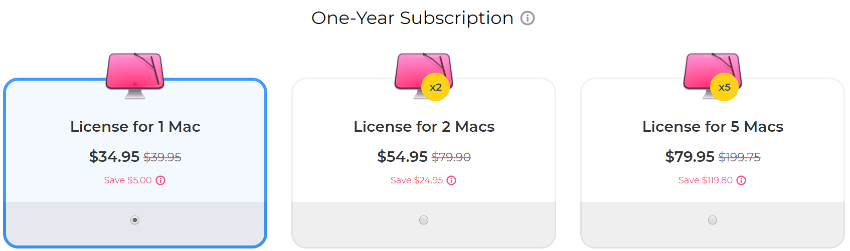
The license costs $34.95 for one Mac license, $54.95 for two Mac licenses, and $79.95 for five Mac licenses. The cost above is when using the special pricing here.
One-Time Purchase Plan
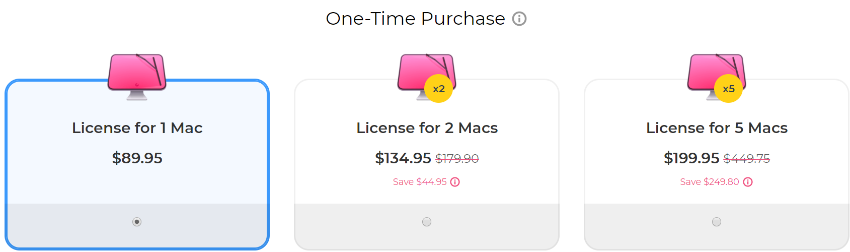
The buy and use it forever plan is a one-time purchase. In this, you get to use CleanMyMac X for as long as you like without having to deal with the yearly subscription. The current license prices are shown above.
If you want to get major version upgrades, you’ll need to pay an upgrade fee on top of the one-time license. This plan costs $128.46 for one Mac license, $289.06 for two Mac licenses, and $722.65 for five Mac licenses.
Is CleanMyMac Spyware?
CleanMyMac X is not spyware. It does not contain any spyware, Trojans, key loggers, phishers, or malware of any kind. It has been designed to remove junk files from computers and scan for and eliminate malware.
Moreover, the software is Apple notarized which means that the software code has been sent to Apple which scanned the code for any malware and malicious code etc and verified that the product is clean and safe to use.

Leave a Reply