Still confused about those “CC” and “BCC” acronyms that you see when sending an email? Here’s what they mean.
Fax and letters are almost obsolete. It’s the age of email, and people trust in it. It’s a simple and straightforward way to get your message across to the other party. Plus, once you hit “send,” you know that recipient will get the mail.
You have been communicating through emails for as long as you remember, but for the life of you, you never tried to figure out what those acronyms “CC” and “BCC” actually mean.
It’s like that game of “Minesweeper.” You randomly click the boxes in hopes that you won’t hit a mine!
Are we right? If yes, keep on reading.
Every communication form has one rule: you need to be civilized. Emails should be sent in an orderly fashion so that there’s no confusion or conflict. That’s where “CC” and “BCC” come in.
Let’s start with basics:
What Does “CC” Stand For?
CC means “Carbon Copy.” In the old days, when you wanted a copy of a letter you were writing, you had to insert a carbon paper between normal pages.
This allowed you to create a copy of the letter right then and there as you wrote. Coming to email, CC has the same meaning. When you enter an email address in the CC section, you are sending a copy of the email to another recipient too.
When you receive an email where your address is written in the CC section, it means that you are not the only one who received the email.
What Does “BCC” Stand For?
BCC means “Blind Carbon Copy.” Similar to CC, the BCC section can also be used when sending emails.
The difference between these terms is that the recipients in CC can see how many people and who received the email. However, they are unaware of the recipients in the BCC section. One more thing is that the recipients in BCC can see all the people who received the email in the TO and CC sections.
You are probably asking yourself why it matters, right? Well, it’s better than drafting an email for every person on the list!
TIP: If you want to send an email to multiple recipients, you can use insert all emails into BCC section so that not everyone learns the email address of everyone else.
Why Use CC?
Think of it as common courtesy. The recipients that are in the “To” section are the primary recipients. You want to catch their attention and want them to open the email as soon as they receive it.
If you feel that the information in the email might be useful for other people too, you can add their email address in the CC section. Its also like saying “hey people in the CC section I’m letting you know also of the specific email that I’m sending to the main recipients“.
Why Use BCC?
Here, things get a little complicated. Let’s assume that you run a company. An employee has been causing quite the trouble and you are just about done with them. You want to inform the HR about this employee so that they can draft a termination letter as soon as possible.
However, you want to give the employee a warning first. So you send first a warning email to the employee using the “to” section and BCC the HR manager. This way, the HR department knows that you have sent the employee a warning to get their affairs in order. Moreover, this will prevent any panic that the employee might have if they see that the email was also sent to the HR department.
Here’s How CC and BCC Work
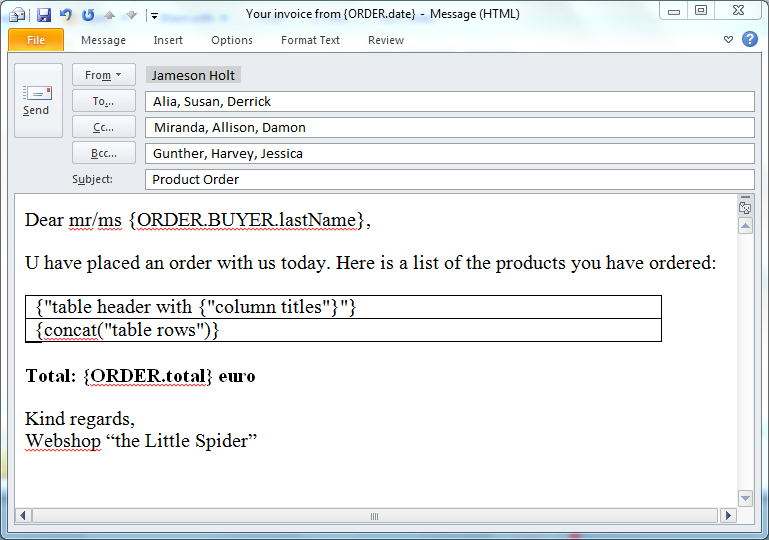
To: Here you type the email address of the person whose attention is most important.
Cc: Here you type the email address of the person who is not as important as the primary recipient but you still want to inform them.
Bcc: Here you type the email address of the person to who you want to send the email privately without the other recipients knowing.
Jameson Holt wants to send an email about a product order to a couple of people. The problem is that he doesn’t want the other recipients to know how many people received the email. Here’s what he does:
- In the “To” section, he writes the email addresses of Alia, Susan, and Derrick
- In the CC section, he writes the email addresses of Miranda, Allison, and Damon
- In the BCC section, he writes the email addresses of Gunther, Harvey, and Jessica
Here’s how everyone receives the email:
- Alia, Susan, and Derrick can see that Alia, Susan, and Derrick received the email and that a copy was sent to Miranda, Allison, and Damon.
- Gunther, Harvey, and Jessica can see that Alia, Susan, and Derrick were the primary receivers of the email and that a copy was sent to Miranda, Allison, and Damon.
- Alia, Susan, Derrick, Miranda, Allison, and Damon cannot see that Gunther, Harvey, and Jessica received the email.
So there you have it — now you can use these sections knowing full well that you can get the job done of sending an email to multiple people at once. For more informational articles like this, visit our website Tech 21 Century.

Leave a Reply